

YouTube Shorts vs TikTok: Reach, Pay and Data (2026)
YouTube Shorts vs TikTok comes down to what you want. TikTok gets more likes, comments and shares per follower. YouTube Shorts reaches more people, keeps getting views for longer, and pays on videos of any length. The video file is the same for both, so most creators should not pick one. Post the same clean edit to both, and use the data below to decide which one gets your best ideas first.
Every number here has a source link and a date. Platform facts come from YouTube's and TikTok's own help pages, newsrooms and earnings calls, checked on 24 September 2026. Where studies measure things in different ways, we say so.
#Quick answer
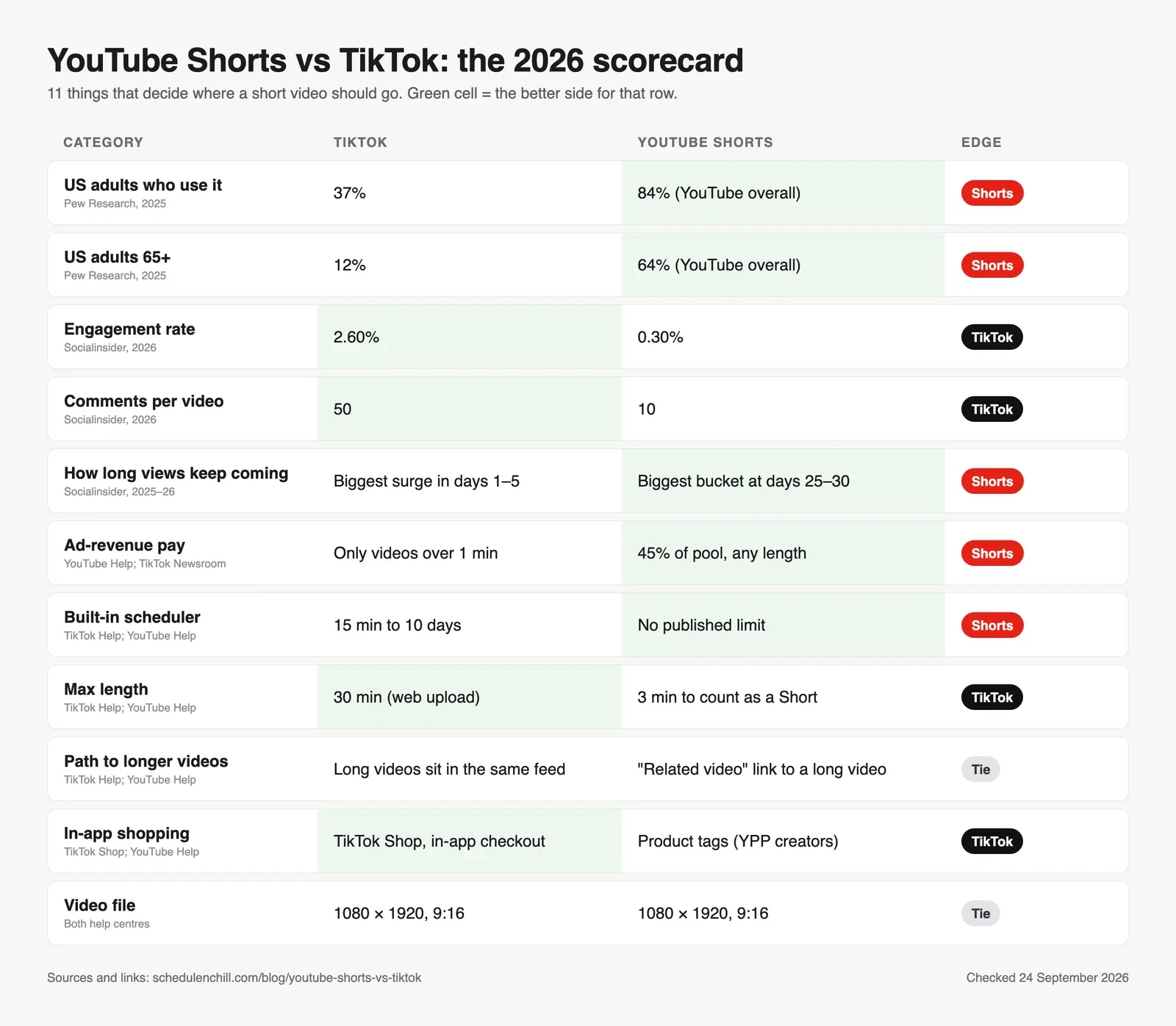
- Bigger audience: YouTube. 84% of US adults use YouTube and 37% use TikTok (Pew Research, 2025).
- More engagement: TikTok. 2.60% engagement rate vs 0.30% for Shorts (Socialinsider, 2026).
- Longer view life: Shorts. In Socialinsider's data, Shorts got their biggest batch of views 25 to 30 days after posting. TikToks got theirs in the first 5 days.
- Pay: Shorts creators keep 45% of their share of the Shorts ad pool, on any length. TikTok's Creator Rewards Program pays only for videos over one minute.
- Specs: the same 1080 × 1920, 9:16 file works on both. A Short must be 3 minutes or less.
- Best plan for most people: one edit, two clean exports, posted to both. Our guides to scheduling YouTube Shorts step by step and scheduling in TikTok Studio cover each side.
#YouTube Shorts vs TikTok at a glance
| TikTok | YouTube Shorts | |
|---|---|---|
| Audience (latest official figure) | Over 1 billion people a month, Sept 2021 | Over 2 billion logged-in users a month, July 2023 |
| Daily activity (latest official figure) | Not published | Over 200 billion daily views, June 2025 |
| US adults who use it | 37% | 84% (YouTube as a whole) |
| Engagement rate (Socialinsider 2026) | 2.60% | 0.30% |
| Max length | 30 min on web upload | 3 min to count as a Short |
| Ad-revenue program | Creator Rewards Program | YouTube Partner Program, Shorts revenue sharing |
| Built-in scheduling | 15 min to 10 days ahead | Yes, no published limit |
| Where it lives | A standalone app | Inside YouTube, next to long videos and search |
#Audience size: who is actually watching
Both platforms are huge. The problem is that they report different numbers, in different years.
| Figure | TikTok | YouTube Shorts | Source |
|---|---|---|---|
| Monthly users (global) | "More than 1 billion people", Sept 2021 | "Over 2 billion logged-in users", July 2023 | TikTok Newsroom; Alphabet Q2 2023 earnings call |
| US users | "170 million Americans", April 2024 | Not published for Shorts alone | TikTok Newsroom |
| Daily views | Not published | "Over 200 billion daily views", June 2025 | YouTube Blog, Neal Mohan |
| Channels posting daily | Not published | Over 10 million channels publish Shorts each day, March 2026 | Alphabet Q1 2026 remarks |
TikTok has not published a new global user count since 2021. Many sites quote numbers near 1.9 billion, but those are estimates, not TikTok figures.
Be careful with view counts. Since 31 March 2025, YouTube counts a Shorts view every time a Short starts to play or replay, with no minimum watch time. The old metric is now called "engaged views", and it is still the one used for pay (YouTube announcement). So a Shorts view and a TikTok view are not the same unit. Compare reach with the survey data below, not with raw view totals.
#Demographics: age matters more than size
Pew Research surveyed 5,022 US adults in 2025. Here is who uses each platform, by age (Pew Research Center, 2025):
| Age group | TikTok | YouTube |
|---|---|---|
| 18–29 | 63% | 95% |
| 30–49 | 44% | 92% |
| 50–64 | 30% | 85% |
| 65+ | 12% | 64% |
| All adults | 37% | 84% |
Two things stand out:
- YouTube wins in every age group. Even among 18 to 29 year olds, more people use YouTube than TikTok.
- TikTok drops off fast with age. Past 50, fewer than a third of adults use it. If your buyers are over 50, TikTok alone will miss most of them.
Pew's YouTube number covers all of YouTube, not only Shorts. But Shorts sit inside the same app, so a YouTube user is one tap from the Shorts feed.
#Engagement: TikTok wins, but check how it is measured
| Study | TikTok | YouTube | What was measured |
|---|---|---|---|
| Socialinsider 2026 (69M videos, Jan 2025 to Jul 2026) | 2.60% | 0.30% (Shorts) | Engagement ÷ followers |
| Socialinsider 2025 (same report) | 3.70% | 0.27% (Shorts) | Engagement ÷ followers |
| Socialinsider, comments per video | 50 | 10 (Shorts) | Average comments |
| Rival IQ / Quid 2026 | 2.01% median | 0.21% median (all YouTube) | Interactions ÷ followers, brand accounts |
TikTok wins by a wide margin in both studies. People comment and share more on TikTok.
There is a catch few comparison posts mention. Socialinsider's TikTok formula counts likes, comments and shares. Its Shorts formula counts only likes and comments. So part of the gap comes from what each formula counts. The same report also found that Shorts had the highest average views at every follower size it tracked, with TikTok second. Put simply: TikTok gets more reactions per follower, and Shorts gets more views per video.
What this means for you: if you want comments, replies and a community, TikTok is the stronger feed. If you want as many views per post as possible, Shorts holds its own.
#Discovery and lifespan: how long a video keeps getting views
Socialinsider ran the same kind of study on both platforms:
| TikTok | YouTube Shorts | |
|---|---|---|
| Dataset | 6M posts, 72K accounts, Jan to Aug 2025 | 3M Shorts, 56K accounts, Jan to Dec 2025 |
| Biggest period for views | Days 1 to 5 (about 9.4K views on average) | Days 25 to 30 (about 3.3K views on average) |
| After that | Growth slows and levels off over the next few weeks | Views in days 10 to 25 were low, then jumped |
| Typical lifecycle | About 20 to 30 days | Still growing at day 30 |
| Source | Socialinsider, Oct 2025 | Socialinsider, Jan 2026 |
This is the best evidence we found for the popular claim that "Shorts last longer". Two notes before you rely on it:
- It is one research firm, and these are averages. Your own videos will not follow the curve exactly.
- TikTok's view totals were higher in these studies. A Short lasts longer; a TikTok gets more views up front.
Why might Shorts last longer? YouTube is also a search engine, and a Short can point viewers to a long video with a Related video link under your channel name (YouTube Help). TikTok's For You feed tests a video fast. If early watch time and shares are weak, the video tends to stop spreading.
#Monetization: YouTube Partner Program vs TikTok Creator Rewards
| YouTube Shorts | TikTok Creator Rewards Program | |
|---|---|---|
| Who can join | 1,000 subscribers and either 10M Shorts views in 90 days or 4,000 long-form watch hours in 12 months | 18+, 10K followers, 100K views in the last 30 days |
| Which videos earn | Shorts of any length | Original videos over one minute |
| How pay is set | Ads between Shorts go into a monthly pool. You get a share based on your engaged views, then keep 45% of it | Qualified views × a rate that depends on originality, play duration, search value and engagement |
| Music | Music costs come out of the pool, but you keep 45% whether you used music or not | Not stated in TikTok's announcement |
| Change to know | From 1 Feb 2027, pool pay needs 10M qualified Shorts views in the last 90 days, each month | None announced |
| Source | YPP eligibility; Shorts monetization policies | TikTok Newsroom, March 2024 |
Three practical takeaways:
- Short clips earn only on YouTube. A 40-second video earns nothing from TikTok's Creator Rewards Program. The same video can earn from the Shorts pool.
- The YouTube bar is going up. Today you can join YPP through long-form watch hours and still get Shorts pay. From February 2027, Shorts pool pay each month needs 10 million qualified Shorts views in the past 90 days.
- Reposts don't earn on YouTube. Reposting other creators' content "from YouTube or other platform" produces ineligible views that earn nothing (YouTube Help). Post your own original video.
Neither platform publishes an average pay rate per 1,000 views. Your real rate (RPM) is in YouTube Studio and TikTok Studio once you are in each program. Use this table to work out the views you need once you know it. The RPMs are examples, not averages:
| Monthly goal | At $0.05 RPM | At $0.10 RPM | At $0.25 RPM |
|---|---|---|---|
| $100 | 2M views | 1M views | 400K views |
| $1,000 | 20M views | 10M views | 4M views |
| $10,000 | 200M views | 100M views | 40M views |
Formula: views needed = goal ÷ RPM × 1,000. For most creators, ad revenue share is a small part of the money. Brand deals, affiliate links and your own products usually matter more. TikTok Shop and YouTube Shopping product tags (YouTube Help) are both built for that.
#Specs side by side
The same file works on both, which makes cross-posting cheap.
| Spec | TikTok | YouTube Shorts |
|---|---|---|
| Recommended size | 1080 × 1920 px | 1080 × 1920 px |
| Aspect ratio | 9:16 | Square or vertical (9:16 fills the screen) |
| Max length | 30 min (web), 3 to 10 min via API | 3 min to count as a Short |
| Max file size | Under 10 GB (web), 4 GB (API) | 256 GB or 12 hours, whichever is less |
| Format | MP4 or WebM (web) | MP4 recommended |
| Details | TikTok video size | YouTube Shorts dimensions, YouTube Shorts length |
Sources: TikTok Help Center, YouTube Help: three-minute Shorts, YouTube Help: upload size.
Two length rules catch people out:
- A 4-minute vertical video is not a Short. YouTube files it as a normal video. TikTok takes it without a problem.
- Music claims on longer Shorts. Until now, a Short between 1 and 3 minutes with an active Content ID claim was blocked. From 24 September 2026, those Shorts are no longer blocked by default and may stay playable (YouTube Help).
Safe zones differ a little because the buttons sit in different places. Keep text in the middle of the frame and it works on both. The pixel details are in the two size guides above.
#Scheduling on each platform
| TikTok Studio | YouTube Studio | |
|---|---|---|
| How far ahead | 15 minutes to 10 days | No published limit |
| Where | Desktop browser or the TikTok Studio app | Desktop browser or the YouTube app |
| Before it goes live | Hidden until the scheduled time | Set as private or scheduled, then public at the time you set |
| Edit after scheduling | No. Delete and upload again | Yes, you can change details or the time |
| Guide | Can you schedule posts on TikTok? | How to schedule YouTube Shorts |
Sources: TikTok Help Center, YouTube Help: schedule videos.
TikTok's 10-day limit is the main difference. A month of Shorts can be queued in one sitting, which suits a monthly YouTube upload calendar. A month of TikToks needs three sessions, or a tool: see what to check in a TikTok scheduling tool. For posting hours, see the best time to post on TikTok and the best time to post YouTube Shorts. The best hours are not the same on both platforms.
#Analytics: the one number to watch on each
| TikTok Studio | YouTube Studio | |
|---|---|---|
| Metric to watch first | Average watch time and "watched full video" | "Viewed vs. swiped away" |
| What it tells you | Whether people stayed to the end | Whether the first second stopped the scroll |
| Audience data | Age, gender, location, most active times | Age, gender, location, when your viewers are on YouTube |
| Source | TikTok Creator Academy | YouTube Help |
If you post the same video to both, compare retention, not views. Views are counted differently on each platform. The percentage of the video people watched is much closer to the same thing on both.
#Which should you choose? Pick by goal
This is the table we wish the other comparison posts had. Find your main goal and read across.
| Your main goal | Lead with | Why |
|---|---|---|
| Fast reach and trends | TikTok | Most views land in the first 5 days; trends move fast |
| Comments and community | TikTok | 50 comments per video vs 10 on Shorts (Socialinsider) |
| Ad-revenue pay on short clips | YouTube Shorts | TikTok pays only for videos over 1 minute |
| Views that last for weeks | YouTube Shorts | Biggest view bucket was at days 25 to 30 |
| Growing a long-form channel | YouTube Shorts | Related video link sends viewers to your long videos |
| Being found in search | YouTube Shorts | Lives inside YouTube's search |
| Selling products in the app | TikTok | TikTok Shop has in-app checkout |
| Reaching buyers over 50 | YouTube Shorts | 85% of 50 to 64 year olds use YouTube vs 30% on TikTok (Pew) |
| B2B and founders | YouTube Shorts first, then TikTok | Older, wider audience; Shorts can lead to demos and long videos |
| Not sure yet | Both | One file works on both, so the extra cost is small |
For B2B, one more note. Many B2B buyers watch YouTube for product demos and tutorials. A Short that links to a 10-minute demo does more work than a TikTok that ends at the video. TikTok still works for founders with a strong on-camera voice. Treat it as the second channel.
#A cross-posting workflow: one edit, two exports
Posting the same video to both is normal. What hurts reach is posting a copy with the other app's logo on it.
The evidence:
- Instagram: Adam Mosseri said, "What we try to do is not recommend Reels with logos from other apps" (Social Media Today, Oct 2024). Your own logo is fine.
- TikTok: content "is also ineligible for the FYF if it includes unoriginal or reused material without anything new" (TikTok Community Guidelines).
- YouTube: reuploading other creators' content from other platforms produces ineligible views that earn no pay (YouTube Help).
None of these punish your own original video posted to two places. They punish recycled, watermarked copies. So:
- Edit once, in your editor. CapCut, Premiere, DaVinci or your phone app. Work at 1080 × 1920. If you upload from a laptop, the desktop Shorts upload steps show how to batch up to 15 files.
- Keep it under 3 minutes if you want it to be a Short. Aim for 61 seconds or more if you want TikTok Creator Rewards pay. A clip between 1 and 3 minutes qualifies on both.
- Keep text in the centre so neither app's buttons cover it.
- Export a clean master. No TikTok or CapCut watermark, and no end card from the other app. Never download your TikTok and re-upload that file to YouTube.
- Add sound on the platform only if you need to. Trending TikTok sounds do not come with you to YouTube. If the video depends on a trending sound, add it inside TikTok and keep a version with your own audio for Shorts.
- Write two captions. TikTok: a short hook and 3 to 5 hashtags. YouTube: a searchable title (up to 100 characters) and a description with a link to your related long video.
- Schedule each for its own best hour. Don't post both at the same minute just because it is convenient.
- Compare retention after 7 and 30 days. Because Shorts often grow late, don't judge the YouTube side after 48 hours.
For more on posting one piece of content to several accounts, see how to post to multiple social media accounts at once.
#Scheduling Shorts and TikToks with Schedule & Chill
Schedule & Chill is a free scheduler for posting the same content to several platforms from one place, or from an AI assistant like Claude through our MCP server. The free plan includes 2 social accounts, 500 posts a month and uploads up to 400 MB. Today it publishes to YouTube, LinkedIn, Bluesky and Mastodon. You set the YouTube title, description, privacy and made-for-kids answer for each post, and a vertical video of 3 minutes or less goes up as a Short. TikTok support is opening to all accounts soon.
If you only post to one platform, its own Studio scheduler is free and works fine. A third-party tool helps when the same clip goes to YouTube and other platforms every week. Our roundup of YouTube scheduling tools compares seven of them.
#Keep reading
- The Shorts scheduling playbook — time zones, bulk uploads and the API limits behind every tool.
- TikTok's weekly calendar template — a copy-paste plan for the TikTok side of a cross-posting routine.
- Why the best posting hours differ on each app — Shorts peak in the evening, and the studies disagree on the day.
- Turning short clips into a LinkedIn presence — if your audience is B2B, LinkedIn is the third place the clip can go.
- YouTube Shorts length by goal — how long to make the clip before you export it twice.
#Frequently Asked Questions
Is it better to post on YouTube Shorts or TikTok? For most creators, post on both. The same 1080 × 1920 file works on each. If you must pick one, choose TikTok for fast reach, comments and trends. Choose YouTube Shorts for a wider and older audience, views that last longer, and ad-revenue pay on clips under one minute.
Do more people watch YouTube Shorts or TikTok? YouTube has the larger audience. Pew Research found 84% of US adults use YouTube and 37% use TikTok in 2025. Globally, Shorts had over 2 billion logged-in monthly users in 2023 and over 200 billion daily views in June 2025. TikTok's last official global figure was over 1 billion monthly users in 2021.
Which makes more money, YouTube Shorts or TikTok? It depends on your video length. TikTok's Creator Rewards Program pays only for original videos over one minute. YouTube Shorts pays on any length, and creators keep 45% of their share of the Shorts ad pool. Neither platform publishes an average pay rate, so check your own RPM in each Studio.
How many views do you need on YouTube Shorts to make $10,000? Divide your goal by your RPM, then multiply by 1,000. At a $0.10 RPM, $10,000 takes 100 million views. At $0.25, it takes 40 million. You also need to be in the YouTube Partner Program, and from 1 February 2027, you need 10 million qualified Shorts views in the last 90 days to get pool pay each month.
Does TikTok pay $1 per 1,000 views? TikTok does not publish a fixed rate. Creator Rewards pay depends on qualified views and factors like originality, play duration, search value and engagement. Only videos over one minute qualify, and you need 10,000 followers and 100,000 views in the last 30 days to join.
Can I post the same video on TikTok and YouTube Shorts? Yes. Posting your own original video to both is fine. Export a clean file without the other app's watermark, keep it 3 minutes or less so YouTube treats it as a Short, and write a separate caption for each platform.