

YouTube Shorts Length: Max, Minimum and Best Length
The maximum YouTube Shorts length is 3 minutes, and it only applies to videos with a square or vertical aspect ratio. A vertical video longer than 3 minutes, or a 16:9 video of any length, is posted as a regular YouTube video instead.
The limit is the easy part. The harder questions are which features stop at 60 or 90 seconds, what changed for copyright claims today, and how long a Short should actually be. Every rule below comes from YouTube's own help pages, checked on 24 September 2026, with a link to each one. Once your cut is the right length, our step-by-step guide to scheduling Shorts covers the posting side.
#Quick answer
- Max length: 3 minutes (180 seconds). The video must be square or vertical.
- Over 3 minutes: it becomes a regular long-form video, not a Short.
- 16:9 video under 3 minutes: also a regular video. Shape decides as much as length.
- Minimum length: YouTube publishes no minimum for uploads. Its Edit with AI tool needs at least 5 seconds of footage.
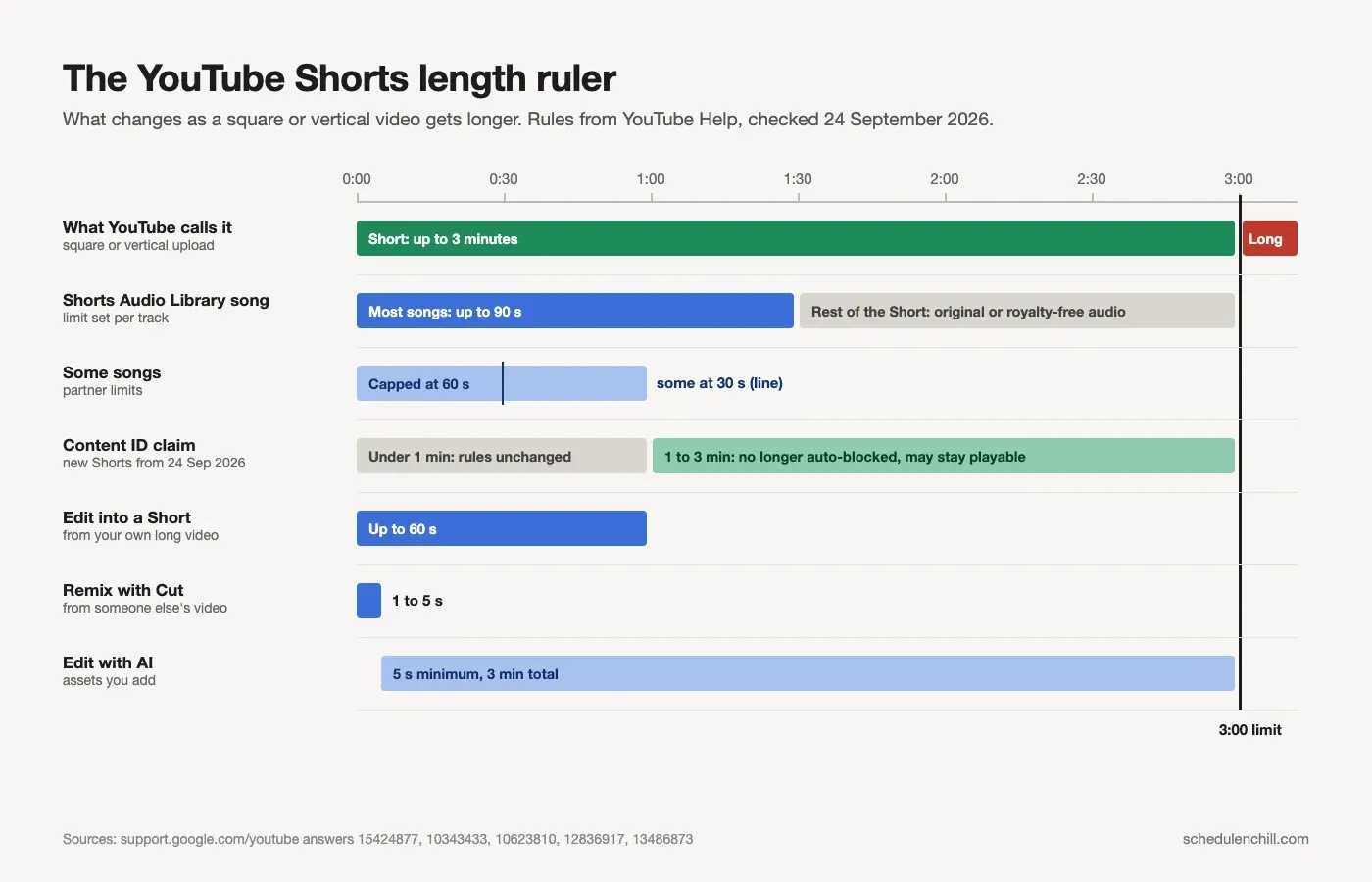
- Music: most songs from the Shorts Audio Library can cover up to 90 seconds. Some are capped at 60 or 30 seconds.
- Copyright claims: from 24 September 2026, new Shorts over 1 minute with a Content ID claim are no longer blocked automatically.
- Best length: there is no single answer. The studies disagree (table below). Most data points to under 60 seconds, and under 30 seconds for pure reach.
#YouTube Shorts max length: the official rules
| Rule | What YouTube says | Source |
|---|---|---|
| Max length | Up to 3 minutes | Understand three-minute YouTube Shorts |
| Shape | Square or vertical aspect ratio | Same page |
| Start date (normal channels) | Uploads on or after 15 October 2024 | Same page |
| Start date (Official Artist Channels) | Uploads on or after 8 December 2025 | Same page |
| Older uploads | Vertical videos over 60 seconds uploaded before those dates stay long-form | Same page |
| Upload from a computer | YouTube Studio, file up to 3 minutes, square or vertical, up to 15 files at once | Upload YouTube Shorts |
| Record in the app | One or more clips that add up to 3 minutes | Create YouTube Shorts |
| Resolution (app upload) | Maximum 1080p | Same page |
| Title | Max 100 characters | Same page |
YouTube announced the change on its blog in October 2024 in Tall updates coming to Shorts. Before that, Shorts stopped at 60 seconds. That is why so many older guides and studies still say "60 seconds". YouTube Creators also made a short official video about it: UPDATE: Create 3 Minute Shorts.
#What happens at the 3:00 edge
YouTube sorts the video by two things: length and shape. Here is what you get for each mix.
| Your video | Length | What YouTube makes it |
|---|---|---|
| Vertical (9:16) or square (1:1) | 3:00 or less | Short |
| Vertical or square | Over 3:00 | Regular long-form video |
| Landscape (16:9) | Any length | Regular long-form video |
| Vertical, uploaded before 15 Oct 2024 | 1:01 to 3:00 | Stays long-form. It does not become a Short later. |
Two practical tips:
- Leave a second of room. Export at 2:58 or 2:59, not exactly 3:00. Editors often add a frame or two at the end. If the file runs a hair over, it posts as a long video.
- To stop a video from becoming a Short, make it wider. YouTube's own advice is to use a wider ratio such as 16:9 for long-form videos (source).
For the pixel side of this, see YouTube Shorts dimensions.
#Is there a minimum length?
YouTube does not publish a minimum length for a Short you upload. A 5-second loop is a valid Short.
A few tools have their own floors:
| Tool | Minimum | Source |
|---|---|---|
| Upload in Studio or the app | None published | Upload YouTube Shorts |
| Edit with AI (in the Shorts camera) | 5 seconds of footage, 3 minutes max | Create YouTube Shorts |
| Remix with Cut | 1 to 5 seconds of someone else's video | Remix content |
Very short Shorts got a small boost in March 2025. Since 31 March 2025, YouTube counts a view every time a Short starts or replays, with no minimum watch time. The old metric is still in YouTube Analytics as "Engaged views", and monetization still uses engaged views (source). So a looping 7-second Short can rack up views fast, but that does not mean it earns more.
#Music and copyright limits by length
Longer Shorts come with tighter music rules. This is where most people get caught.
| Situation | Limit | Source |
|---|---|---|
| Song from the Shorts Audio Library | Most songs up to 90 seconds of a Short up to 3 minutes | Music eligibility for Shorts |
| Some songs | Capped at 60 or 30 seconds by partner agreements | Understand three-minute Shorts |
| Royalty-free music from the YouTube Audio Library | No Content ID claim | Same page |
| Music video remixed with "Sound" | Up to 90 seconds of audio; some videos limited to 30 seconds | Remix content |
| Short over 1 minute with a Content ID claim, uploaded before 24 Sep 2026 | Could be blocked automatically | Understand three-minute Shorts |
| New Short over 1 minute with a Content ID claim, from 24 Sep 2026 | No longer blocked automatically; may stay playable | Same page |
| Short under 1 minute with a claim | No change to the rules | Same page |
Before the 24 September 2026 change, a 1-to-3-minute Short with any claimed music was simply blocked. Now it may stay up, but the claim still applies. If a Short is blocked, YouTube says you can remove the claimed content or dispute the claim. It becomes viewable and eligible for monetization once the claim is resolved.
The safe pattern for a 2-minute Short: use an Audio Library song for the first 90 seconds or less, then switch to your own voice, original sound, or royalty-free music. When you pick a song in the Shorts camera, YouTube shows how many seconds it will cover.
#Shorts camera, remix and clip limits
Not every Shorts feature has caught up with the 3-minute limit. Several tools still stop at 60 seconds.
| Feature | Length limit | Source |
|---|---|---|
| Shorts camera recording | Several segments that add up to 3 minutes. Change the duration in the upper-right corner. | Create YouTube Shorts |
| Edit into a Short (from your own long video) | Up to 60 seconds. You can record extra segments up to a 60-second total. | Create Shorts from your videos |
| Remix with Cut | 1 to 5 seconds, audio and video | Remix content |
| Remix with Sound | Up to 90 seconds of audio | Same page |
| Clips (viewers clip a video) | 5 to 60 seconds. Clips loop on the original video's page. They are not Shorts. | Learn about Clips |
One more catch with Edit into a Short: you cannot add music from the Audio Library to a Short made that way. It only works on your own public videos without third-party claims.
#What length performs best? The studies disagree
Here is the published data we could verify. The numbers do not line up, and the reasons why are useful.
| Study | Sample | Finding | Year |
|---|---|---|---|
| Adobe Express creator survey | 507 creators with 1,000+ subscribers | Under 30 seconds was named best for views by 53%, for shares by 49%, and for clicks to long videos by 49%. For subscriber growth, under 30 s and 30 to 60 s tied at 34% each. | Survey March 2026 |
| Metricool YouTube study | 799,718 videos from 71,177 accounts | Shorts views up 127% year on year, but average watch time per Short fell to about 16 seconds and interactions fell 15% (detail) | Feb 2025 vs Feb 2026 |
| INFLOW Network | 5,400 Shorts | Most Shorts ran 20 to 40 seconds. The 50-to-60-second group had the most views. | 2023, when Shorts maxed at 60 s |
| TunePocket trending study | Thousands of trending Shorts | 30% ran 50 to 60 seconds and 27% ran 10 to 20 seconds. Few sat in the middle. | Updated Feb 2025 |
Why they disagree:
- Different methods. Adobe asked creators what worked. INFLOW and TunePocket counted real views. Opinions and view counts rarely match.
- Different eras. Two studies were done when Shorts could not pass 60 seconds. "Near the limit" meant 55 seconds then. It does not mean 2:55 now.
- Nobody has good public data on 1-to-3-minute Shorts yet. We found no large study that isolates them.
What they agree on: the typical viewer gives a Short about 16 seconds (Metricool). A 2-minute Short only works if people keep watching. Length should follow your retention, not the limit. The same is true of timing: the Shorts posting-time studies also say the first second matters more than the hour.
#YouTube Shorts length by goal
This is our starting point for each kind of Short. It is a default, not a rule. Test it against your own numbers.
| Goal | Target length | Why |
|---|---|---|
| Hook or teaser for a long video (plan them in a calendar) | 15 to 30 s | One idea, then a reason to click. Adobe's creators rated under 30 s best for clicks to long videos. |
| Trend, meme or music Short | 7 to 20 s | Short loops replay, and replays count as views since March 2025. |
| Quick tip or answer | 20 to 45 s | Enough for one clear step. Cut anything that is not the answer. |
| Tutorial or how-to | 45 to 90 s | Steps need time, but most viewers leave early. Put the result first. |
| Story or case study | 60 to 120 s | Needs a setup and a payoff. Only go longer if the retention graph stays flat. |
| Product demo | 30 to 60 s | Show the outcome in the first 3 seconds, then how it works. |
| Cut-down from a podcast or long video | 30 to 60 s | One moment, not a summary. YouTube's Edit into a Short also stops at 60 s. |
| Anything with a licensed song all the way through | 90 s or less | Most Audio Library songs stop at 90 s, and some at 60 or 30 s. |
#A 4-step check for your own length
- Open YouTube Studio, then Analytics, then the Content tab, then Shorts. Look at "Viewed vs. swiped away" for your last 10 Shorts. YouTube defines it as the share of times viewers watched instead of swiping (source).
- Open the retention graph on your three best and three worst Shorts. Note the second where the line drops hardest.
- Cut at that point next time. If most people leave at 0:25, your next Short in that format is 25 seconds.
- Only go longer when a Short holds its line. If a 60-second Short keeps most viewers to the end, try 90 seconds in that format.
#Max length on Shorts vs TikTok, Reels and LinkedIn
Shorts has the shortest ceiling of the four. If you post one video everywhere, the 3-minute Shorts limit sets the length.
| Platform | Max length | Notes | Source |
|---|---|---|---|
| YouTube Shorts | 3 minutes | Square or vertical only. Longer becomes a regular video. | YouTube Help |
| TikTok | Up to 30 minutes (web upload) | Through the API, 3 minutes for all creators and 5 or 10 for some | TikTok Help, developer docs |
| Instagram Reels | Up to 20 minutes | Reels over 3 minutes are not recommended to new audiences | Instagram Help |
| LinkedIn video | 15 minutes | Minimum 3 s on desktop, 2 s in the mobile app | LinkedIn Help |
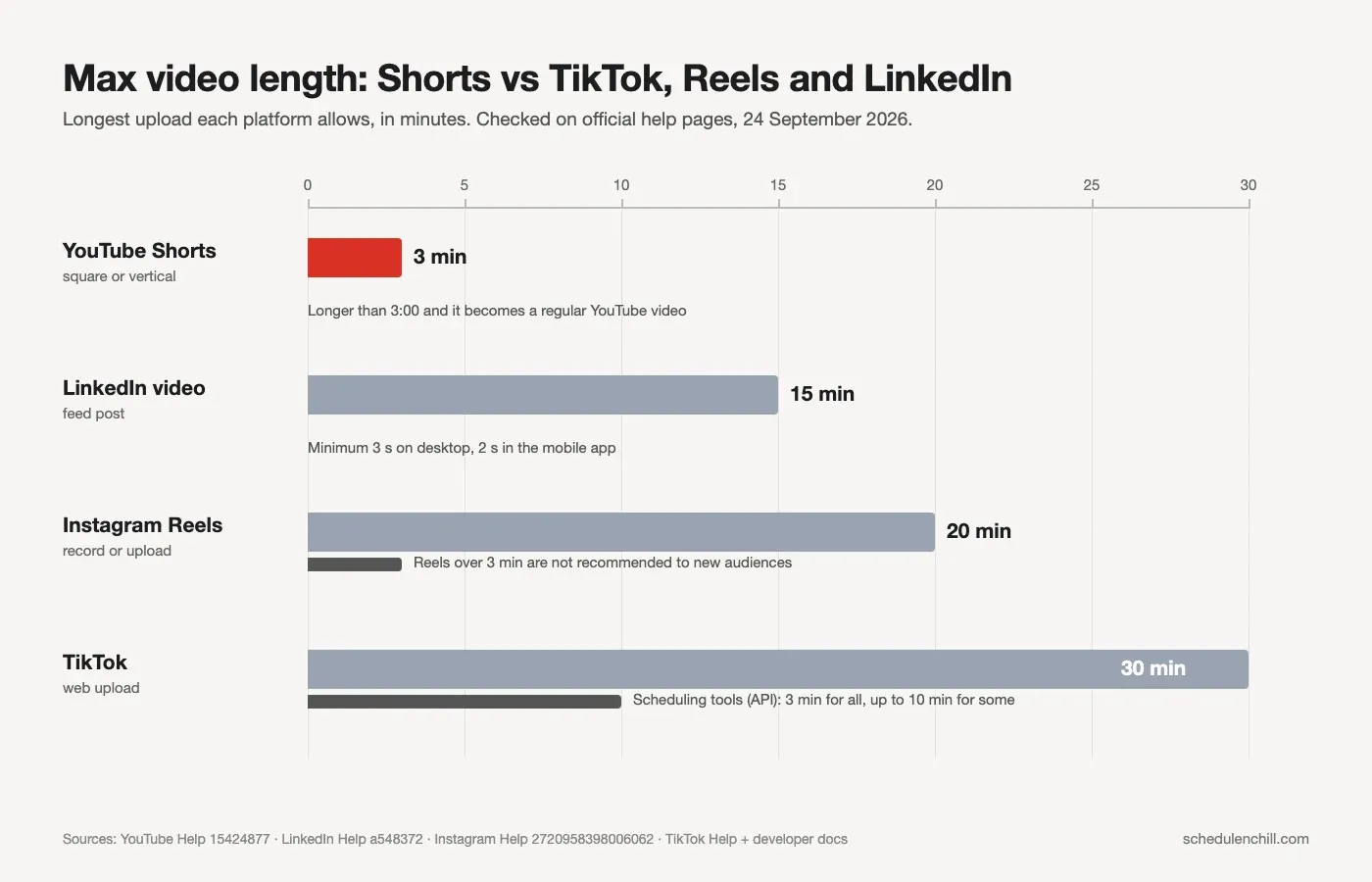
Notice the pattern. Instagram allows 20 minutes but only recommends Reels up to 3 minutes to new people. TikTok allows 30 minutes, but scheduling tools start at 3. So 3 minutes is the practical limit for short vertical video everywhere. A vertical video under 3 minutes can go to all four without a re-edit. That is also what makes it practical to queue one clip for TikTok and YouTube in the same session.
For the file specs on the TikTok side, see TikTok video size. For how the two apps differ beyond length, read YouTube Shorts vs TikTok. For LinkedIn, see how to post a video on LinkedIn.
#Export settings for a 3-minute Short
A long Short is still a small file if you export it sensibly.
| Setting | Value |
|---|---|
| Frame | 1080 × 1920 (9:16), or 1080 × 1080 for square |
| Length | 2:59 or less |
| Codec | H.264 in an MP4 |
| Bitrate | 8 to 12 Mbps |
| Audio | AAC, 48 kHz |
At 10 Mbps, a full 3-minute Short is about 225 MB (10 Mbps × 180 s ÷ 8). Most uploaders take that easily.
If a video runs a little long, you can trim it to 2:59 without re-encoding using ffmpeg:
1ffmpeg -i input.mp4 -t 179 -c copy short.mp4
-t 179 keeps the first 179 seconds. -c copy skips re-encoding, so it takes a second. The cut lands on the nearest keyframe, so check the end before you upload. To upload from a laptop instead of your phone, see how to upload YouTube Shorts from a PC.
#Scheduling Shorts with Schedule & Chill
Schedule & Chill is a free social media scheduler that posts to YouTube, LinkedIn, Bluesky and Mastodon. It uploads to YouTube through YouTube's official upload API. That API has no "Short" switch, so YouTube applies the same rule as a manual upload: square or vertical and 3 minutes or less becomes a Short. Keep your export at 2:59 and it lands as a Short.
Each YouTube post takes one video, a title of up to 100 characters (if you leave it blank, the first line of your caption is used), a description, a privacy setting (public, unlisted or private), and the made-for-kids choice YouTube requires. The free plan includes 2 social accounts, 500 posts a month and uploads up to 400 MB, so a 225 MB three-minute Short fits.
For the full walkthrough, including YouTube Studio's own scheduler, read how to schedule YouTube Shorts.
#Keep reading
- The full scheduling walkthrough for Shorts — Studio, the phone app and third-party tools, with time zones and bulk uploads.
- Pixel specs and safe zone for a Short — the frame, bitrate and thumbnail size that go with a 3-minute export.
- Comparing YouTube schedulers for long videos and Shorts — what Studio does free and what other tools add.
- Which hour to post Shorts, study by study — five studies side by side and a two-week test plan.
- Scheduling the same clip on TikTok — TikTok's own scheduler rules and its 10-day limit.
#Frequently Asked Questions
How long can YouTube Shorts be? Up to 3 minutes, as long as the video is square or vertical. YouTube has allowed this since 15 October 2024. A longer or wider video is posted as a regular YouTube video.
Can YouTube Shorts be 2 minutes? Yes. Any square or vertical video up to 3 minutes counts as a Short. If it uses a song from the Shorts Audio Library, most songs can only cover 90 seconds of it, and some only 60 or 30 seconds. Fill the rest with your own audio or royalty-free music.
Can YouTube Shorts be over 3 minutes long? No. A vertical video longer than 3 minutes is posted as a regular long-form video. To keep it a Short, trim it to 2:59 or less.
Are Shorts 3 minutes now for every channel? Yes, for uploads on or after 15 October 2024 on normal channels and on or after 8 December 2025 on Official Artist Channels. Vertical videos over 60 seconds uploaded before those dates stay long-form. They do not turn into Shorts.
What is the 30-second rule on YouTube? It is not an official YouTube rule. People use it in two ways. For Shorts, it is shorthand for "keep it under 30 seconds". In Adobe's 2026 survey, 53% of creators named under 30 seconds as best for views. It is also used for the myth that 30 seconds of a copyrighted song is safe. That is false. YouTube says any copyright-protected material can get a Content ID claim.
Is there a minimum length for YouTube Shorts? YouTube publishes no minimum for uploaded Shorts. Its Edit with AI tool needs at least 5 seconds of footage. In practice, give viewers enough time to understand the point, which is rarely under 5 seconds.