

TikTok Video Scheduler: How to Pick One That Posts
A TikTok video scheduler is any tool that publishes your video at a time you choose. TikTok has a free one built in, good for up to 10 days ahead. A third-party tool adds a longer runway, other platforms and a team calendar. The catch: some tools publish the video for you, and some only send it to your TikTok inbox so you finish the post yourself. This guide shows how to tell which kind you are buying.
#Quick answer
- Free option: TikTok's own scheduler, on desktop or in TikTok Studio. It works from 15 minutes to 10 days ahead, and you cannot edit a post once it is scheduled.
- Why pay for a tool: a longer runway, the same video on YouTube Shorts and other platforms, a shared calendar, and approvals.
- The question to ask first: does it publish directly, or does it only send a draft to your inbox? Only Direct Post works while you are away.
- Hard limits every tool shares: about 15 API posts per creator per day, 4 GB per video, and up to 10 minutes per video through the API. These come from TikTok, not from the tool.
- Price range today: from free (Buffer, Metricool) up to $399 per user per month (Hootsuite and Sprout Social Advanced).
#TikTok's built-in video scheduler
TikTok's own scheduler is free and needs no other app. The official rules, from the TikTok Help Center "Schedule video" page and the TikTok for Business launch post:
| Rule | What TikTok says |
|---|---|
| How far ahead | "A minimum of 15 minutes and a maximum of 10 days in advance" |
| Where | TikTok on desktop web, and the TikTok Studio app in regions where it has rolled out. "Not available for TikTok Mobile Web." |
| Time zone | "Defaulted to your computer setting" |
| Editing | Scheduled posts "cannot be edited but can be deleted" |
| When it goes live | You get a push notification |
| Account type | The Help Center note ties desktop scheduling to a Business Account. TikTok's newer Studio pages list scheduling as a creator tool too. |
TikTok for Business also posted a short walkthrough video of the flow.
The account-type rules conflict between TikTok's own pages. Our guide to scheduling posts on TikTok sets the sources side by side and gives the click-by-click steps.
Where the built-in scheduler is enough: you post only to TikTok, you plan a week at a time, and one person runs the account.
Where it runs out:
- You cannot queue more than 10 days ahead, so a monthly plan (like this TikTok posting calendar) has to be loaded in two or three sittings.
- A typo in the caption means you delete the post, upload the video again, and fill in every field again.
- It only posts to TikTok. The same vertical video usually also goes to YouTube Shorts and other platforms.
- It has no approval step, no shared queue, and no client view.
#What a third-party scheduler can and cannot do
Every legitimate third-party scheduler goes through TikTok's official Content Posting API. This means every tool works inside the same limits. Marketing pages differ, but the pipe underneath is the same. If you want the developer view, see does TikTok have an API.
#Direct Post vs upload to inbox
The API gives a tool two ways to send your video:
| Direct Post | Upload (inbox draft) | |
|---|---|---|
| API scope | video.publish |
video.upload |
| What happens at the scheduled time | The video is published to your profile | The video lands in your TikTok inbox. You open the notification, finish editing, and tap Post. |
| Works while you sleep | Yes | No. Someone has to open the app. |
| Can you add a TikTok sound or effect | No. The video goes out as uploaded. | Yes, in TikTok's own editor |
| Daily limit | About 15 posts per creator per day ("typically around 15"), shared across all apps | At most 5 pending uploads in any 24 hours |
| Source | Direct Post reference | Upload reference |
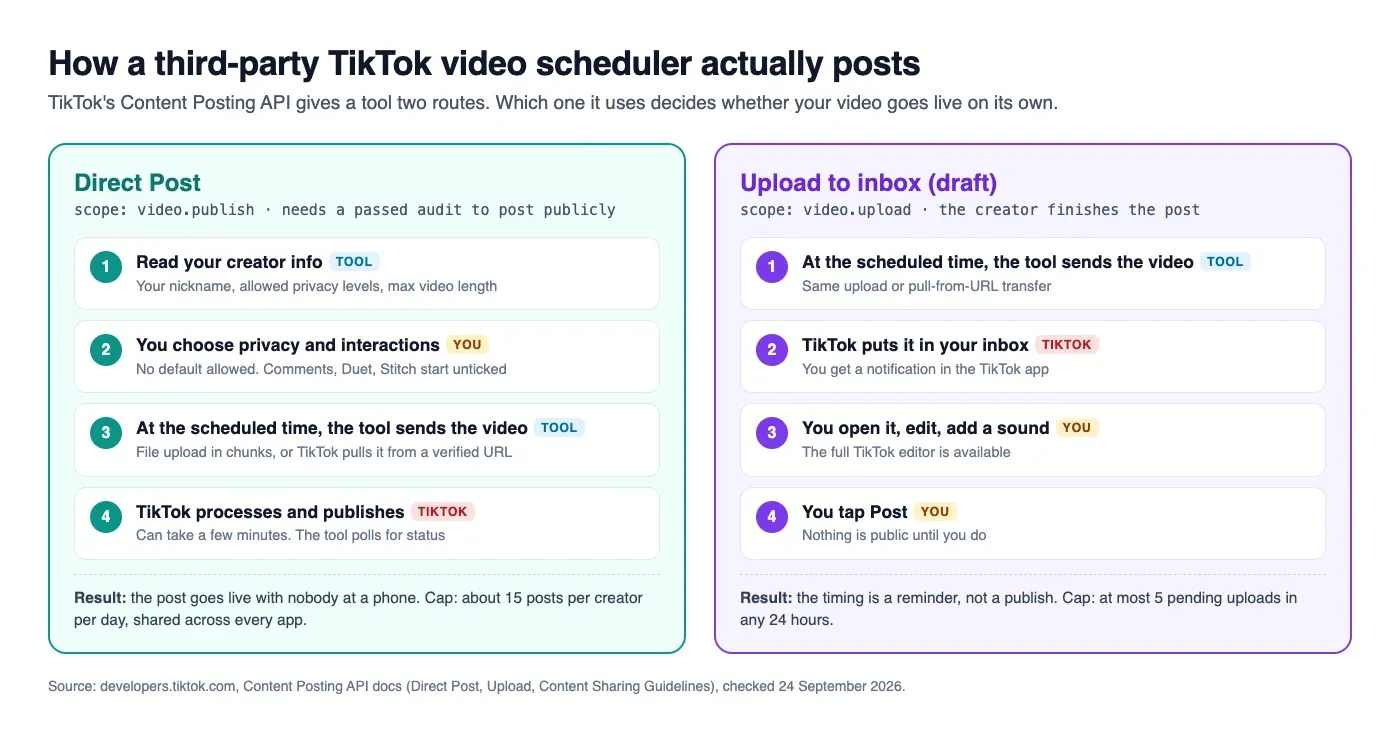
Tools often call the inbox route "notification publishing" or "mobile publishing". It is useful when you want TikTok's trending sounds, which you can only add inside TikTok. It is not auto-posting. If a tool's TikTok page says "we'll remind you to post", you are buying a reminder.
Many tools offer both routes and let you pick per post. Check which one applies to your account type before you pay.
#The audit, and why your first post may come out private
TikTok's Content Sharing Guidelines say an app that has not passed TikTok's audit is limited like this:
- Every post is
SELF_ONLY, meaning only you can see it. - The TikTok account must be set to private at the time of posting, or the request is blocked.
- At most 5 users can post through the app in any 24 hours.
A scheduler that has not passed the audit will "work": the post appears on your profile, but nobody else can see it. Before you trust a new tool, schedule one test video and check it from a second account. If the privacy dropdown only offers "Only me", the tool is not audited.
#What an audited tool must show you
TikTok requires specific screens from every app that uses Direct Post. These make a good quality check, because a tool that skips them is breaking TikTok's rules:
- Your TikTok nickname on the post screen, so you know which account it goes to.
- A privacy dropdown with no default. The options must come from your account. A public account sees Everyone, Friends and Only me. A private account sees Followers, Friends and Only me.
- Comments, Duet and Stitch checkboxes, all unticked at the start. They are greyed out if you turned them off in TikTok.
- A commercial content toggle. "Your brand" labels the post "Promotional content". "Branded content" labels it "Paid partnership", and Branded content cannot be set to Only me.
- A consent line above the button, such as "By posting, you agree to TikTok's Music Usage Confirmation".
- A preview, and a note that processing can take a few minutes.
- No watermark. TikTok does not allow apps to add their own logo or promo text to your video.
The tool also has to read your maximum video length from TikTok (the max_video_post_duration_sec field in Query Creator Info) and stop a video that is too long.
#Limits every TikTok scheduler shares
These come from TikTok's media transfer guide and API reference, checked 24 September 2026. No tool can go past them.
| Limit | Value |
|---|---|
| File formats | MP4 (recommended), WebM, MOV |
| Codecs | H.264 (recommended), H.265, VP8, VP9 |
| Frame rate | 23 to 60 fps |
| Picture size | 360 to 4096 px on each side |
| Max file size | 4 GB |
| Max length through the API | 10 minutes. All creators can post 3 minutes; some have 5 or 10. |
| Caption | Up to 2,200 characters |
| Posts per creator per day (Direct Post) | About 15, shared across every app you use |
| Pending inbox uploads | At most 5 in any 24 hours |
| Post requests per user | 6 per minute |
The shared daily cap matters if you use two tools. A post from Tool A counts against Tool B's limit too.
A tool's own upload limit is often lower than TikTok's 4 GB. For export settings that stay small without losing quality, see TikTok video size.
#Buyer's checklist for a TikTok video scheduler
Ask each question before you pay. Most answers are on the tool's pricing page or help centre.
| Question | Good answer | Warning sign |
|---|---|---|
| Is it audited for Direct Post? | Your privacy dropdown offers Everyone | Only "Only me" is available, or the test post is private |
| Direct Post or inbox? | Direct Post, with inbox as an option | Inbox only, called "auto-publishing" in marketing |
| Does it ask for privacy each time? | Dropdown with no default | Privacy set for you, or hidden |
| Multiple TikTok accounts? | Clear per-account pricing | "Unlimited" with a small print cap |
| Video size limit | States a number in MB or GB | No number anywhere |
| Other platforms from one upload | YouTube Shorts, Instagram, and others from one composer | TikTok-only |
| How far ahead? | Weeks or months | Same 10 days as TikTok itself |
| Failed-post alerts | Email or in-app alert, with the reason | Silent failure |
| Analytics | Views, likes, comments, shares per post | Only "published" status |
| Price for your real setup | Priced per channel, brand or seat, and you can add it up | "Contact sales" for the basics |
A worked example. A solo creator posts 4 TikToks a week and puts the same clips on YouTube Shorts. That is 2 channels and about 35 posts a month. Most free plans below cover that. A 3-person agency with 10 client TikToks needs team seats and approvals. Priced per channel, 10 channels on Buffer Team is $100 a month. Priced per seat, 3 users on Hootsuite Standard is $297 a month billed annually, and 3 seats on Sprout Social Professional (needed for more than 5 profiles) is $897 a month.
#TikTok video schedulers compared
Prices and plan limits are from each company's own pricing page, checked on 24 September 2026. Prices change often, so check the link before you buy. TikTok details come from each tool's own help pages. A blank means we did not find it documented, not that the tool lacks it.
| Tool | Free plan | Entry paid price | How it counts | TikTok publishing (from their docs) |
|---|---|---|---|---|
| Buffer | Yes: 3 channels, 10 scheduled posts per channel | $5/month per channel (Essentials) | Per channel | TikTok listed on all plans |
| Hootsuite | No, 14-day trial | $99/month per user, billed annually (Standard, 10 accounts) | Per user | Scheduling needs a TikTok Business account (Hootsuite guide) |
| Later | No, 14-day trial | $18.75/month, billed yearly (Starter: 8 profiles, 30 posts per profile) | Per "social set" of 8 profiles | TikTok is part of each social set |
| Metricool | Yes: 1 brand, 20 posts/month | $20/month billed annually, $25 monthly (Starter, up to 5 brands) | Per brand | TikTok on the free plan (free covers all networks except LinkedIn and X) |
| Sprout Social | No, 30-day trial | $79/month per seat billed annually, $99 monthly (Essentials, 5 profiles) | Per seat | Posts videos and photo posts; comments, Duet and Stitch toggles (Sprout help) |
| Schedule & Chill | Yes: 2 accounts, 500 posts/month, 400 MB uploads | No paid plans sold right now | Per account | Opening soon |
A few notes, so the table stays fair:
- Hootsuite Professional is $199 and Advanced $399 per user per month, billed annually. Its trial caps posting at 10 to 20 posts a day per organisation.
- Sprout Social Standard is $199, Professional $299 and Advanced $399 per seat per month. Sprout's help centre says videos must be 3 seconds to 10 minutes, at 23 to 60 fps.
- Later Growth is $37.50 and Scale $82.50 per month, billed yearly. Monthly billing costs more.
- Metricool Advanced starts at $53 a month billed annually ($67 monthly), for up to 15 brands.
- Buffer Team is $10 per channel per month.
How to read it:
- Cheapest for one creator: a free plan. Buffer, Metricool and Schedule & Chill all have one. Compare the post caps against how often you post.
- Cheapest for many TikTok accounts: per-channel or per-brand pricing (Buffer, Metricool) grows slowly. Per-seat pricing (Hootsuite, Sprout) grows with your team size.
- Best for teams with approvals: the per-seat suites. That is what the higher price pays for.
Whichever tool you pick, run the private-post test from the checklist on day one. Then set its queue to the hours your followers are online. Our comparison of four timing studies shows how to find them.
#Scheduling TikTok and YouTube Shorts from one upload
Most short vertical videos work on both TikTok and YouTube Shorts. A tool that publishes to both from one upload saves the second upload and the second caption. That is the real time saving, more than the scheduling itself.
Two things differ between the platforms, so check them per post:
- Length. Your TikTok limit comes from your account (3, 5 or 10 minutes). YouTube has its own Shorts length limits. Keep the master clip under the shorter one.
- Caption. TikTok allows 2,200 characters. YouTube uses a title and a description. A good composer lets you set a different caption per platform.
For the YouTube side, see the YouTube video scheduler guide. For the general setup, see how to post to multiple social media accounts at once.
#Where Schedule & Chill fits
Schedule & Chill is a scheduler for putting the same content on several platforms from one composer. You can also schedule from an AI assistant like Claude or ChatGPT through our MCP server. It is free right now: 2 social accounts, 500 posts a month and 400 MB uploads. Today it publishes to LinkedIn, Bluesky, Mastodon and YouTube. TikTok support is opening to all accounts soon.
If you only post to TikTok and plan a week at a time, TikTok's built-in scheduler is free and does the job. Use a third-party tool when you need more than 10 days of runway or more than one platform.
#Keep reading
- The complete TikTok scheduling guide — the native scheduler's rules, account types and fixes.
- A monthly TikTok posting plan with a CSV — fill the queue a week at a time.
- TikTok vs YouTube Shorts: which one fits — reach, length and money on each platform.
- Scheduling YouTube Shorts ahead of time — the YouTube Studio side of a two-platform plan.
- Can AI agents post on social media? — scheduling from Claude or ChatGPT instead of a dashboard.
#Frequently Asked Questions
Can you schedule your videos on TikTok? Yes. TikTok's built-in scheduler works on desktop and in the TikTok Studio app, from 15 minutes to 10 days ahead. Third-party schedulers can go further ahead and post to other platforms too. They publish through TikTok's official Content Posting API.
Does scheduling videos on TikTok affect views? TikTok has not published anything saying scheduled videos get less reach. A scheduled post is published as a normal post. Views depend far more on the video, and on posting when your audience is online. Our TikTok scheduling guide covers the evidence.
Why can't I schedule a post on TikTok anymore? The most common causes: you are on mobile web, where scheduling is not offered. Your region may not have scheduling in the TikTok Studio app yet. Or your account type is not eligible. Try TikTok on a desktop browser first. If the toggle is still missing, check your account type in Settings.
How many followers do you need on TikTok to schedule posts? TikTok's Help Center note on desktop scheduling mentions a Business Account "or over with a 10,000 followers or more". TikTok's newer TikTok Studio pages list scheduling as a creator tool without a follower number. TikTok's Content Posting API docs do not set a follower minimum for posting through a third-party tool.
Is there a free TikTok video scheduler? Yes. TikTok's own scheduler is free. Among third-party tools, Buffer (3 channels, 10 scheduled posts per channel) and Metricool (1 brand, 20 posts a month) have free plans, as of 24 September 2026.
Why did my scheduled TikTok post as private? The tool has probably not passed TikTok's audit. TikTok forces every post from an unaudited app to "Only me" and requires the account to be private. Your settings are not the cause. Switch to a tool whose privacy dropdown offers "Everyone".