

TikTok Video Size: Dimensions, Limits and Safe Zone
The right TikTok video size is 1080 × 1920 pixels at a 9:16 aspect ratio, exported as an H.264 MP4. That fills the whole phone screen with no black bars. File size and length limits depend on how you upload: TikTok's web uploader takes files under 10 GB and up to 30 minutes, and the developer API takes files up to 4 GB.
Most guides give one number for "max file size". There is no single number. Below is each upload path with the limit TikTok itself publishes, and a link to the page it comes from. Every spec was checked against TikTok's own help centre and developer docs on 24 September 2026. The path matters when you schedule a TikTok in advance, because TikTok Studio and third-party tools use different limits.
#Quick answer
- Dimensions: 1080 × 1920 px. TikTok's web uploader asks for at least 720 × 1280.
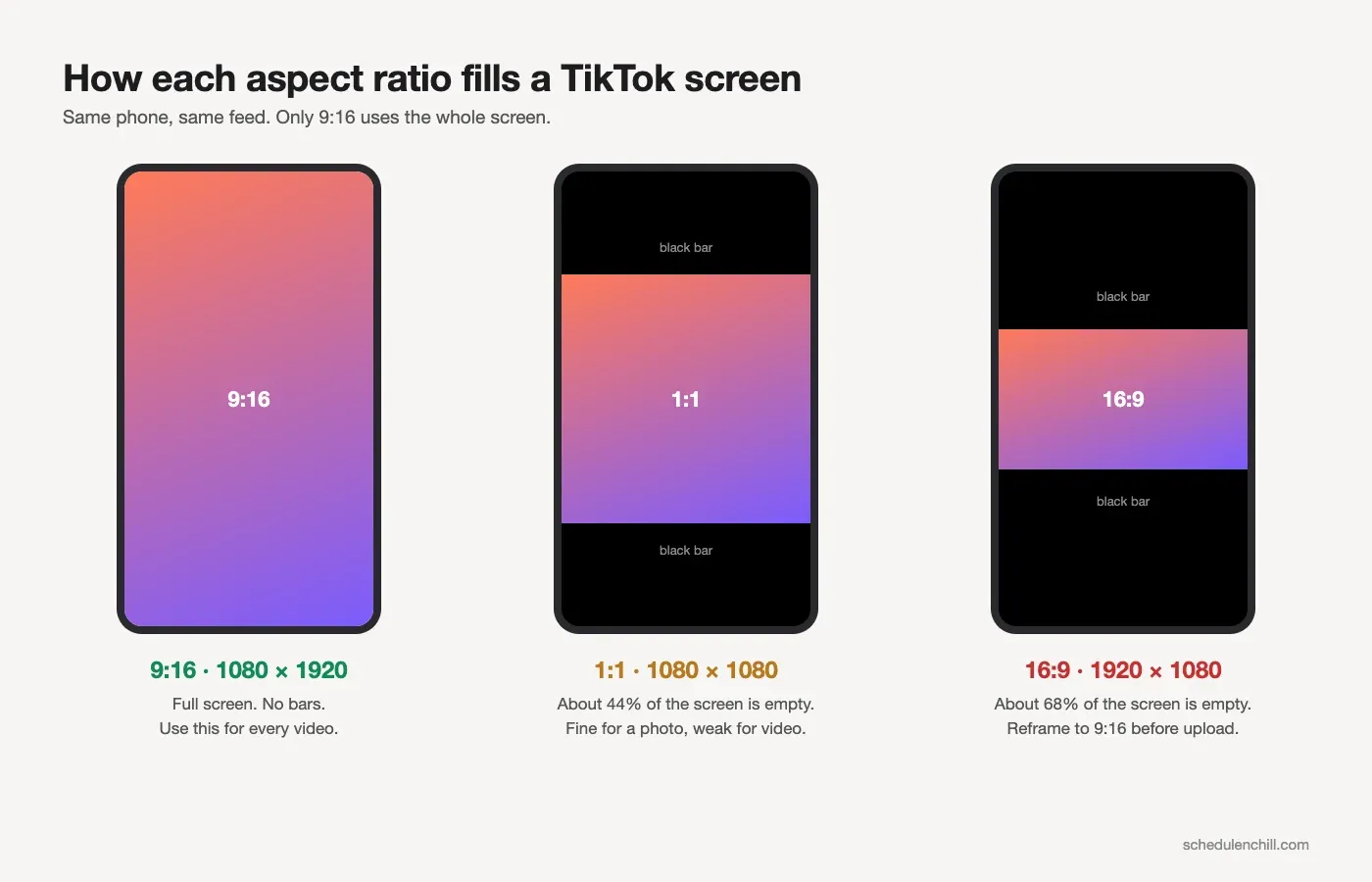
- Aspect ratio: 9:16. 1:1 and 16:9 upload fine but play with black bars.
- Format: MP4 with H.264 video and AAC audio. The web uploader also takes WebM.
- Max file size: under 10 GB on the web, 4 GB through the API. TikTok does not publish a limit for the phone app.
- Max length: 30 minutes on the web. Through the API, 3 minutes for everyone and up to 10 minutes for some accounts.
- Frame rate: 23 to 60 fps. 30 fps is the safe default.
- Safe zone: keep text and faces 240 px from the top, 660 px from the bottom and 120 px from each side.
#TikTok video size and dimensions at a glance
| Spec | Value | Source |
|---|---|---|
| Recommended size | 1080 × 1920 px | Standard full HD vertical; see note below |
| Minimum size (web upload) | 720 × 1280 px | TikTok Help Center: TikTok Studio |
| Allowed range (API) | 360 to 4096 px on each side | TikTok developer docs: Media Transfer Guide |
| Aspect ratio | 9:16 (vertical, full screen) | TikTok Ads Help: In-Feed Ads |
| Formats | MP4, WebM (web); MP4, WebM, MOV (API) | Help Center; Media Transfer Guide |
| Video codecs (API) | H.264 (recommended), H.265, VP8, VP9 | Media Transfer Guide |
| Frame rate (API) | 23 to 60 fps | Media Transfer Guide |
A note on 1080 × 1920. TikTok's organic help pages give a minimum (720 × 1280), not a recommended size. 1080 × 1920 is full HD turned on its side. Every phone camera and every editor exports it, and it sits well inside the 4096-px API ceiling. That is why every guide, including this one, recommends it.
#Max file size by upload path
This is where most guides go wrong. They quote one limit, but TikTok sets a different one for each way in.
| Upload path | Max file size | Where TikTok says so |
|---|---|---|
| TikTok Studio on the web (tiktok.com) | Less than 10 GB | Help Center: TikTok Studio upload |
| Content Posting API (scheduling tools) | 4 GB | Media Transfer Guide |
| TikTok app on iPhone | Not published | No current TikTok page states a limit |
| TikTok app on Android | Not published | No current TikTok page states a limit |
| Non-Spark video ads | 500 MB | TikTok Ads Help |
You will see "287.6 MB on iOS and 72 MB on Android" in many guides. We could not find either number on any current TikTok page, so we do not repeat them as fact. In practice, a phone upload of a normal 1080p clip works. If the app rejects a big file, use the web uploader, which has the highest published limit.
#Max length by upload path
| Upload path | Max length | Where TikTok says so |
|---|---|---|
| TikTok Studio on the web | Up to 30 minutes | Help Center: TikTok Studio upload |
| Content Posting API | 3 minutes for all creators; some accounts get 5 or 10 minutes | Media Transfer Guide |
| Longest video a tool can send by API | 10 minutes | Media Transfer Guide |
| Recording in the app | You pick a maximum length before recording; the options depend on your account | Help Center: Making a post |
| Non-Spark video ads | Up to 10 minutes | TikTok Ads Help |
Some guides mention 60-minute uploads. TikTok has tested these with some accounts, but its help centre still says 30 minutes for web uploads. Plan around 30.
Your account's own ceiling matters more than the headline number. Tools that post through the API must read it for each account (TikTok calls it max_video_post_duration_sec) and block videos that are too long. If a scheduling tool says your 4-minute video is too long, that is TikTok's limit for your account, not the tool's.
For the YouTube side of the same question, see YouTube Shorts length.
#The TikTok safe zone, in pixels
TikTok puts its interface on top of your video. The tabs sit at the top. The like, comment, share and profile buttons sit on the right. Your username, caption and sound name sit at the bottom. Anything under them is hard to see.
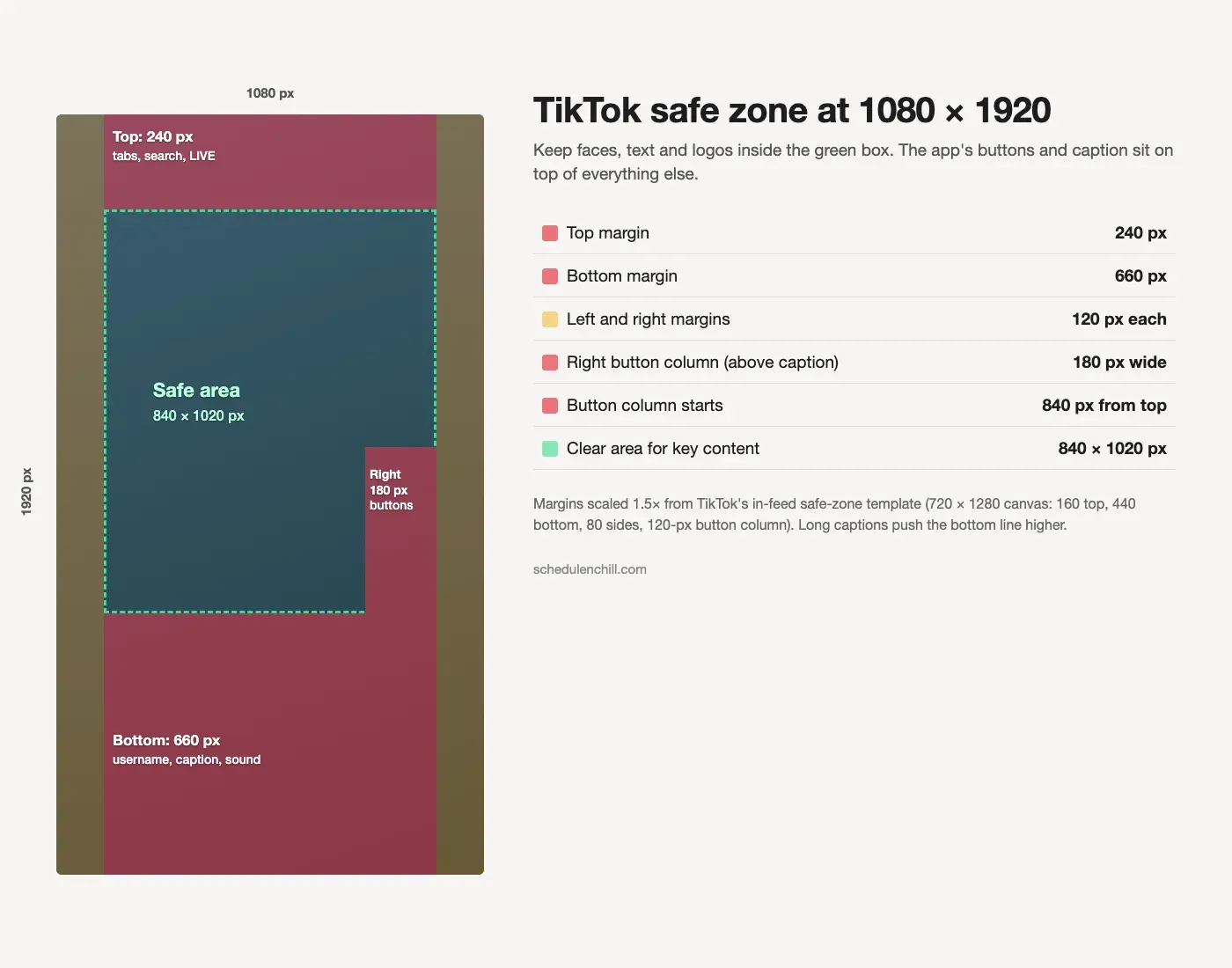
We built this diagram from TikTok's own in-feed safe-zone template. The template is drawn on a 720 × 1280 canvas, so we scaled every margin by 1.5 to fit 1080 × 1920.
| Zone | At 720 × 1280 (TikTok template) | At 1080 × 1920 |
|---|---|---|
| Top margin | 160 px | 240 px |
| Bottom margin | 440 px | 660 px |
| Left and right margins | 80 px each | 120 px each |
| Right button column | 120 px wide, lower 720 px | 180 px wide, from 840 px down |
| Clear area | 560 × 680 px | 840 × 1020 px |
How to use it:
- Put on-screen text, faces and logos inside the clear area.
- Keep the right edge clear from the middle of the frame down. The buttons live there.
- Keep any call to action well above the bottom third. A long caption covers more than the template shows.
- Backgrounds can run edge to edge. Only the important parts need to sit inside the box.
The template is made for ads, which show a short caption. An organic post with a long caption or several hashtags pushes the text higher. Treat the bottom margin as the minimum.
#Photo mode and carousel specs
TikTok photo posts (carousels) follow different rules from video.
| Spec | Value | Source |
|---|---|---|
| Photos per post | Up to 35 | Help Center: Making a post |
| Image formats (API) | JPEG, WebP | Media Transfer Guide |
| Max resolution (API) | 1080p | Media Transfer Guide |
| Max file size (API) | 20 MB per image | Media Transfer Guide |
| Suggested size | 1080 × 1920 px (9:16) to fill the screen | Same frame as video |
Note that PNG is not on the API list. If a tool posts your carousel through the API, convert PNGs to JPEG first. Images larger than 1080p should be scaled down before upload.
#Cover image and caption length
| Item | Rule | Source |
|---|---|---|
| Video cover | Pick any frame. In the app, tap Select cover on the post screen. | Help Center: Editing, posting and deleting |
| Cover via API | A timestamp in milliseconds. If none is set, TikTok uses the first frame. | API reference: Direct Post |
| Photo post cover (API) | The index of one of the photos | API reference: Photo |
| Video caption (API) | 2,200 characters | API reference: Direct Post |
| Photo post title (API) | 90 characters | API reference: Photo |
| Photo post description (API) | 4,000 characters | API reference: Photo |
The cover is a frame from the video, so it uses the same 1080 × 1920 size. The profile grid crops covers to a shorter shape, so keep the title text in the middle of the frame.
#Export settings cheat sheet
Use these settings for every TikTok video. They land well under every file size limit.
| Setting | Value |
|---|---|
| Resolution | 1080 × 1920 |
| Frame rate | Match your footage: 30 fps, or 60 fps for fast motion |
| Container | MP4 |
| Video codec | H.264 |
| Bitrate | 8 to 12 Mbps (about 60 to 90 MB per minute) |
| Audio | AAC, 48 kHz, 128 to 320 kbps |
Per app:
| App | Where to set it |
|---|---|
| CapCut | Start a 9:16 project. On Export, set Resolution 1080p, Frame rate 30, Codec H.264, Format MP4, Bitrate Recommended. |
| Premiere Pro | Use a 1080 × 1920 vertical sequence. File → Export → Media: Format H.264, frame size Match Source, Bitrate VBR 1 pass, target 10 Mbps, max 16 Mbps, audio AAC 48 kHz. |
| DaVinci Resolve | Set Project Settings → Timeline resolution to 1080 × 1920. On the Deliver page choose Custom Export, Format MP4, Codec H.264, Quality Restrict to 10000 Kb/s. |
| iPhone camera | Settings → Camera → Record Video → 1080p at 30 fps. Under Settings → Camera → Formats, Most Compatible records H.264. Turn off HDR Video if your uploads look washed out. |
| Android camera | In the camera settings, choose FHD 1080p and the 9:16 or full-screen frame. Menu names vary by phone brand. |
Shooting in 4K is fine. The API accepts up to 4096 px on a side, so 2160 × 3840 passes. It just makes the file four times bigger for a screen that shows it much smaller. Export at 1080 × 1920 unless you have a reason not to.
#Common errors and fixes
| Problem | Likely cause | Fix |
|---|---|---|
| "Video too large" or upload fails | File is over 10 GB (web) or 4 GB (API), or too big for the phone app | Re-export at 1080p and 8 to 12 Mbps. Or upload from the web. |
| Black bars above and below | The video is 16:9, 1:1 or 4:5, not 9:16 | Reframe to 9:16 in your editor, or crop with the command below. |
| Text hidden behind buttons or caption | Text sits outside the safe zone | Move it inside the 840 × 1020 clear area. |
| Blurry after upload | Uploaded below 720 × 1280, or a low bitrate | Export at 1080 × 1920, 8 Mbps or more. |
| Washed-out colours | HDR footage shown as SDR | Turn off HDR recording, or export SDR (Rec. 709). |
| "Video too long" from a scheduling tool | Over your account's API length limit | Trim it, or post that one from the app. |
| Sound out of sync | Variable frame rate from a phone | Re-export at a fixed frame rate (the commands below do this). |
#Fix it with ffmpeg
If you have ffmpeg installed, one command turns any clip into a TikTok-ready file. This version keeps the whole picture and adds bars to fill the 9:16 frame:
 1ffmpeg -i input.mov \
 2  -vf "scale=1080:1920:force_original_aspect_ratio=decrease,pad=1080:1920:(ow-iw)/2:(oh-ih)/2,setsar=1" \
 3  -r 30 -c:v libx264 -preset slow -crf 20 -pix_fmt yuv420p \
 4  -c:a aac -b:a 192k -movflags +faststart \
 5  tiktok.mp4
This version fills the whole screen with no bars. It crops the sides of a landscape clip, so keep your subject in the centre:
 1ffmpeg -i input.mov \
 2  -vf "scale=1080:1920:force_original_aspect_ratio=increase,crop=1080:1920,setsar=1" \
 3  -r 30 -c:v libx264 -preset slow -crf 20 -pix_fmt yuv420p \
 4  -c:a aac -b:a 192k -movflags +faststart \
 5  tiktok.mp4
What the settings do: -crf 20 keeps quality high at a sensible size (raise it to 23 for a smaller file). -pix_fmt yuv420p makes the file play everywhere. -r 30 fixes the frame rate, which cures most sync problems. -movflags +faststart lets the video start playing before it fully downloads.
#TikTok vs YouTube Shorts sizes
The same 1080 × 1920 file works on both, so you can export once and post twice. For the YouTube half, here is how to upload a Short from your computer.
| Spec | TikTok | YouTube Shorts |
|---|---|---|
| Frame | 1080 × 1920, 9:16 | 1080 × 1920, 9:16 |
| Max length | 30 min web, 3 to 10 min API | See YouTube Shorts length |
| Safe zone | Bottom 660 px, right 180 px | See YouTube Shorts dimensions |
For more differences between the two, see YouTube Shorts vs TikTok.
#Scheduling your TikTok videos
Getting the size right is one step. Posting on a steady schedule is the next. Our guide to scheduling posts on TikTok covers TikTok's built-in scheduler, which works up to 10 days ahead, and its limits. For a comparison of tools, see TikTok video schedulers. To pick your posting hours, read the best time to post on TikTok. To plan a week of videos around one export preset, use our free TikTok content calendar template.
Schedule & Chill is a free scheduler that posts to LinkedIn, Bluesky, Mastodon and YouTube. The free plan includes 2 accounts, 500 posts a month and uploads up to 400 MB, so export with the settings above to stay under that. TikTok support is opening to all accounts soon. If you want the technical side of posting to TikTok from software, see does TikTok have an API.
#Keep reading
- Can you schedule posts on TikTok? The full guide — native scheduling, third-party tools and the audit rule.
- YouTube Shorts dimensions and safe zone — the matching spec sheet for the other vertical platform.
- How to schedule YouTube Shorts — queue the same 9:16 export on YouTube.
- Posting a video on LinkedIn — LinkedIn's own video rules if the clip goes there too.
- How to pick a TikTok video scheduler — every tool shares the same 4 GB and 10-minute API limits.
#Frequently Asked Questions
What size should a TikTok video be? 1080 × 1920 pixels at a 9:16 aspect ratio. TikTok's web uploader needs at least 720 × 1280. Export as an MP4 with H.264 video and AAC audio.
Is TikTok 9:16 or 4:5? TikTok is 9:16. A 4:5 video will upload, but it fills only about 70% of the screen height and shows black bars above and below. Reframe to 9:16 for full screen.
Is TikTok 1920 × 1080? Not quite. 1920 × 1080 is landscape (16:9), and it plays with large black bars on TikTok. TikTok wants the same pixels turned upright: 1080 wide by 1920 tall.
What is the maximum file size for a TikTok video? Under 10 GB when you upload through TikTok Studio on the web, and 4 GB when a tool posts through TikTok's API. TikTok does not publish a limit for the phone app. If the app rejects a file, upload it on the web.
Is 4K or 1080p better for TikTok? 1080p for almost everyone. TikTok accepts 4K (the API allows up to 4096 px on a side), but it compresses the video for phone screens. A 4K file is about four times bigger for little visible gain. Shoot in 4K if you like, then export at 1080 × 1920.
How long can a TikTok video be? Up to 30 minutes when uploaded from the web. Through the API, every creator can post 3 minutes, and some accounts can post 5 or 10 minutes.