

TikTok Content Calendar: A Free Template That You Will Actually Use
A TikTok content calendar is a simple plan of what you will post, on which day, and why. For most accounts it only needs one week of rows, four content pillars and one film day. Below you get a copy-paste weekly template, a monthly theme table and a CSV you can paste into Google Sheets. You also get the workflow that turns those rows into posts that go out on time.
#Quick answer
- What it is: a list of planned TikToks with a date, a pillar, a hook, a sound and a status.
- How often to post: Buffer's study of 11.4 million posts found 2 to 5 posts a week is the most efficient range. TikTok itself says 1 to 4 a day. Pick the number you can keep up.
- What to put in it: 3 to 5 content pillars. Rotate them through the week.
- Trends: keep one open slot a week for a trending sound. Do not plan it a month ahead.
- Workflow: film one day, edit the next, then schedule the rest of the week.
- Scheduling: TikTok Studio on desktop schedules 15 minutes to 10 days ahead. Use a third-party scheduler if you plan further out.
#What a TikTok content calendar is (and is not)
A content calendar is a planning tool. It holds decisions: this Thursday we post a behind-the-scenes clip, with this hook, for this reason. It is not the thing that publishes. That part is the scheduler or the queue. If you are new to that side, start with how TikTok's own scheduler works.
Keep those two jobs separate in your head. Most calendars fail in the gap between the plan and the publish button, not in the plan itself. We wrote a full post about that gap: from calendar to publishing queue.
A useful TikTok calendar row has seven fields:
| Field | Why it matters on TikTok |
|---|---|
| Date + time | Posting on a steady rhythm is the whole point |
| Pillar | Stops you posting the same kind of video 5 times in a row |
| Hook | The first 1–2 seconds decide if people keep watching |
| Format | Talking head, screen recording, voiceover, stitch, photo post |
| Sound | Trending sound, original audio, or commercial library track |
| Caption + hashtags | Written in advance, not at 11pm |
| Status | Idea → filmed → edited → scheduled → posted |
#Why cadence matters more than any single video
TikTok rewards accounts that keep showing up. The data sources do not agree on the exact number, and that is useful to see side by side:
| Source | What it says | Basis |
|---|---|---|
| Buffer (Oct 2025) | 2–5 posts a week. Views per post: +17% at 2–5/week, +29% at 6–10, +34% at 11+ (vs 1/week) | 11.4M posts, 150,000+ accounts, each account compared to itself over time |
| Hootsuite | 3–5 posts a week is "the sweet spot" | Hootsuite's own testing |
| TikTok (as quoted by Hootsuite) | 1–4 posts a day | Platform guidance |
Two details from Buffer's study matter for planning:
- The biggest gain per extra post is the jump from 1 to 2–5 a week. After that, each extra video buys less.
- Median views per post fall a little at very high cadence. The average goes up because a few videos hit big. More posts mean more lottery tickets, not better tickets.
So the honest advice is this. Start at 3 or 4 posts a week. Hold it for 6 weeks. Only then decide if you have the time for more. If you want to fine-tune the hour, read the best time to post on TikTok.
#Pick 3 to 5 content pillars
A pillar is a repeatable type of video. Pillars stop the "what do I post today" problem. They also make your account feel coherent to new viewers.
Here are four pillars that work for most businesses and creators:
| Pillar | What it looks like | Share of posts |
|---|---|---|
| Teach | "3 mistakes…", quick how-to, myth vs fact | 35% |
| Behind the scenes | How you make, pack, build or decide things | 25% |
| Trend / sound | A rising sound or format with your niche twist | 20% |
| Proof | Results, customer stories, replies to comments | 20% |
Change the names to fit your niche. A fitness coach might use Workout, Food, Client wins, Trend. A SaaS founder might use Tip, Build log, Customer story, Trend. The rule is the same: no pillar twice in a row.
#Copy-paste weekly TikTok calendar template
This is the week in the image below. Four posts, one film day, one edit day, one review day.
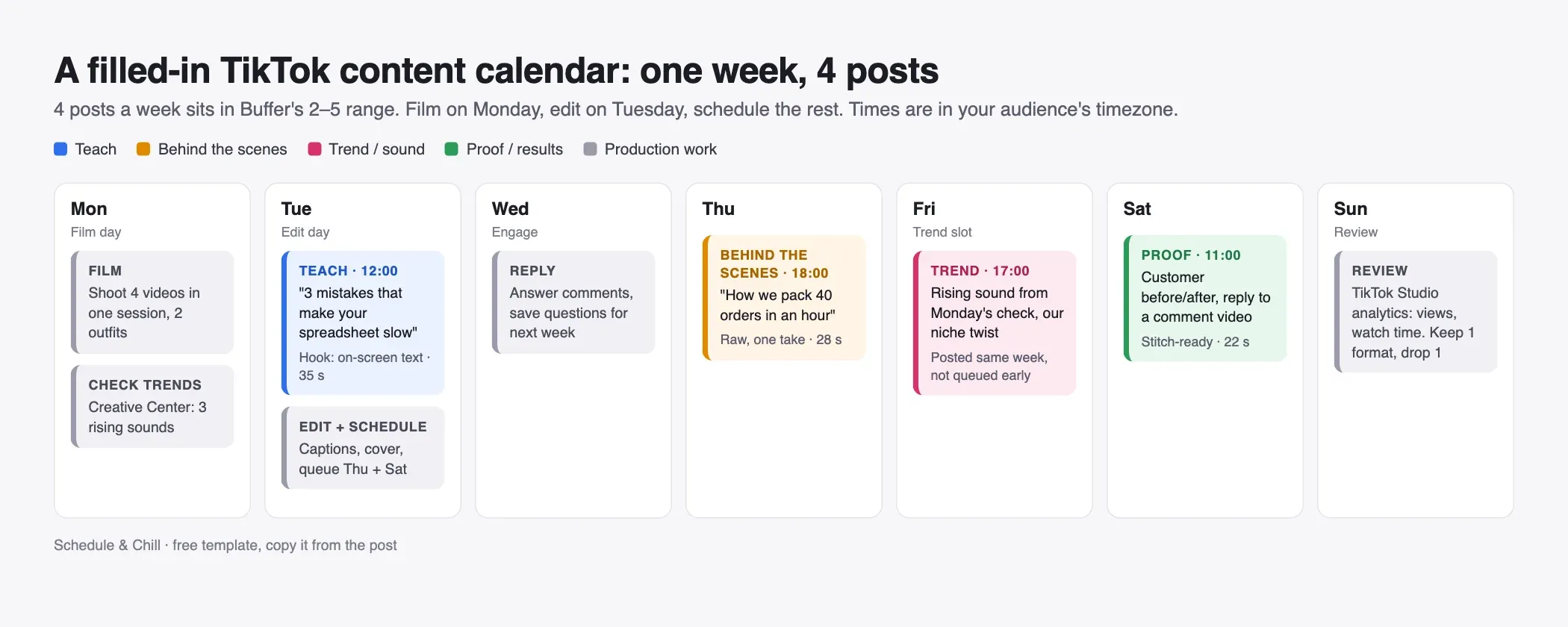
| Day | Task | Pillar | Example video | Time |
|---|---|---|---|---|
| Mon | Film 4 videos + check trends | — | Batch shoot, 2 outfits | — |
| Tue | Edit + schedule, post 1 | Teach | "3 mistakes that slow down your spreadsheet" | 12:00 |
| Wed | Reply to comments | — | Save questions for next week | — |
| Thu | Post 2 | Behind the scenes | "How we pack 40 orders in an hour" | 18:00 |
| Fri | Post 3 (trend slot) | Trend | Rising sound from Monday's check | 17:00 |
| Sat | Post 4 | Proof | Before/after, or reply to a comment | 11:00 |
| Sun | Review analytics | — | Keep 1 format, drop 1 | — |
The times are placeholders. Use your audience's timezone, not yours. TikTok Studio analytics shows when your followers are active.
#Monthly theme table
A monthly theme gives each week a direction without locking the details. Fill the themes at the start of the month. Fill the actual videos one week at a time.
| Week | Theme | Teach | Behind the scenes | Trend slot | Proof |
|---|---|---|---|---|---|
| 1 | Beginner basics | Top 3 beginner mistakes | Our first-ever product | Open | First customer story |
| 2 | Tools and setup | Our full tool stack | Desk / studio tour | Open | Reply to top comment |
| 3 | Myths | Myth vs fact | A decision we got wrong | Open | Result with numbers |
| 4 | Best of the month | Remake the best video | Month in 30 seconds | Open | Customer review |
Week 4 is the cheap week. You remake what already worked, which is less work and usually performs.
#TikTok content calendar template CSV (for Google Sheets)
Copy this block. In Google Sheets, click cell A1, paste, then choose Data → Split text to columns. It also opens in Excel or Numbers as a .csv file.
 1date,day,time,pillar,format,hook,sound,caption,hashtags,status,views_48h,notes
 22026-10-05,Mon,,production,batch film,,,,,todo,,Film 4 videos
 32026-10-06,Tue,12:00,teach,talking head,3 mistakes that slow down your spreadsheet,original audio,Number 2 surprised me,#exceltips #productivity,edited,,
 42026-10-08,Thu,18:00,behind the scenes,one take,How we pack 40 orders in an hour,commercial library,Real speed no cuts,#smallbusiness #packingorders,edited,,
 52026-10-09,Fri,17:00,trend,trend remix,TBD from trend check,trending sound TBD,,,idea,,Pick on Monday
 62026-10-10,Sat,11:00,proof,reply to comment,Replying to your question about pricing,original audio,,#customerstory,filmed,,
 72026-10-11,Sun,,review,,,,,,todo,,Check views and watch time
The views_48h column is the one people skip and the one that matters. Write the view count two days after posting. After a month, sort by it. Your next month's plan is in the top five rows.
#How to plan around trends and sounds
Trends move in days. A calendar moves in weeks. So do not try to plan a trend a month ahead. Plan the slot, not the trend.
- Keep one open trend slot a week. In the template above it is Friday.
- Check trends on film day. TikTok Creative Center shows trending hashtags, songs and creators. TikTok's help page says you can filter by industry and time frame, and open "See Analytics" for a hashtag's trendline, related videos and audience (how to use Trends).
- Pick a sound that is still rising. Compare the short and the long time window. A sound that is flat or falling on the short window is already late.
- Film it the same week. Trend videos are the one pillar you should not queue 10 days ahead.
Business accounts: check the music rules first. TikTok says business accounts should use the Commercial Music Library for commercial content. A Business Account only sees commercial library sounds when it adds a sound. Plan your trend slot around those tracks or around original audio.
#Batching: film day, edit day, schedule
Batching is the reason a calendar survives week three. Doing one video a day from scratch means setting up lights and your head four times.
Film day (60–90 minutes)
- Open the calendar. Read the four hooks out loud once.
- Film all four in one session. Change your shirt between videos if you want them to look like different days.
- Film 2–3 extra hooks per video. You will pick the best one in the edit.
Edit day (60–90 minutes)
- Cut each video. Put the hook in the first second.
- Add on-screen text and captions.
- Write the caption and hashtags from the calendar row.
- Change the status to
edited.
Schedule (15 minutes)
- Upload the evergreen videos (Teach, Behind the scenes, Proof) to the scheduler.
- Leave the trend slot empty until you film it.
- Change the status to
scheduled.
Review day (15 minutes)
- Fill
views_48hfor last week's posts. - Keep the best format. Drop the worst one. Change one thing only, so you know what caused the change.
#Turn the calendar into scheduled posts
A calendar full of edited rows does nothing until the videos are queued. You have two paths.
#Path 1: TikTok Studio (free, native)
TikTok's help page for scheduling videos lists the rules:
| Rule | TikTok's native scheduler |
|---|---|
| Where | TikTok on desktop web (not mobile web) |
| How far ahead | 15 minutes to 10 days |
| Account type | The page says Business Accounts, and accounts with 10,000+ followers |
| Editing after scheduling | Not possible. Delete it and upload again |
| Timezone | Your computer's timezone |
| Notification | Push notification when the post goes live |
The 10-day limit is the catch. It fits the weekly template above. It does not fit a month planned in one sitting. Our TikTok scheduling guide covers every native option step by step.
#Path 2: a third-party scheduler
Third-party schedulers post through TikTok's official Content Posting API. They let you plan further ahead, queue many videos at once and post the same video to other platforms. See our TikTok video scheduler comparison for how the options differ.
Whichever path you use, check the TikTok video specs before film day, not after. A wrong aspect ratio is an edit-day problem you can avoid.
#Reuse the same calendar on other platforms
The same row structure works for other channels. Only the cadence and the pillars change:
- YouTube Shorts: same vertical video, often the same week. See the YouTube content calendar.
- LinkedIn: fewer posts, more text, different pillars. See the LinkedIn content calendar.
One film day can feed two or three platforms. That is where batching pays off most.
#Where Schedule & Chill fits
Schedule & Chill is a free social media scheduler with a calendar view and posting slots. You set your weekly times once, and each post drops into the next free slot. That matches the weekly template above. Right now you can connect LinkedIn, YouTube, Bluesky and Mastodon. TikTok support is opening to all accounts soon. The free plan covers 2 social accounts, 500 posts a month and 400 MB uploads. It also has an MCP server, so Claude or ChatGPT can turn your CSV rows into scheduled posts for you.
If you only post on TikTok, TikTok Studio's native scheduler is free and good enough for a one-week plan.
#Keep reading
- Can you schedule posts on TikTok? Every option explained — turn the calendar rows into scheduled posts.
- Best TikTok posting times by day — fill the time column with hours that fit your audience.
- TikTok scheduling tools, side by side — when a plan runs past TikTok's 10-day window.
- YouTube Shorts or TikTok? — decide where one film day's videos should go.
- LinkedIn post ideas that fill a calendar — pillars for the text side of the same week.
#Frequently Asked Questions
How do I create a TikTok content calendar? Choose 3 to 5 content pillars, pick a posting frequency you can keep (3 or 4 a week is a good start), then fill one week of rows with a date, pillar, hook, sound and status. Film all videos in one session, edit the next day, and schedule them. Review views after 48 hours and plan the next week from what worked.
How often should I post on TikTok? Buffer's analysis of 11.4 million posts found 2 to 5 posts a week gives the most efficient lift, about 17% more views per post than posting once a week. TikTok's own guidance says 1 to 4 a day, which most small teams cannot keep up. Consistency matters more than the exact number.
Is there a way to schedule content on TikTok? Yes. TikTok Studio on desktop lets you schedule a video from 15 minutes to 10 days ahead. You cannot edit a scheduled video, so you delete it and upload again. For longer plans or many videos at once, use a third-party scheduler that posts through TikTok's official API.
Are there free TikTok content calendar templates? Yes. This post has a free weekly template, a monthly theme table and a CSV you can paste straight into Google Sheets. Notion and ClickUp also offer free TikTok planner templates.
Should I plan TikTok trends in my content calendar? Plan the slot, not the trend. Keep one open slot a week, check TikTok Creative Center on film day for sounds that are still rising, and film the trend video that same week. Trends that are planned a month ahead are usually over by the time they post.
What is the best tool for a TikTok content calendar? A spreadsheet is enough for most people. What matters more is the step after the plan: getting each video into a scheduler so it posts on time. Use TikTok Studio for a one-week plan, or a third-party scheduler if you plan further ahead or post to several platforms.