

LinkedIn Personal Branding: A 90-Day System
LinkedIn personal branding is the work of making the right people connect your name with one clear topic, so that when they need help with it, they think of you. On LinkedIn that comes from five parts working together: a clear position, a profile that proves it, posts on a few repeat topics, useful comments on other people's posts, and a monthly check of your analytics.
This guide walks through each part in order, with a 90-day plan you can copy. It is written for founders and B2B professionals who want clients, hires or partners from LinkedIn, not followers for their own sake. Every number is linked to its source, and LinkedIn features were checked against LinkedIn's Help Center on 24 September 2026.
#Quick answer
- What is it? Being known for one specific thing, by a specific group of people, on the platform where they already spend work time.
- Why bother? Buyers read thought leadership. In the 2025 Edelman-LinkedIn study, 64% of US target decision-makers spend more than an hour a week on it, and 56% use it to vet vendors (Edelman-LinkedIn, 2025).
- Personal profile or company Page? Personal profile first. In Richard van der Blom's 2024 feed analysis, organic company Page posts were about 2% of what people saw (AuthoredUp summary).
- Is creator mode still a thing? No. LinkedIn removed the toggle in March 2024. Its tools went to eligible profiles without a switch (LinkedIn Help).
- How often should you post? Two to three times a week, every week, is a good start for most people. See how often to post on LinkedIn.
- How long until it works? Plan for 90 days before you judge it. The first month is setup and habit.
#Why LinkedIn personal branding matters in 2026
LinkedIn says it has more than 1.3 billion members, with 290 million or more in North America (LinkedIn Pressroom). Size alone is not the reason to care. The reason is that B2B buyers use content from people and companies to decide who to trust, and much of that content lives here.
#What the buyer research says
Edelman and LinkedIn have run a B2B thought leadership study for seven years. The 2025 edition surveyed 1,934 business executives on LinkedIn between 17 March and 3 April 2025 (report PDF). The figures below are the US sample.
| Finding (2025, US) | Target decision-makers | Hidden decision-makers |
|---|---|---|
| Spend over 1 hour a week on thought leadership | 64% | 63% |
| Use thought leadership to vet vendors | 56% | 55% |
| Trust it more than marketing materials and product sheets | 65% | 64% |
| Say it shows value better than traditional marketing | 73% | 71% |
| Say it makes them more open to sales outreach | Not reported | 95% |
| Have little or no contact with sales reps | Not reported | 71% |
"Hidden decision-makers" are people in finance, legal, procurement and similar roles who sign off on a purchase but are not the main user. The 71% line is the important one for a founder. Most of the people who can block your deal will never take your sales call. They can still read your posts.
The study defines thought leadership as free content from "organizations or individuals". A founder's LinkedIn posts count.
#Why the person, not the Page
Richard van der Blom's Algorithm Insights reports are the largest public studies of LinkedIn reach. His 2024 research looked at what fills the feed. AuthoredUp's summary of it gives this split: top creator content 31%, other creator content 28%, promoted company content 28%, LinkedIn ads 11%, and organic company content 2% (AuthoredUp).
| What fills the LinkedIn feed (van der Blom, 2024) | Share |
|---|---|
| Top creator content | 31% |
| Other creator content | 28% |
| Promoted (paid) company content | 28% |
| LinkedIn ads | 11% |
| Organic company Page content | 2% |
So a company Page mostly reaches people when it pays. People's posts make up most of the rest.
The 2025 report, built on 1.8 million posts, found that organic reach fell by almost 50% year on year and that 72% of activity was on mobile (van der Blom on LinkedIn). Reach is harder to get than it was, for everyone. That is a reason to be more focused, not a reason to stop. A narrow topic that the right 2,000 people read beats a broad one that 20,000 people scroll past.
#What a personal brand will not do
Be honest with yourself about this before you start:
- It will not replace a product people want. It gets you conversations. The product has to close them.
- It will not work in a month. Reach builds slowly for new accounts.
- It will not work if you post about everything. The whole point is to be known for one thing.
#How to build a personal brand on LinkedIn: the five-part system
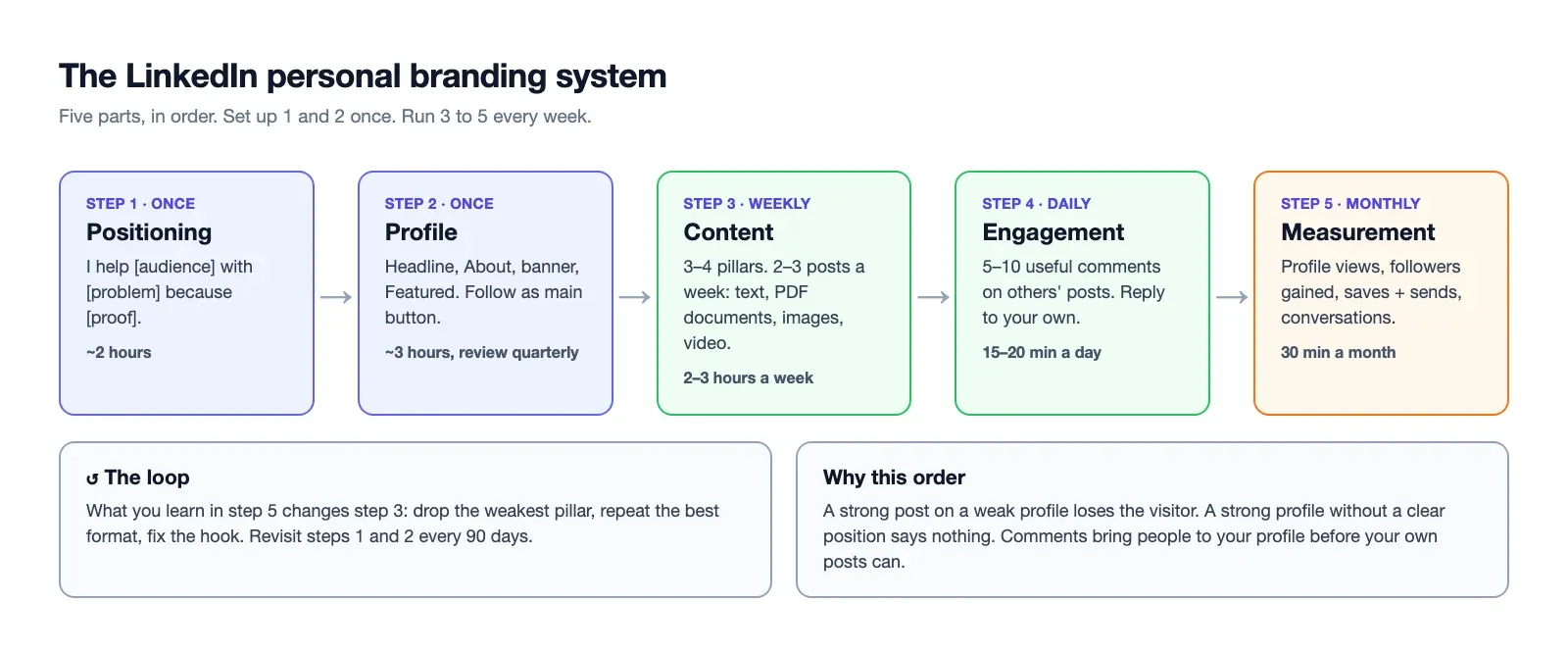
Each part depends on the one before it. A great post on a weak profile loses the visitor. A great profile with no position says nothing. Work through them in order the first time, then run parts 3 to 5 every week.
| Part | Question it answers | Time |
|---|---|---|
| 1. Positioning | Who do I help, with what, and why me? | 2 hours, once |
| 2. Profile | Does a visitor get it in 5 seconds? | 3 hours, once, then quarterly |
| 3. Content | What do I post, and how often? | 2–3 hours a week |
| 4. Engagement | Where do I show up besides my own posts? | 15–20 minutes a day |
| 5. Measurement | What is working, and what do I change? | 30 minutes a month |
#Step 1: Positioning (who, what, why you)
Positioning is one sentence you can say out loud. Everything else in this guide is built on it. Write it before you touch your profile.
Use this template:
I help [specific audience] with [specific problem] because [proof or experience].
Three examples:
| Weak | Strong |
|---|---|
| "I'm a founder and I talk about startups." | "I help B2B SaaS founders get their first 20 customers without paid ads, because I did it twice with $0 budget." |
| "Marketing leader, growth, brand." | "I help Series A fintech teams fix their activation rate, because I ran onboarding at two payment companies." |
| "Engineer who loves building." | "I help small dev teams ship Laravel apps faster, because I've maintained production apps for 10 years." |
Test your sentence with three questions:
- Could a stranger repeat it? If they can't say what you do after one read, it is too vague.
- Would your ideal client stop scrolling? The problem has to be one they already feel.
- Is the proof real and checkable? Numbers you can defend, roles you really held.
#Pick one audience, even if it feels small
The most common positioning mistake is fear of narrowing. "I help businesses grow" feels safe because it excludes nobody. It also attracts nobody. LinkedIn's feed shows posts to people interested in a topic. A clear topic gives it something to match on.
You can widen later. It is much harder to narrow down after you've trained your audience to expect everything.
#Step 2: Your profile (headline, About, banner, Featured)
When a post works, people click your name. The profile's job is to tell them in five seconds whether you are worth following. Most of that happens above the fold on a phone: photo, banner, name, headline and the first lines of About.
#Headline
The headline is the line under your name. It shows on your profile, in search results, next to every comment you leave and on every post. It is the most-read text you will ever write on LinkedIn.
LinkedIn caps it at 220 characters (AuthoredUp's limits guide). On a phone, far less shows next to a comment, so put the important words first.
A simple formula: what you do + who for + one proof point.
- Before: "CEO at Acme"
- After: "Helping B2B SaaS founders get their first 20 customers | Founder, Acme | 2 exits"
For examples by role, see LinkedIn headline examples.
#About section
The About section allows up to 2,600 characters (AuthoredUp). Only the first two or three lines show before "See more", so they carry the weight.
A structure that works:
- Opening line: the problem your audience has, in their words.
- What you do about it: one short paragraph.
- Proof: two or three specific results, with numbers where you have them.
- Who it's for, and who it isn't for. This builds trust faster than you'd expect.
- One next step: "DM me 'audit'", a booking link, or your newsletter.
Write in the first person. Keep paragraphs to two or three lines. Read it on your phone before you save it.
#Photo and banner
- Photo: a clear, well-lit shot of your face, looking at the camera, cropped from the shoulders up. It should look like you do today.
- Banner: the wide image behind your photo. The common spec is 1584 × 396 pixels (Canva's LinkedIn size guide). Put your one-sentence position on it, plus one proof point or a URL. Keep text on the right side, because your photo covers the lower left, and check it on a phone.
#Featured section
Featured sits near the top of your profile and holds posts, links and media you choose. Treat it as your proof shelf. Pick two to four items:
- Your best-performing post on your main topic
- A case study, portfolio page or product page
- A lead magnet, newsletter or booking link
- A talk, podcast or press mention
Swap items out every quarter when you have a better one.
#What happened to creator mode
Many older guides tell you to "turn on creator mode". You can't anymore. LinkedIn's Help Center says the creator mode toggle was removed in March 2024, and profile hashtags ("topics") were removed in February 2024 (LinkedIn Help: Updates to Creator Mode).
What members with creator access kept:
- LinkedIn Live, Audio Events and Newsletters
- Creator analytics
- Being eligible to be suggested as a creator to follow
- Choosing Follow instead of Connect as the main button on your profile
If you want strangers to follow you rather than send connection requests, set Follow as your primary button. It is the closest thing left to the old switch.
#The rest of the profile
- Custom URL: linkedin.com/in/yourname, not a string of numbers.
- Experience: one or two lines of results per role, not job descriptions.
- Recommendations: ask three clients or colleagues for one each. Ask for a specific story, not "a nice word".
- Skills: pin the three that match your position.
#Step 3: Content (pillars, formats and cadence)
#Content pillars
Content pillars are the three or four topics you post about again and again. They keep you from staring at a blank page, and they teach both readers and LinkedIn's feed what you are about.
Build them from your position sentence:
| Pillar type | What it is | Founder example |
|---|---|---|
| Expertise | How-tos, frameworks, mistakes in your field | "How we got our first 20 customers without ads" |
| Proof | Results, case studies, numbers, before/after | "Month 6 revenue, and what moved it" |
| Point of view | Opinions your field argues about | "Why I think free trials hurt B2B SaaS" |
| Personal | Your story, lessons, behind the scenes | "The feature we killed after 3 months" |
A reasonable split is 40% expertise, 25% proof, 20% point of view and 15% personal. The personal pillar is what makes people remember you. The other three are what makes them hire you. If every post is personal, you become entertaining but not useful. If none are, you become a textbook.
Out of ideas? Our LinkedIn post ideas list has prompts for each of these pillars.
The 4-1-1 rule and the 95:5 rule
Two "rules" come up often in personal branding searches:
- The 4-1-1 rule is a content-marketing rule of thumb: for every 6 posts, share 4 from other people, 1 of your own original posts and 1 promotional post. It pre-dates LinkedIn's current feed and is not a LinkedIn rule. For a personal brand, the part worth keeping is the ratio of useful to promotional. Keep selling to about one post in six.
- The 95:5 rule comes from the Ehrenberg-Bass Institute. It says that at any time, about 95% of B2B buyers are not in the market to buy (cited by Edelman-LinkedIn, 2024). This is the best argument for personal branding. You are posting for the 95% who will buy later, so that they remember you when they are ready.
#Formats: text, documents, video, polls
LinkedIn supports text posts, image posts (up to 9 images), document posts (PDFs), native video, polls, articles and newsletters. Pick the format that fits the idea, not the one that is trending.
| Format | Best for | Watch out for | Our guide |
|---|---|---|---|
| Text | Opinions, stories, quick lessons | Only ~140–250 characters show before "See more" | Character limit |
| Document (PDF) | Frameworks, step-by-steps, checklists | Takes the most time to make | Carousel posts |
| Multi-image | Before/after, screenshots, event photos | Different from a PDF carousel | Carousel posts |
| Video | Showing a product, talking to camera | One video per post, processing wait | Posting video |
| Poll | Quick audience research | Easy votes, often weak conversations | — |
| Repost with thoughts | Adding your view to someone else's post | An instant repost adds nothing | How to repost |
Van der Blom's 2025 data, as summarised by AuthoredUp, gives format multipliers against a baseline. For personal profiles: polls 1.64×, documents 1.45×, images 1.18×, video 1.10× and text-only 0.88× (AuthoredUp). Read these as averages across a huge dataset, not a promise for your account. A strong text post will still beat a weak document.
A simple mix for a new brand is two text posts and one document or image post each week. Add video when you are comfortable on camera. If you already film short vertical clips, the same file can also go out as scheduled YouTube Shorts or a TikTok post you schedule ahead. Our YouTube Shorts vs TikTok comparison helps you pick which one to add first.
The hook
Whatever the format, the first line decides whether anyone reads the rest. On mobile, the "See more" cut often comes after two lines. A useful first line does one of these:
- States a surprising result: "We cut churn by half by removing a feature."
- Names the reader's problem: "Your first 10 customers won't come from your website."
- Makes a clear claim someone could disagree with.
Skip warm-ups like "I've been thinking a lot lately about...". Start where the interesting part starts.
#Cadence: how often, and when
Consistency beats volume. Posting twice a week for six months builds more than posting daily for three weeks and stopping. The feed learns what you post about by seeing it again and again, and so do people.
| Stage | Posts per week | Comments per day |
|---|---|---|
| Month 1 | 2 | 5–10 |
| Months 2–3 | 3 | 10 |
| After 90 days | 3–5, if quality holds | 10+ |
For the detailed version, read our comparison of seven LinkedIn posting-frequency studies. For timing, there is no single best hour. Start with weekday mornings in your audience's time zone, then use your own data, as explained in the best time to post on LinkedIn.
The way to stay consistent is to separate writing from posting. Write in one weekly block, then schedule the posts. LinkedIn's own scheduler works for this, though its queue is hidden inside the composer (how to find and edit scheduled LinkedIn posts). A LinkedIn posting calendar gives you a copy-paste template for a month.
#Step 4: Engagement (the commenting strategy)
Commenting is the most underrated part of LinkedIn personal branding. A good comment on a bigger account's post puts your name and headline in front of their audience, which is exactly the audience you want. It costs no design time and very little writing time.
It also works while your own reach is small. With 200 followers, your posts reach few people. A useful comment under a post with 50,000 views can be read by more people than your own post that week.
#A daily 15-minute routine
- Keep a list of 20–30 accounts your ideal clients follow: peers, podcasts, industry voices, a few customers.
- Each day, leave 5–10 real comments on their newest posts. Two or three sentences each.
- Reply to every comment on your own posts in the first hour or two after posting.
- Send one message to someone who engaged, if there is a real reason to talk.
#What a useful comment looks like
| Weak comment | Useful comment |
|---|---|
| "Great post!" | "The point about pricing pages matched what we saw. We removed our annual toggle and conversions went up 12%. Did you test the order of plans too?" |
| "So true 👏" | "I'd push back on step 3. For teams under 10 people, a weekly review worked better for us than a daily one, because..." |
| "Thanks for sharing" | "Saving this. One thing I'd add for founders: do this before you hire your first salesperson." |
A good comment adds a fact, a story, a counterpoint or a question. If you could paste it under any post, it isn't one.
#Tagging
On LinkedIn itself, tagging a person helps when they really are part of the story. Don't tag 15 people to get reach; it annoys them. If you schedule posts with a tool, check whether it can add mentions. Ours can't, because LinkedIn's API doesn't give us that access. If a tag matters, add it in the LinkedIn app after the post goes live.
#Step 5: Measurement (what LinkedIn shows you)
LinkedIn gives every member free post analytics. They are private to you (LinkedIn Help: Post analytics).
| Group | Metrics LinkedIn shows |
|---|---|
| Discovery | Impressions, in-network, out-of-network, members reached |
| Profile activity | Profile viewers and followers gained from the post |
| Social engagement | Reactions, comments, reposts, saves, sends on LinkedIn |
| Links | Link clicks and custom button clicks |
| Video | Views and watch time |
How long LinkedIn keeps it: discovery and engagement data for 1,000 days, members reached for 400 days, audience demographics for 180 days, videos for 365 days and articles for two years (LinkedIn Help). Export or note your numbers monthly, because the demographic data expires fastest.
#The four numbers to track
Impressions feel good but don't pay bills. Track these once a month, in a simple sheet:
- Profile views from posts. Shows whether posts make people curious about you.
- Followers gained from posts. Shows whether they want more.
- Saves and sends. A save means the post was useful. A send means someone shared it privately, often with a colleague who buys.
- Conversations started. DMs, calls booked, intro requests. Count them by hand. LinkedIn can't measure this one for you, and it is the one that matters.
Also look at the demographics of who saw each post: job titles, companies, locations. If your posts reach students when you sell to CFOs, the topic or the hook needs to change, not the posting time.
For engagement rate, use: (reactions + comments + reposts) ÷ impressions × 100. Compare your own posts with each other, not with benchmarks from other people's accounts.
#The 90-day LinkedIn personal branding plan
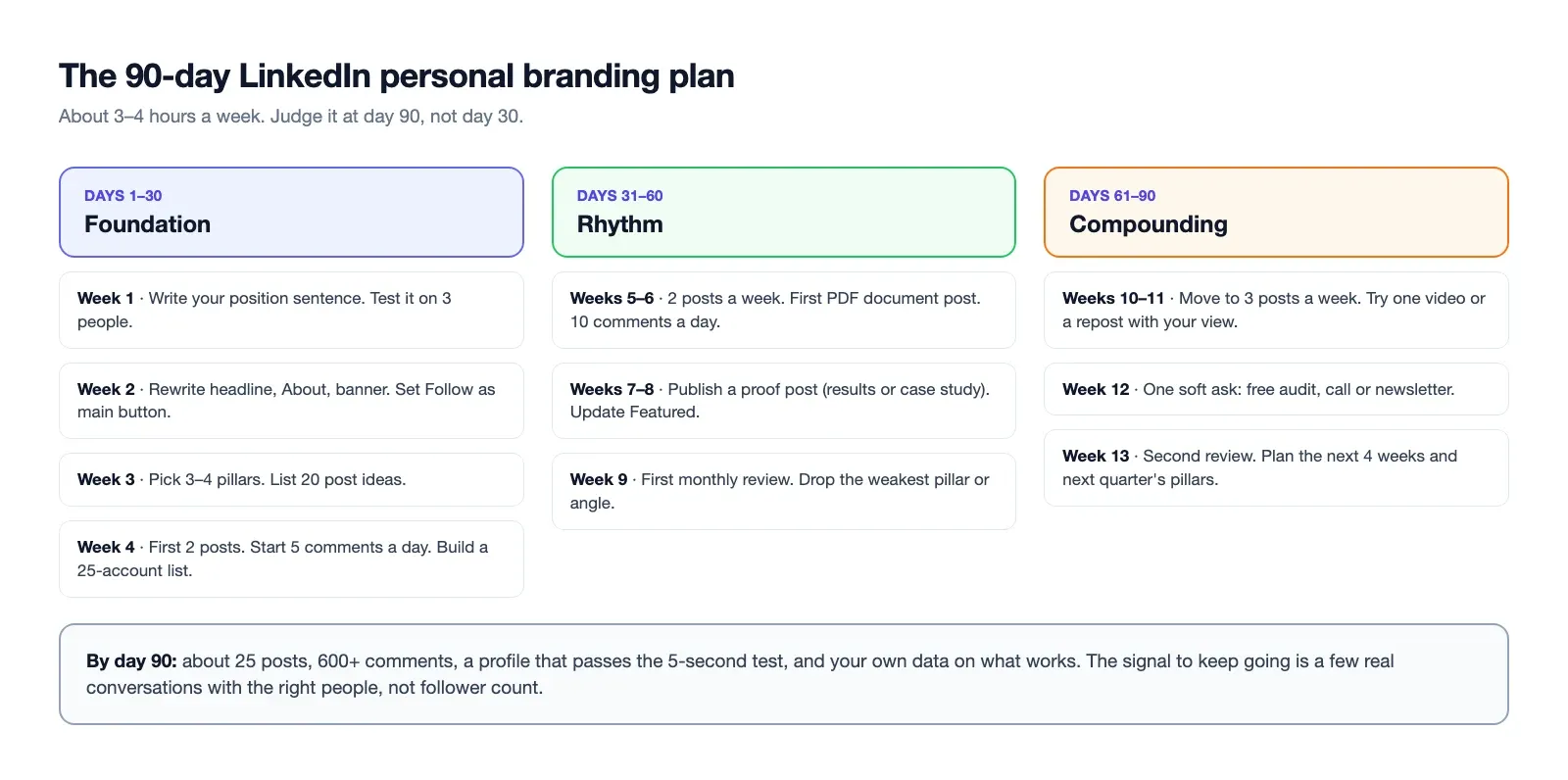
Copy this plan. It assumes about 3–4 hours a week.
| Week | Focus | Actions | Done when |
|---|---|---|---|
| 1 | Positioning | Write your position sentence. Test it on 3 people. | A stranger can repeat it |
| 2 | Profile | Rewrite headline, About, banner. Set Follow as primary button. Custom URL. | Profile passes the 5-second test on a phone |
| 3 | Pillars | Pick 3–4 pillars. Write 20 post ideas, 5 per pillar. | You have a list of ideas |
| 4 | First posts | Publish 2 posts. Start commenting 5 a day. Build your 25-account list. | 2 posts live, 25 comments left |
| 5–6 | Rhythm | 2 posts a week. First document post. 10 comments a day. | 4 posts, no missed week |
| 7–8 | Proof | Add a case study or results post. Update Featured with your best post. | Featured shows real proof |
| 9 | Review | First monthly review of the four numbers. Drop the weakest pillar or angle. | You know your best post type |
| 10–11 | Scale | Move to 3 posts a week. Try one video or a repost with your view. | 6 posts in 2 weeks |
| 12 | Asks | One soft ask post: a free audit, a call, a newsletter. | At least one conversation started |
| 13 | Reset | Second review. Write next quarter's pillars and a 4-week calendar. | Next 30 days are planned |
By day 90 you should have about 25 posts, 600+ comments, a profile you're proud of, and real data on what your audience responds to. You should not expect a large following yet. You should expect a few good conversations with the right people. That is the signal to keep going.
#Common LinkedIn personal branding mistakes
- Posting before positioning. Without a clear topic, posts are random and nobody knows what to follow you for.
- A headline that is only a job title. "Founder at Acme" tells a stranger nothing.
- Too many topics. AI, leadership, parenting, fitness and your product, all in one week. Pick your pillars and stick to them.
- Only posting, never commenting. A new account's reach grows mostly through other people's comment sections.
- Selling in every post. Keep promotion to about one post in six.
- Chasing viral posts. A post that reaches 100,000 people outside your market is worth less than one that reaches 800 buyers.
- Copying a style that isn't yours. One-line-per-sentence "broetry" and forced stories read as fake quickly.
- Engagement pods and bought likes. They add the wrong people to your audience and teach the feed the wrong thing.
- Quitting at week 6. The first 60 days are the slowest. Most people stop right before it starts to work.
- Generic AI posts. It is fine to use AI to draft or edit. It is not fine to publish text with no real story, number or opinion of yours in it. Readers notice.
#LinkedIn personal branding for founders
For a founder, the personal brand and the company brand are the same thing in the early years. People buy from people they trust, and an early company has no track record yet. You are the track record.
What changes when you're a founder:
- Your posts are sales material. A hidden buyer who will never take your call can read how you think. That is the finding from the Edelman study above.
- Build in public, carefully. Revenue, lessons, product decisions and mistakes make strong proof posts. Customer names and private numbers need permission.
- Hiring is part of the job. Good engineers and early employees check the founder's LinkedIn. A thoughtful profile helps recruiting as much as sales.
- Your company Page still matters, but less. Keep it complete and use it for official news. Put your effort into the personal profile, where reach is.
- Your team can help. Early employees posting about their own work, in their own words, add reach the Page can't.
We go deeper on this, with a weekly routine for busy founders, in founder-led LinkedIn.
#When to use a LinkedIn ghostwriter
A ghostwriter turns your ideas and experience into posts in your voice. It can make sense when:
- You have strong opinions and real stories, but writing takes you hours
- You already know your position and pillars
- You will still read and approve every post, and do the commenting yourself
It does not make sense when you don't know your position yet. A ghostwriter can't invent your point of view. It also does not replace the engagement part. Comments must come from you, because that's where relationships start.
Prices, what to ask, and how to keep it honest are in our guide to hiring a LinkedIn ghostwriter.
#Planning: the weekly system that keeps it going
Personal brands usually die from a busy week, not from bad ideas. Run it as a system:
| Day | Task | Time |
|---|---|---|
| Monday | Pick 3 ideas from your ideas list, one per pillar | 15 min |
| Tuesday | Write all 3 posts in one sitting | 60–90 min |
| Tuesday | Schedule them for the week | 10 min |
| Daily | Comment on 5–10 posts, reply to your own comments | 15–20 min |
| Friday | Note any new ideas from comments and DMs | 10 min |
| Last Friday of the month | Review the four numbers | 30 min |
Keep a running ideas list. Every good comment you leave, every client question and every DM is a possible post. The monthly LinkedIn posting template turns this into a plan, and our bank of 75 post prompts fills the list when it runs dry.
#Scheduling your LinkedIn posts with Schedule & Chill
Schedule & Chill is a scheduler you can use for the "write once a week, publish all week" part of this system. It publishes to LinkedIn personal profiles: text posts, up to 9 images, one video, or one PDF document post of up to 300 pages. You can set each post to public or connections only. You can also write and schedule posts from an AI assistant like Claude through our LinkedIn MCP server.
It is free right now: 2 social accounts, 500 posts a month and 400 MB uploads. Some honest limits: it can't post to LinkedIn company Pages yet, it can't add mentions of people or companies (LinkedIn's API doesn't allow it), and automatic first comments are paused until LinkedIn approves the API access they need. The engagement part of this guide is yours to do by hand, and it should be.
#Keep reading
- LinkedIn headline formulas and 90+ examples — the ready-made version of step 2 in this system.
- A founder's playbook for LinkedIn content — how a personal brand turns into B2B pipeline.
- What a LinkedIn ghostwriter costs and how to vet one — if writing is the slow part of your week.
- Every LinkedIn post limit in one table — 3,000 characters, and the fold that matters more.
- A YouTube content calendar for long videos and Shorts — plan video next to your LinkedIn posts.
#Frequently Asked Questions
Is LinkedIn good for personal branding? Yes, for B2B work it is usually the best place to start. LinkedIn has more than 1.3 billion members, and buyers use it to research people and vendors. In the 2025 Edelman-LinkedIn study, 56% of US target decision-makers said reviewing thought leadership is one way they vet vendors. It is less useful if your audience is consumers who aren't on LinkedIn for work.
How do I build a personal brand on LinkedIn from scratch? Start with one position sentence: who you help, with what, and why you. Rewrite your headline, About section and banner to match it. Pick three or four content pillars, post twice a week, and leave five to ten useful comments a day on posts your audience reads. Review your analytics monthly and give it 90 days before you judge it.
What is the 4-1-1 rule on LinkedIn? It is a content-marketing rule of thumb, not an official LinkedIn rule. For every six posts, share four pieces from others, one original post of your own and one promotional post. For a personal brand, the useful part is the balance: keep direct selling to about one post in six.
What is the 95-5 rule on LinkedIn? It comes from the Ehrenberg-Bass Institute's B2B research, not from LinkedIn. It says that about 95% of B2B buyers are not in the market at any given moment, and only about 5% are ready to buy. For personal branding, it means most of your readers will buy later, so your posts need to be memorable, not pushy.
Does creator mode still exist on LinkedIn? No. LinkedIn removed the creator mode toggle in March 2024 and profile hashtags in February 2024. Members who had access kept LinkedIn Live, Audio Events, Newsletters, creator analytics and the option to make Follow their main profile button.
What are the 5 P's of personal branding? There is no single official list. Versions vary by author. A useful set for LinkedIn is: Position (what you're known for), Profile (the page that proves it), Pillars (the topics you repeat), Participation (commenting and conversations) and Performance (the numbers you review). Those are the five parts of the system in this guide.