


Best Time to Post on TikTok: 4 Studies Compared
The best time to post on TikTok is when your own followers are online, and TikTok Studio shows you that hour for free. If you have no data yet, the big studies overlap most on Tuesday to Thursday, 2 to 4 p.m., and on Saturday afternoon and Sunday morning, in your audience's local time.
That is the short answer. The longer one is more useful: the four largest published studies disagree about almost everything, including which day is best. This guide puts their actual numbers side by side, explains why they conflict, and gives you a two-week test to find your own answer. Once you know your hour, TikTok's built-in scheduler lets you hit it without being online.
#Quick answer
- Best default with no data: Tuesday to Thursday, 2–4 p.m. in your audience's timezone. Two of four studies name those hours.
- Most-agreed single slots: Saturday 3 p.m. and Sunday 9 a.m. Three of four studies name each one.
- Best day? The studies do not agree. Sprout Social says weekdays and calls weekends a dead zone. Buffer says Saturday is the best day of the week.
- How to find your own time: TikTok Studio → Analytics → Followers. It shows when your followers are active, by hour and day.
- Does TikTok itself say timing matters? TikTok's own explanation of the For You feed lists interactions, video details and account settings. Posting time is not on that list.
- What matters more: the first seconds of the video and posting on a steady schedule.
#What each study says: the numbers side by side
These are four large studies that publish their sample size and method, plus Later, which publishes its own account's result. I read each one in full on 24 September 2026.
| Study | Year | Sample | What they measured | Timezone | Overall best time | Best day | Worst day |
|---|---|---|---|---|---|---|---|
| Sprout Social | 2026 (Nov 2025–Feb 2026 data) | ~2 billion engagements, 307,000 profiles | Engagement | Local time | Tue–Thu, 2–6 p.m. | Tue, Wed, Thu | Sunday (weekends "avoid") |
| Buffer | 2026 (Sep) | 7.1 million posts | Median engagement rate | Adjusted to be "universally applicable" | Sunday 9 a.m., then Mon 1 p.m., Sun 1 p.m. | Saturday | Not named (Wed and Thu quieter) |
| Hootsuite | 2025 (Nov) | 1 million+ posts | Engagement | Localized across 118 countries | Thu 6–9 a.m., Sat 10 a.m.–6 p.m. | Thursday, Saturday | Not named (avoid before 7 a.m. on weekends) |
| SocialPilot | 2026 (Jan–Dec 2025 data) | 700,000 posts, 50,000+ accounts | Engagement | Timezone-agnostic | 8 a.m. and 8 p.m., then 2–4 p.m. | Tue, Wed, Thu | Sunday (worst hours 11 p.m.–3 a.m.) |
| Later | 2025 (Mar) | Later's own TikTok account | Views | PST | Mon–Fri, 10 a.m. | Thu, Fri | Not named |
Two things stand out.
First, Sprout and Buffer contradict each other directly. Sprout says Saturday and Sunday are the weakest days. Buffer says Saturday is the strongest day and Sunday 9 a.m. is the single best slot of the week. Both have large samples.
Second, almost everyone measured engagement, not views. Engagement means likes, comments and shares. That is a fair signal, but it is not the same as reach. Only Later talks about views, and Later's number comes from one account.
#Best time to post on TikTok by day
Here is what each study says for every day of the week. Times are in the audience's local time, except where the study says otherwise above.
| Day | Sprout Social | Buffer | Hootsuite | SocialPilot |
|---|---|---|---|---|
| Monday | 3–5 p.m. | 1 p.m. (also 11 a.m., 8 a.m.) | 5 p.m. | 5–7 p.m., 10–11 p.m. |
| Tuesday | 2–6 p.m. | 6 a.m. (also 10 p.m., 7 a.m.) | 10 a.m.–1 p.m. | 8 a.m., 2–4 p.m., 8 p.m. |
| Wednesday | 1–8 p.m. | 10 p.m. (also 6 a.m., 9 p.m.) | 4–6 p.m. | 8 a.m., 2–4 p.m., 8 p.m. |
| Thursday | 1–5 p.m. | 1 p.m. (also 10 p.m., 6 a.m.) | 7–9 a.m. | 9 a.m., 2–4 p.m., 8 p.m. |
| Friday | 3–5 p.m. | 6 p.m. (also 10 p.m., 8 p.m.) | 4–6 p.m. | 8 a.m., 1–3 p.m. |
| Saturday | Avoid | 5 p.m. (also 4 p.m., 3 p.m.) | 10 a.m.–7 p.m. | 11 a.m., 3 p.m., 8 p.m. |
| Sunday | Avoid | 9 a.m. (also 1 p.m., 12 p.m.) | 8 a.m.–12 p.m. | 9 a.m., 10 a.m., 4 p.m. |
To see where they actually overlap, I counted, for every hour from 6 a.m. to midnight, how many of the four studies name that hour as a top slot.
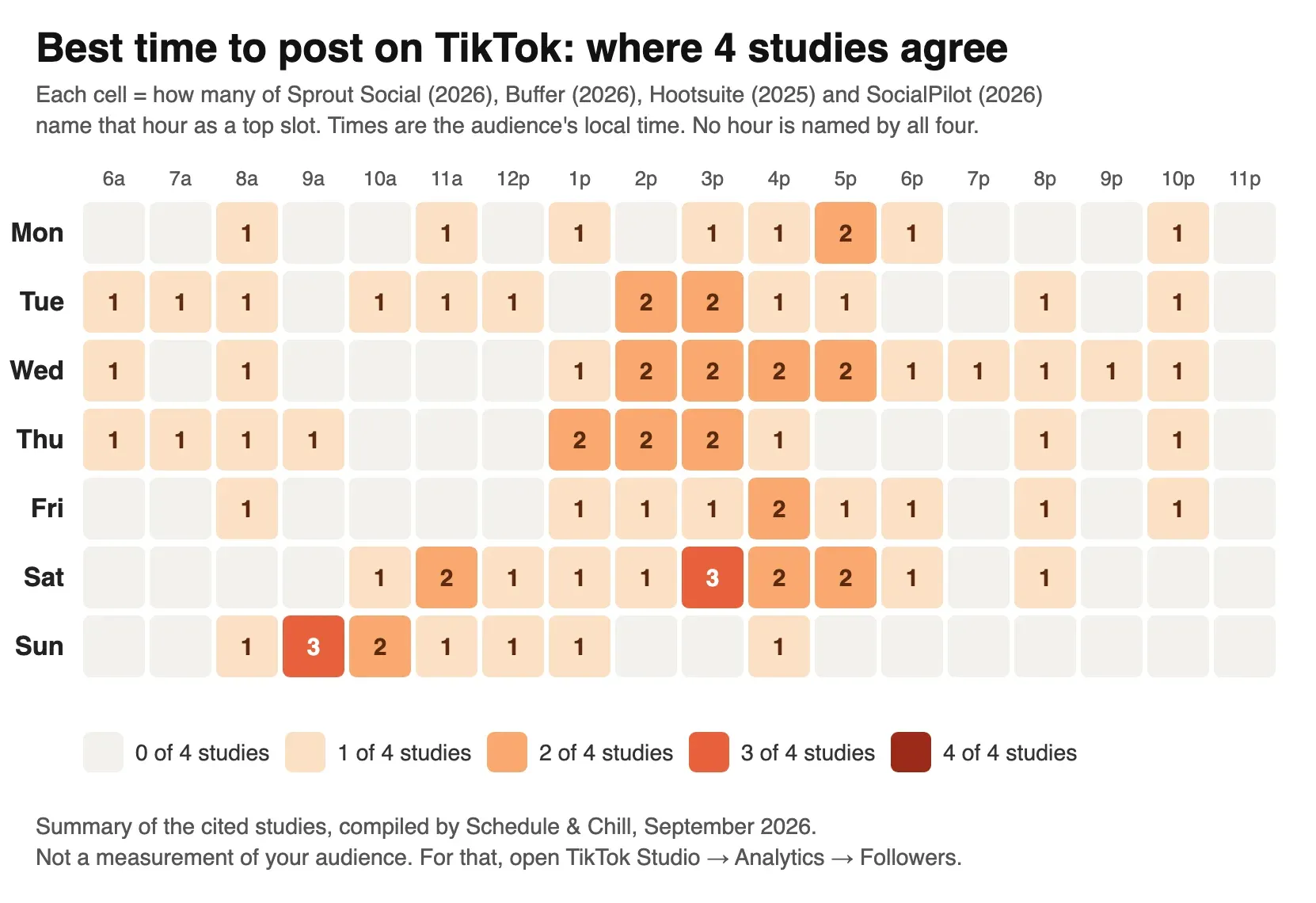
What the chart shows:
- No hour is named by all four studies. Not one.
- Three of four agree on only two slots: Saturday 3 p.m. and Sunday 9 a.m. Sprout is the one that disagrees, because it rates weekends as the weakest days.
- Two of four agree on a weekday band: Tuesday to Thursday, roughly 1 to 5 p.m.
- Late night and very early morning are mostly empty. Only Buffer names 10 p.m. and 6 a.m. slots.
This chart is a summary of the cited studies. It is not a measurement of any audience, including yours.
#Why the studies disagree
The studies are not wrong. They measured different things.
- Different customers. Each study uses the accounts of its own customers: 30,000 Sprout Social customers, Buffer's users, SocialPilot's users. Each tool attracts a different mix of brands, creators and small businesses, and their audiences do not scroll at the same hours.
- Different timezone methods. Sprout reports local time. Hootsuite localized data across 118 countries. Buffer and SocialPilot adjusted their data to be timezone-agnostic. Later reports Pacific time for one account. These methods produce different peaks from similar raw data.
- Different metrics. Most studies use engagement. Buffer uses median engagement rate. A slot can have a high engagement rate and still bring fewer total views.
- Different time windows. Sprout's data covers winter (late November to late February). SocialPilot's covers all of 2025. Holidays and school terms change when people use TikTok.
- Who posts when. Accounts that post on weekends may be different kinds of accounts from those that post on Tuesday afternoon. The study sees the result, not the reason.
Buffer says this itself: "not all studies agree on this," and results "vary by audience, dataset, and methodology." That is the honest summary.
#What TikTok itself says about timing
TikTok has not published a best time to post. Its own explanation of the For You feed, How TikTok recommends videos #ForYou, says recommendations are based on:
- User interactions, such as videos you like or share, accounts you follow and comments you post.
- Video information, such as captions, sounds and hashtags.
- Device and account settings, such as language and country. TikTok says these get lower weight.
It also says that a strong signal, such as a viewer watching a longer video to the end, counts for more than a weak one. And it says follower count is not a direct factor, even though bigger accounts tend to get more views.
Posting time is not on that list. So timing does not change how TikTok ranks your video. What it can change is who is awake to give the first reactions. If most of your followers are asleep when you post, the first views come later.
TikTok does point you to one timing tool: its analytics. The Creator Academy page Introducing TikTok analytics says the Followers tab shows your audience's activity "broken down by hours and days to help you understand when they're most active."
#How to find your own best time in TikTok Studio
This takes about ten minutes and costs nothing. TikTok's help centre says you need at least one public post before analytics appear.
- Open Analytics. In the TikTok app: Profile → menu (three lines) → TikTok Studio → Analytics → View all. On the web: TikTok Studio → Analytics in the left menu. In the TikTok Studio app: the Analytics tab at the bottom.
- Open the Followers tab. Scroll to the follower activity chart. It shows when your followers were active, by hour and by day.
- Check the timezone. Note which timezone the chart uses. If your followers live somewhere else, convert it before you plan anything.
- Check Top locations on the same tab. If most of your followers are in one country, plan in that country's time.
- Write down the 2–3 busiest hours for each day. Do this on two different weeks. One week can be unusual.
- Open the Viewers tab too. Its "Most active times" section shows when your viewers (not only followers) were active in the last 7 days. If most of your views come from the For You feed, this is the more useful number.
- Pick a posting time just before the peak. Buffer suggests posting "slightly before" your followers' most active times, so the video is ready when they arrive.
You now have a short list of candidate times. The next step is to test them.
#A simple 2-week test plan
Pick two candidate slots from your analytics, for example 1 p.m. and 7 p.m. Post the same kind of video at each. Keep everything else the same: length, format, hook style. Export both at the same TikTok video dimensions and export settings, so quality is not part of the test.
| Day | Week 1 | Week 2 |
|---|---|---|
| Monday | Slot A (1 p.m.) | Slot B (7 p.m.) |
| Tuesday | Slot B (7 p.m.) | Slot A (1 p.m.) |
| Wednesday | Slot A | Slot B |
| Thursday | Slot B | Slot A |
| Friday | Slot A | Slot B |
| Saturday | Weekend slot (from your analytics) | Weekend slot |
| Sunday | Rest or weekend slot | Rest or weekend slot |
Rules for a fair test:
- Swap the slots between weeks, so each slot gets each weekday once. Otherwise you are testing the day, not the hour.
- Record numbers 48 hours after posting, not the next morning. Log views, average watch time and new followers.
- Compare the median, not the best video. One viral post tells you about that post, not the hour.
- Expect a small gap. As a rule of thumb, if the two slots finish within about 20% of each other, timing is not your bottleneck. Spend the effort on the video instead.
Here is a log you can copy into a spreadsheet:
 1date,day,slot,posted_at_local,views_48h,avg_watch_time_s,new_followers,notes
 22026-09-28,Mon,A,13:00,,,,
 32026-09-29,Tue,B,19:00,,,,
After two weeks, keep the winning slot for a month. Then test it against one new candidate. Audiences change, so repeat the test every few months.
#Timezone advice
Most "best time" mistakes are timezone mistakes.
- Post in your audience's timezone, not yours. If you live in Dhaka and most followers are in the US, 3 p.m. for you is 5 a.m. in New York.
- Know which clock each study used. Sprout's times are local. Later's are Pacific. Buffer and SocialPilot adjusted theirs to work in any timezone. Do not add or subtract hours to a number that is already local.
- Split audience? Pick the overlap. For a US East Coast and UK audience, early afternoon in New York is early evening in London. Buffer gives the same advice.
- TikTok's own scheduler uses your computer's timezone. TikTok's help page on scheduling videos says the time zone "is defaulted to your computer setting." Check it before you pick a time.
- Daylight saving time moves your slot. The US and Europe change clocks on different weekends, so a US–UK gap can be 4 or 5 hours depending on the week.
#Why consistency beats the perfect hour
A video that is never posted gets zero views at any hour. Someone who posts three times a week at a decent hour will beat someone waiting to post at the perfect time.
The perfect hour is also often an awkward hour: 9 a.m. on a Sunday, or 8 p.m. on a Tuesday when you are eating dinner. This is why scheduling helps. You make the video when you have time, and it goes out when your audience is online.
TikTok's own web scheduler lets you schedule a video between 15 minutes and 10 days ahead. For the full steps and limits, read can you schedule posts on TikTok. For a weekly plan, use the TikTok posting calendar. To compare tools, see our TikTok video scheduler guide.
#Schedule & Chill
Schedule & Chill is a free scheduler. You set your posting slots once, and each new post drops into the next free slot. So once your test finds your best hours, you set them one time and stop thinking about them. It posts to LinkedIn, Bluesky, Mastodon and YouTube today, and you can also schedule from Claude or ChatGPT through our MCP server. TikTok support is opening to all accounts soon.
If you also post Shorts, the same method works there: see the best time to post YouTube Shorts. For LinkedIn, read the best time to post on LinkedIn.
#Keep reading
- Every way to schedule a TikTok, step by step — the 15-minute to 10-day window and how to use it.
- Choosing a TikTok scheduler that really posts — Direct Post vs inbox drafts, and six tools on price.
- TikTok 1080 × 1920 specs and safe zone — so the video you schedule is ready for the slot.
- YouTube Shorts vs TikTok, compared — what changes when the same clip goes to both.
- How often to post on LinkedIn — cadence data for the text-first platform.
#Frequently Asked Questions
What is the best time to post on TikTok today? Check your own TikTok Studio first: Analytics → Followers shows today's busiest hours for your followers. With no data, the studies overlap most on 2–4 p.m. on Tuesday, Wednesday and Thursday, around 3 p.m. on Saturday, and around 9 a.m. on Sunday, in your audience's local time.
What is the best day to post on TikTok? The big studies disagree. Sprout Social (2026) says Tuesday to Thursday and rates weekends lowest. Buffer (2026) says Saturday is the best day, with Monday and Sunday close behind. SocialPilot says Tuesday to Thursday. Test a weekday and a weekend slot on your own account.
What time does TikTok go viral? No time makes a video go viral. TikTok's own explanation of the For You feed lists viewer interactions, video information and account settings, not posting time. Timing only helps by putting your video in front of followers while they are awake, so the first reactions come sooner.
How do I find the best time to post for my account? Open TikTok Studio → Analytics → Followers and look at the activity chart by hour and day. Note the busiest hours over two weeks, then test two of them against each other for two weeks and compare the median views, not the single best video.
Should I post in my timezone or my followers' timezone? Your followers' timezone. Check Top locations on the Followers tab. If your audience is split between regions, choose an hour that falls in the daytime or evening for both.
How often should I post on TikTok? Post as often as you can keep up with for months. A steady schedule, a few times a week, does more than finding the perfect hour. Our TikTok posting calendar has a ready weekly plan.