

YouTube Video Scheduler: Studio vs Third-Party Tools
A YouTube video scheduler publishes your video at a time you choose. YouTube has a free one built into YouTube Studio and the YouTube app, and it works for long videos and Shorts. A third-party tool is worth it when the same video also goes to other platforms, or when a team shares one calendar. This guide shows what each option can do, and what to check before you pay.
#Quick answer
- Free option: YouTube Studio. Upload the video, open Schedule on the Visibility step, and pick a date, time and time zone. The video stays private until then (YouTube Help).
- Why pay for a tool: one upload to YouTube plus other platforms, a shared calendar, approvals, and a queue.
- How tools post: through the official YouTube Data API. Some upload early and let YouTube release the video. Others hold the file and upload it at the scheduled time.
- The rule that trips people up: uploads from an API project that has not passed YouTube's audit are locked to private. A new or small tool may post videos nobody can see.
- Price range today: free (YouTube Studio, TubeBuddy's free plan, Buffer, Metricool, Schedule & Chill) up to $399 per user per month (Hootsuite and Sprout Social top plans).
#YouTube Studio's built-in video scheduler
YouTube Studio is the default YouTube video scheduler, and for many channels it is enough. The official steps, from YouTube's Schedule video publish time page, checked 24 September 2026:
- Sign in to YouTube Studio, or open the YouTube app.
- Click Create, then Upload videos.
- Pick the file and fill in the details.
- Click the Schedule card.
- Set the date, time and time zone.
- Click Schedule.
The same flow works for Shorts. A square or vertical file of 3 minutes or less becomes a Short on its own (the YouTube Shorts length rules explain the edge cases). Our guide to uploading YouTube Shorts from a PC covers the Shorts details step by step, and how to schedule YouTube Shorts on desktop and phone walks through every scheduling route.
#The rules and limits
| Rule | What YouTube says | Source |
|---|---|---|
| How it works | "Schedule a private video to go public at a specific time" | Help 1270709 |
| Change the time | Keep visibility Private, click Edit draft, pick a new time | Help 1270709 |
| How far ahead | The Help page does not state a maximum | Help 1270709 |
| Strikes | With a Community Guidelines strike, scheduled videos stay private during the penalty. You must reschedule them. | Help 1270709 |
| "Published on" date | Based on Pacific Time, so it can differ from your local date | Help 1270709 |
| Video length | 15 minutes by default. Verified accounts can upload longer. | Help 71673 |
| Max file | 256 GB or 12 hours, whichever is less | Help 71673 |
| Premieres | A scheduled video can be set as a Premiere. Shorts are not supported for Premieres. | Help 9080341 |
Scheduled uploads then sit in Studio's Content tab until they go public. YouTube Creators has a short official tour of that page: The Content Tab in YouTube Studio.
Where Studio is enough: you post only to YouTube, one person runs the channel, and you upload each video yourself anyway.
Where it runs out:
- It only posts to YouTube. The same Short usually also goes to TikTok, LinkedIn or elsewhere, and TikTok's own scheduler stops at 10 days.
- There is no approval step. A teammate with access can publish without review.
- There is no queue. You pick each time by hand. Our YouTube upload calendar is a way to plan slots in a sheet instead.
#What a third-party YouTube scheduler can do through the API
Every legitimate third-party tool uses YouTube's official Data API. So every tool works inside the same rules. Here are the parts that matter to a buyer, checked on 24 September 2026.
#Two ways a tool can schedule
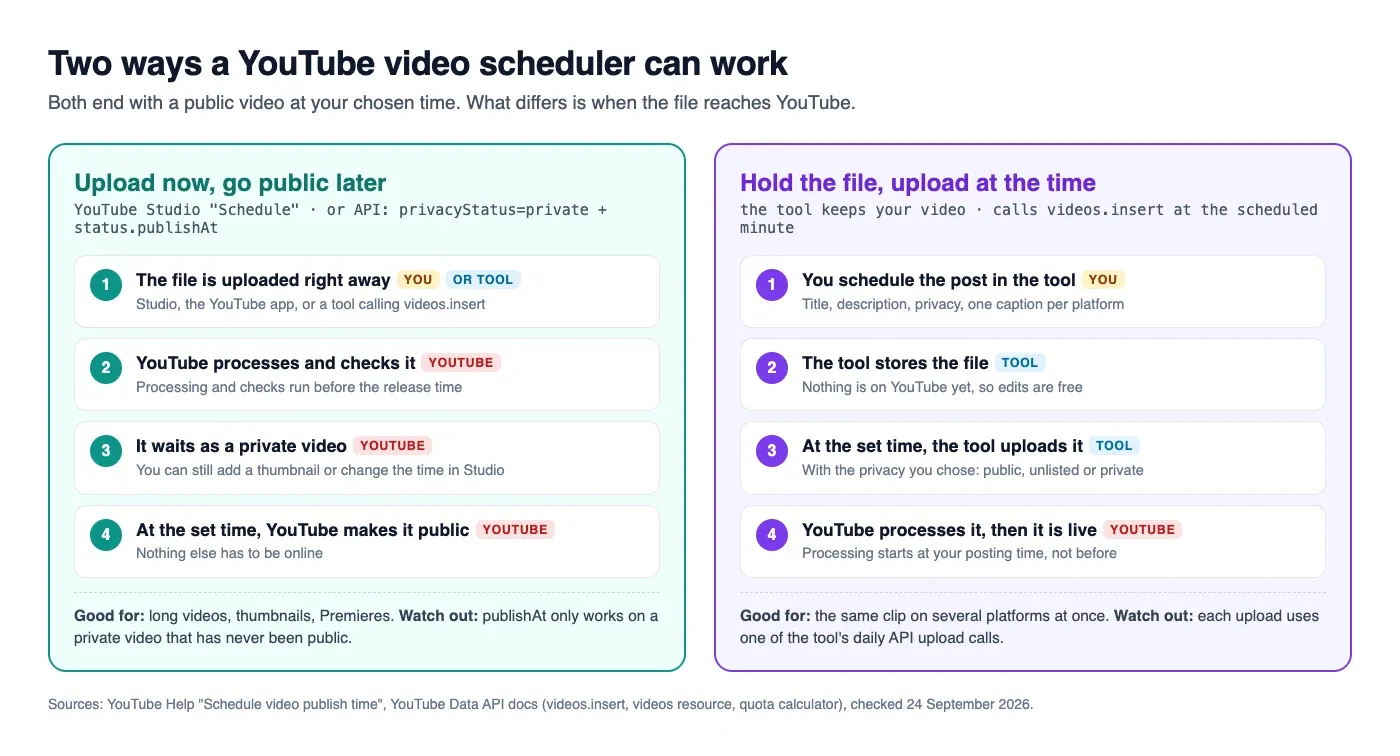
Route 1: upload now, let YouTube release it. The tool uploads with videos.insert, sets privacyStatus to private, and sets status.publishAt to your time. This is the same thing Studio does. YouTube's videos reference sets two limits on it:
publishAt"can be set only if the privacy status of the video is private".- It "can only be set if the video's privacy status is private and the video has never been published."
A past date publishes the video right away.
Route 2: hold the file, upload at the time. The tool keeps your video and calls videos.insert at the scheduled minute, with the privacy you chose. Nothing is on YouTube until then, so you can change the video or caption up to the last minute. The trade-off: YouTube's processing starts at your posting time, not before.
Neither route is wrong. Ask the tool which one it uses, because it changes what you see in Studio before the release.
#What else the API allows
| Task | API method | Quota cost | Source |
|---|---|---|---|
| Upload a video | videos.insert |
1 call from a separate upload bucket, default 100 per day per API project | videos.insert |
| Set a custom thumbnail | thumbnails.set |
About 50 units. JPEG or PNG, up to 50 MB. | thumbnails.set |
| Add to a playlist | playlistItems.insert |
50 units | playlistItems.insert |
| Change title or privacy later | videos.update |
50 units | Quota calculator |
| Read views and likes | videos.list |
1 unit | Quota calculator |
Custom thumbnails for Shorts are a special case. YouTube says they can only be added in YouTube Studio on a computer, on a verified account (YouTube Help).
#The quota changed in 2026
Many guides still say an upload costs 1,600 quota units out of 10,000 a day. That is out of date. YouTube's revision history shows two changes:
- 4 December 2025: an upload's cost dropped from about 1,600 units to about 100.
- 1 June 2026:
videos.insertmoved to its own quota bucket.
Today's quota calculator says a project gets "100 search.list calls, 100 videos.insert calls, and 10,000 units per day combined for all other endpoints." Quotas reset at midnight Pacific Time.
Why a buyer should care: the quota belongs to the tool's API project, not to you. All of the tool's users share it. A tool can ask YouTube for more through a quota extension. If a busy tool has not, uploads can fail with an error on a heavy day. So ask the tool if it has a daily YouTube cap per user. A stated cap is a good sign. It means the tool has planned for the shared limit.
#The audit, and why your video may come out private
The videos.insert page says: "All videos uploaded via the videos.insert endpoint from unverified API projects created after 28 July 2020 will be restricted to private viewing mode. To lift this restriction, each API project must undergo an audit." The audit guide covers the forms.
Separately, Google's OAuth consent screen warns you when an app is not verified, and refresh tokens from apps left in "Testing" mode expire after 7 days (Google OAuth docs). A tool whose YouTube connection drops every week is often in that state.
Test before you trust a tool: schedule one unlisted test video. Open it in a private browser window. If it says "Video unavailable" or shows as private in Studio when you chose public, the tool's project is not audited.
#Buyer's checklist for a YouTube video scheduler
Ask each question before you pay. Most answers are on the tool's pricing page or help centre.
| Question | Good answer | Warning sign |
|---|---|---|
| Does a public test video come out public? | Yes, on day one | It lands as private whatever you pick |
| Long videos and Shorts? | Both, with the length limits stated | Only one, and the page does not say which |
| Upload early or at the time? | The tool tells you which | You find out when a video appears in Studio |
| Privacy choice per video | Public, unlisted, private | Always public |
| Title and description fields | Separate from the caption | One text box split by guesswork |
| Custom thumbnail | Supported for long videos, or clearly stated as not supported | No mention |
| Playlist | Pick a playlist at upload | No mention |
| Other platforms from one upload | Yes, with a caption per platform | YouTube only |
| Daily YouTube cap | A stated number per user or per plan | No number, and uploads fail on busy days |
| Failed-upload alerts | Email or in-app, with YouTube's error | Silent failure |
| Price for your setup | Adds up by channel, brand or seat | "Contact sales" for the basics |
A worked example. A solo creator uploads 1 long video and 4 Shorts a week, and puts the Shorts on TikTok too. That is 2 channels and about 36 posts a month. Studio covers the long video. A free multi-platform plan covers the Shorts. A 3-person team with 5 client channels needs approvals and seats: 3 users on Hootsuite Standard is $297 a month billed annually. Priced per channel, 5 channels on Buffer Team is $50 a month.
#YouTube video schedulers compared
Prices are from each company's pricing page, checked on 24 September 2026. Prices change often, so check the link before you buy. YouTube details come from each tool's own pages. A blank or "not stated" means we did not find it documented, not that the tool lacks it.
| Tool | Free plan | Entry paid price | How it counts | YouTube publishing (from their docs) |
|---|---|---|---|---|
| YouTube Studio | Free | None | Per channel | Long videos, Shorts, Premieres. YouTube only. |
| TubeBuddy | Yes, and it includes Scheduled Publish | Pro and Legend plans | Per creator | Browser extension inside Studio. Schedules publish and later title, thumbnail or unlist changes (TubeBuddy). YouTube only. |
| Buffer | Yes: 3 channels, 10 scheduled posts per channel | $5/month per channel (Essentials) | Per channel | Documents YouTube Shorts: automatic or "notify me" publishing (Buffer help) |
| Hootsuite | No, 14-day trial | $99/month per user, billed annually (Standard) | Per user | Schedules YouTube videos next to other networks (Hootsuite) |
| Later | No, 14-day trial | $18.75/month, billed yearly (Starter) | Per "social set" | Page describes YouTube Shorts scheduling and auto publish (Later) |
| Metricool | Yes: 1 brand, 20 posts/month | $20/month billed annually (Starter) | Per brand | Long videos and Shorts, thumbnails, playlists. 10 YouTube posts per 24 hours on free, 20 on paid (Metricool help) |
| Sprout Social | No, 30-day trial | $79/month per seat billed annually (Essentials) | Per seat | Videos and Shorts, playlist, thumbnail for videos, message approval. 3 GB file limit (Sprout help) |
| Schedule & Chill | Yes: 2 accounts, 500 posts/month, 400 MB uploads | No paid plans sold right now | Per account | Long videos and Shorts, uploaded at the scheduled time. No custom thumbnail. |
Notes, so the table stays fair:
- Hootsuite Professional is $199 and Advanced $399 per user per month, billed annually.
- Sprout Social Standard is $199, Professional $299 and Advanced $399 per seat per month. Sprout's help says custom thumbnails are not supported for Shorts.
- Buffer's help notes that unverified YouTube accounts are limited to 10 posts in 24 hours and cannot add external links. Verify your channel at youtube.com/verify first.
- Metricool Advanced starts at $53 a month billed annually.
- vidIQ is a research and ideas tool. Its pricing page does not list scheduled publishing, so we left it out.
How to read it:
- YouTube only, one person: YouTube Studio, plus TubeBuddy if you want scheduled edits after release.
- YouTube plus other platforms, on a budget: a free plan from Buffer, Metricool or Schedule & Chill. Compare the post caps with how often you post.
- Teams with approvals: the per-seat suites (Hootsuite, Sprout). That is what the higher price pays for.
#Long videos vs Shorts: what to schedule where
| Long video | Short | |
|---|---|---|
| Best tool | YouTube Studio: thumbnail, chapters, end screens, Premiere | Any tool that posts to YouTube plus your other platforms |
| Custom thumbnail | Studio or API (thumbnails.set) |
Studio on a computer only, verified account |
| Same file elsewhere | Rarely | Usually TikTok, Instagram, LinkedIn (how Shorts and TikTok compare) |
| When to post | When your viewers are on | See the best time to post YouTube Shorts |
Most channels end up with both: Studio for the main video, a multi-platform tool for the Shorts cut from it. The TikTok video scheduler guide covers the TikTok side of the same clip. For the full Shorts walkthrough, read how to schedule YouTube Shorts.
#Where Schedule & Chill fits
Schedule & Chill puts the same post on several platforms from one composer. You can also schedule from an AI assistant like Claude or ChatGPT through our MCP server. It is free right now: 2 social accounts, 500 posts a month and uploads up to 400 MB. Today it publishes to YouTube, LinkedIn, Bluesky and Mastodon.
For YouTube you set a title (up to 100 characters), a description, privacy (public, unlisted or private), a category and the "made for kids" answer. We hold your file and upload it at the scheduled time (route 2 above). YouTube classifies it with the same rules as a Studio upload, so a vertical file of 3 minutes or less becomes a Short. We do not set custom thumbnails or playlists, so add those in Studio afterwards. Each user can publish up to 10 YouTube videos a day, because the upload quota is shared by every user. If an upload fails, you get an email and an in-app alert with the reason.
If you only post to YouTube, Studio's scheduler is free and does more for a long video. Use a tool like ours when the same clip goes to several platforms. See how to post to multiple social media accounts at once for that setup.
#Keep reading
- YouTube Shorts scheduling, start to finish — native steps, time zones and the two ways tools schedule.
- A YouTube calendar to feed the scheduler — one long video and three Shorts a week, with a CSV.
- Picking a TikTok scheduler that actually posts — the same buying questions for TikTok's Content Posting API.
- A LinkedIn content calendar for founders — if the scheduler also posts your LinkedIn updates.
- Shorts dimensions to export before you schedule — 1080 × 1920, bitrate and the safe zone.
#Frequently Asked Questions
Is it possible to schedule YouTube videos? Yes. In YouTube Studio or the YouTube app, upload the video, open Schedule on the Visibility step, and pick a date, time and time zone. The video stays private until then. Third-party tools can also schedule YouTube videos through YouTube's official Data API.
Is there a free YouTube video scheduler? Yes. YouTube Studio's scheduler is free. TubeBuddy's free plan includes Scheduled Publish. Buffer, Metricool and Schedule & Chill have free plans that post to YouTube and other platforms, as of 24 September 2026.
Can I schedule a YouTube video on my phone? Yes. YouTube's Help Center says you can schedule from the YouTube app as well as YouTube Studio on a computer. Choose the schedule option on the visibility step before you publish.
Can you schedule YouTube Shorts in YouTube Studio? Yes. Shorts use the same upload flow. Pick Schedule on the Visibility step. Shorts cannot be set as a Premiere, and a custom Shorts thumbnail can only be added in Studio on a computer.
How far in advance can you schedule a YouTube video? YouTube's Help page on scheduling does not state a maximum. You can change the time later while the video is still private, from Content, then Edit draft.
Why did my scheduled YouTube video upload as private? Two common causes. If the tool's API project has not passed YouTube's audit, every upload is locked to private. If your channel has a Community Guidelines strike, scheduled videos stay private during the penalty and you must reschedule them.