

YouTube Content Calendar: A Monthly Template for Videos and Shorts
A YouTube content calendar is a plan of which videos you will publish, on which day, and what stage each one is in right now. On YouTube it needs two things a TikTok calendar does not: a production timeline, because a long video takes weeks, and a plan for how your Shorts point viewers to your long videos. Below you get a copy-paste monthly template with 1 long video and 3 Shorts a week, a lead-time table, a CSV for Google Sheets and the steps to turn it into scheduled uploads.
#Quick answer
- What it is: a list of planned uploads with a publish date, format (long or Short), pillar, title, stage and a link between each Short and its long video.
- How often to upload: vidIQ's study of 10.2 million channels found channels with 12+ uploads a month had 4.1x the median view growth of channels with less than 1. Shorts count as uploads.
- A mix that works for a small team: 1 long video + 3 Shorts a week = 16 uploads a month.
- Plan backwards: start a long video about 3 weeks before its publish date. Shorts need a few days.
- Link them: add a Related video link to each Short so it sends viewers to the long video (YouTube Help).
- Schedule: YouTube Studio lets you set a date, time and time zone for any upload. The video stays private until then. Our YouTube Shorts scheduling tutorial has the full steps.
#Why a YouTube calendar is different from a short-form one
A TikTok or Reels calendar is mostly a posting rhythm. You film on Monday and post on Tuesday. YouTube is different in three ways.
| Short-form calendar (TikTok, Reels) | YouTube content calendar | |
|---|---|---|
| Formats | One: vertical short video | Two: long videos and Shorts |
| Lead time | 1–3 days per video | 2–4 weeks per long video |
| What the plan tracks | Posting days | Production stages + posting days |
| How posts connect | Mostly standalone | Shorts send viewers to long videos |
| How long a post keeps working | Days | Months, through search and suggested videos |
| Trends | Plan the slot, film the week of | Seasonal topics planned 1–2 months ahead |
That is why a YouTube calendar has more columns. If you only track the publish date, you find out on Wednesday that Thursday's video is not edited yet.
For the short-form version of this guide, see our TikTok content calendar. For how the two platforms differ beyond the calendar, read how YouTube Shorts and TikTok differ.
#How often should you upload? What the data says
YouTube itself does not give a number. Its upload schedule tips say "a consistent, sustainable release schedule is critical when building and fulfilling audience expectations and maintaining your well-being". It asks you to decide between "low-frequency, high-production value content or high-frequency, easy-to-produce content".
The studies give numbers:
| Source | What it found | Basis |
|---|---|---|
| vidIQ (updated Jul 2026) | Median monthly view growth: 0.53% at less than 1 upload a month, 0.89% at 1–3, 1.32% at 4–7, 2.18% at 12+. Subscriber growth: 0.00% vs 0.91% | 10,210,278 channels with 1,000+ subscribers, Apr 2025–Mar 2026. Long videos and Shorts counted together |
| Buffer (Jan 2025) | Accounts that posted in 20+ of 26 weeks got 450% more engagement per post than accounts that posted in 4 weeks or fewer. 5–19 weeks: 340% more | 100,000+ Buffer users, 10 platforms including YouTube |
| SocialPilot | Median of 12 YouTube videos a month; 3–5 Shorts a week | Brandwatch data across 12 industries |
| YouTube | No number. Pick a schedule you can keep | Official guidance |
Two honest notes:
- These studies show a link, not a cause. Big channels upload more and also grow more. Uploading more will not by itself give you 4x growth.
- Consistency is the common thread. Buffer measured weeks with a post, not the number of posts. Posting once every week beat posting in bursts.
So the plan below uses 16 uploads a month. That puts you in vidIQ's top band, but only one of those uploads is a long video each week. The rest are Shorts, which are much cheaper to make.
Does posting Shorts hurt your long videos? YouTube says: "we haven't seen evidence of Shorts negatively impacting long-form performance" (YouTube Official Blog, May 2025).
#Content pillars and series
A pillar is a type of video you make again and again. A series is a named, numbered set inside a pillar. Pillars stop you asking "what do I make this week?". Series give viewers a reason to watch the next one.
Pick 3 or 4 pillars. Here is an example for a home coffee channel:
| Pillar | Long video example | Short example | Share of long videos |
|---|---|---|---|
| Teach | "How to dial in espresso in 10 minutes" | "The 1 grind mistake everyone makes" | 40% |
| Test / review | "5 grinders under $150, tested" | "Cheapest vs most expensive, 20 s" | 30% |
| Story | "I made coffee every way for 30 days" | Behind-the-scenes clip from filming | 15% |
| Community | "Answering your 10 most asked questions" | Reply to one comment | 15% |
Then turn one pillar into a series. A monthly series is the easiest to keep, for example "Budget Brew #1, #2, #3", one per month. Put every series episode in a playlist the day it goes live. A series also makes titles easier: you already know half of the next one.
#Copy-paste monthly YouTube content calendar
This is October 2026 for the example channel. It uses one long video every Thursday and three Shorts a week:
- Tuesday Short: a standalone Short from any pillar.
- Thursday long video: the main upload of the week.
- Friday Short: a clip cut from Thursday's video, with a Related video link back to it.
- Sunday Short: a community Short, like a reply to a comment.
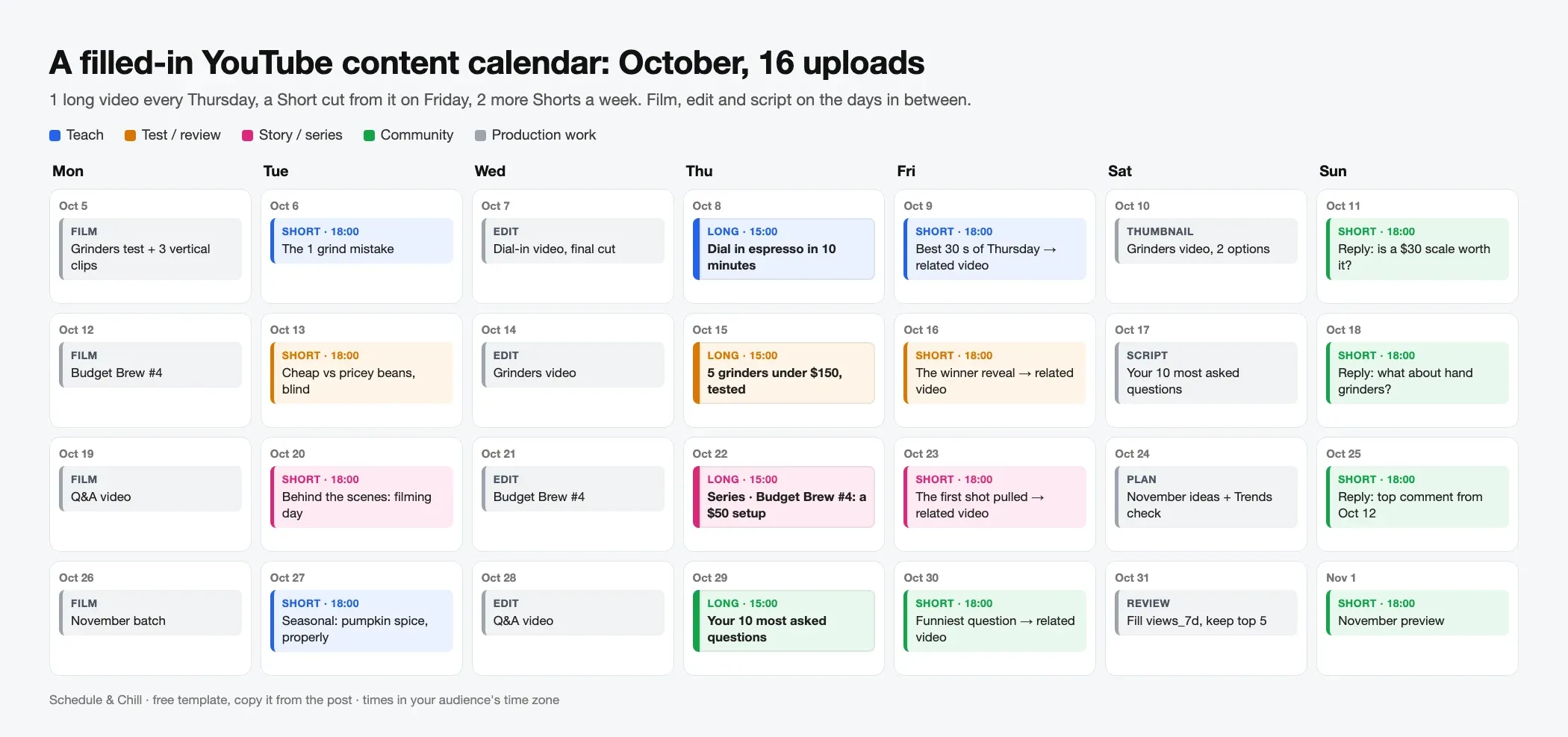
| Week | Tue: Short | Thu: long video | Fri: Short (clip of Thu) | Sun: Short |
|---|---|---|---|---|
| Oct 5 | Teach: "The 1 grind mistake" | Teach: "Dial in espresso in 10 minutes" | Best 30 s of the dial-in video | Reply: "Is a $30 scale worth it?" |
| Oct 12 | Test: "Cheap vs pricey beans, blind" | Test: "5 grinders under $150, tested" | The winner reveal | Reply: "What about hand grinders?" |
| Oct 19 | Story: filming day, behind the scenes | Series: "Budget Brew #4: a $50 espresso setup" | The first shot pulled | Reply: top comment from Oct 12 |
| Oct 26 | Seasonal: "Pumpkin spice, made properly" | Community: "Your 10 most asked questions" | The funniest question | Next month preview |
Publish times for this example: long videos at 15:00, Shorts at 18:00, in the audience's time zone. Long videos and Shorts often peak at different hours. Buffer's data found "almost no overlap". For the details, see the best time to post YouTube Shorts.
Two rules make this template work:
- Every long video gets at least one Short cut from it. That is the Friday slot. It costs 20 minutes of editing, not a new shoot.
- The last week of the month is the lightest. A community video needs almost no research, so you have time to plan the next month.
#Use Shorts as trailers for your long videos
YouTube's own blog calls the Related video link "the most effective tool" for turning Shorts viewers into long-form viewers (YouTube Official Blog, Jul 2026). The link shows under your channel name on the Short.
The rules from YouTube Help:
| Rule | Detail |
|---|---|
| Who can use it | Channels with advanced feature access |
| What you can link | A video, Short or live stream from your own channel |
| Linked video must be | Public or unlisted, and follow the Community Guidelines |
| Where to set it | YouTube Studio → Content → pick the Short → Related video → Save |
| Automatic | Shorts made with the Clips and Shorts tool link their source video, unless the Short is private, unlisted or Made for Kids |
The same blog post gives two tips worth putting in your calendar notes:
- Say it in the last 5 seconds. Tell viewers to tap the link, and point to it or show the long video's thumbnail.
- Keep the promise fast. "The first 5 to 10 seconds of your long video should directly address the topic, question, or hook promised in the Short."
Add a related_video column to your calendar. When a Friday Short goes live, you fill it with the Thursday video's link.
Prefer to watch? YouTube's Creator Insider team covers this Shorts-to-long-form approach in How to Grow Long-form with YouTube Shorts.
#Production pipeline: lead times for a long video
Work backwards from the publish date. The lead times below are our planning estimates for a solo creator or a team of two. They are not from a study. Change them after your first month.
| Stage | What happens | Starts | Time it takes | Done when |
|---|---|---|---|---|
| 1. Idea | Pick the topic, check search demand, write 3 title options | 21 days before | 30 min | One title chosen |
| 2. Script | Outline or full script, hook for the first 10 seconds | 14 days before | 2–4 hours | Script read out loud once |
| 3. Film | Record the video and 2–3 vertical clips for Shorts | 10 days before | 2–4 hours | All footage backed up |
| 4. Edit | Cut, music, captions, chapters | 7 days before | 4–8 hours | Final export watched once |
| 5. Thumbnail + title | Design 2 thumbnails, pick 1, final title and description | 3 days before | 1 hour | Thumbnail uploaded |
| 6. Schedule | Upload, set details, schedule the publish time | 2 days before | 20 min | Status is "scheduled" |
| 7. Shorts | Cut 1–2 Shorts from the edit, schedule them | 1 day before | 30–60 min | Shorts scheduled |
The 2-day buffer at stage 6 matters. It gives you time to fix a failed check, a copyright claim or a typo in the title before the video goes public.
When you run four videos a month, the stages overlap. In any given week you are filming one video, editing the one before it and scripting the one after. The CSV below tracks this with a stage column.
#YouTube content calendar template CSV (for Google Sheets)
Copy this block. In Google Sheets, click cell A1, paste, then choose Data → Split text to columns. It also opens in Excel or Numbers as a .csv file.
 1publish_date,day,time,format,pillar,series,title,stage,script_due,film_due,edit_due,thumbnail_due,related_video,views_7d,notes
 22026-10-06,Tue,18:00,short,teach,,The 1 grind mistake everyone makes,edited,,2026-09-28,2026-10-02,,,,Film in the Sep 28 batch
 32026-10-08,Thu,15:00,long,teach,,How to dial in espresso in 10 minutes,editing,2026-09-24,2026-09-28,2026-10-01,2026-10-05,,,Chapters + end screen
 42026-10-09,Fri,18:00,short,teach,,Best 30 seconds of the dial-in video,idea,,,2026-10-07,,link to Oct 8 video,,Cut from final edit
 52026-10-11,Sun,18:00,short,community,,Is a $30 scale worth it?,idea,,2026-10-05,2026-10-09,,,,Reply to top comment
 62026-10-15,Thu,15:00,long,test,,5 grinders under $150 tested,scripting,2026-10-01,2026-10-05,2026-10-08,2026-10-12,,,Order grinders by Sep 30
 72026-10-22,Thu,15:00,long,test,Budget Brew,Budget Brew #4: a $50 espresso setup,idea,2026-10-08,2026-10-12,2026-10-15,2026-10-19,,,Add to series playlist
 82026-10-29,Thu,15:00,long,community,,Your 10 most asked questions,idea,2026-10-15,2026-10-19,2026-10-22,2026-10-26,,,Collect questions from comments
Use one row per upload, long or Short. Sort by publish_date to see the posting plan. Sort by film_due to see this week's shoot list.
The views_7d column is the one people skip. Fill it 7 days after each upload. After two months, sort by it and make more of the top five.
#Plan seasonal videos early
Long videos keep getting views for months through search, so seasonal topics need to go up before the peak, not on the day. We plan them 4 to 8 weeks ahead. That is enough time to make the video and for YouTube to start showing it in search.
Two free tools help:
- Google Trends, set to YouTube Search. Enter a topic at trends.google.com, then change the Web Search menu above the chart to YouTube search. Google's News Initiative lists five search types there, including YouTube search (Google News Initiative). Set the time range to 5 years and look for the week the curve starts to rise each year. Trends numbers are relative, from 0 to 100, not search counts (Google Trends Help).
- The Trends tab in YouTube Studio. Go to Studio → Analytics → Trends. It shows top searches from your audience, videos from similar channels, and search terms for Shorts, all from the last 28 days (YouTube Help). YouTube says this tab may look different as it rolls out an updated Studio from July 2026.
Put the seasonal dates in a separate row at the top of your sheet. Then count back 3 weeks from the publish date to get the idea date, like any other video.
#Turn the calendar into scheduled uploads
A calendar full of edited videos does nothing until each one has a publish time. You have two paths.
#Path 1: YouTube Studio (free, native)
From YouTube Help:
- Sign in to YouTube Studio and click Create → Upload videos.
- Fill in the details.
- On the Visibility step, click the Schedule card.
- Set the date, time and time zone, then click Schedule.
Rules to know:
| Rule | Detail |
|---|---|
| Before it goes live | The video is private until the scheduled time |
| Change the time | Content → the video → change the schedule, or set it to Public to post now |
| Date on the watch page | Based on Pacific Time, so it can differ from your local date |
| Community Guidelines strike | Scheduled videos do not publish during the penalty period. You must reschedule them |
| Shorts | Scheduled the same way. A Short is a square or vertical video up to 3 minutes (length rules) |
YouTube Studio also takes several files in one upload, which makes Short batches faster. Our guide on how to upload YouTube Shorts from a PC covers that flow.
#Path 2: a third-party scheduler
A scheduler helps when the same Short goes to YouTube and other platforms, or when you want one calendar for all your channels. Check two things before you pick one:
- Can it post both Shorts and long videos? Check the tool's own docs, not a comparison list.
- What do you still set in Studio? Custom thumbnails for Shorts can only be added in YouTube Studio on a computer, on a verified account (YouTube Help). The Related video link is also set in Studio.
For the full comparison, read how to schedule YouTube Shorts and our YouTube video scheduler guide.
The step between the plan and the scheduler is where most calendars fail. We wrote about that gap in from calendar to publishing queue.
#Reuse the calendar on other platforms
The same rows work elsewhere with a different cadence:
- TikTok: your vertical Shorts clips, often the same week. See the TikTok content calendar.
- LinkedIn: fewer posts, more text, and a link to the long video. See the LinkedIn content calendar, and check the LinkedIn posting-frequency data before you set the cadence.
#Where Schedule & Chill fits
Schedule & Chill is a free social media scheduler with a month calendar view and posting slots. You set your weekly times once, and each new post can go into the next free slot. You can drag a post to another day on the calendar. YouTube is one of the platforms you can connect today, along with LinkedIn, Bluesky and Mastodon. The free plan covers 2 social accounts, 500 posts a month and 400 MB uploads.
For each YouTube post you set the title (up to 100 characters), description, privacy (public, unlisted or private), category and the made-for-kids answer. Schedule & Chill uploads the file at the scheduled time, and YouTube decides if it is a Short, the same as a Studio upload. Custom thumbnails and Related video links are still set in YouTube Studio. It also has an MCP server, so Claude or ChatGPT can turn the rows of your CSV into scheduled posts.
If you only post to YouTube, YouTube Studio's own scheduler is free and does the job well.
#Keep reading
- Scheduling each Short in the calendar — Studio steps, bulk uploads of up to 15 files and time zones.
- Picking the publish hour for your Shorts — why Shorts and long videos peak at different times.
- YouTube Studio vs third-party schedulers — when the free scheduler is enough and when a tool helps.
- Shorts export specs for the Friday clip — 1080 × 1920, safe zone and a 9:16 thumbnail.
- Why calendars fail at the handoff to the queue — the gap between a plan and posts that actually go out.
#Frequently Asked Questions
How do I make a YouTube content calendar? Pick 3 or 4 content pillars and an upload rhythm you can keep, such as 1 long video and 3 Shorts a week. Put one row per upload in a sheet with the publish date, format, pillar, title and stage. Then count back from each publish date to set script, film and edit deadlines. Review views after 7 days and plan the next month from what worked.
How many videos should I post on YouTube per week? vidIQ's 2026 study of 10.2 million channels found channels with 12 or more uploads a month grew views fastest, and Shorts count toward that. YouTube itself gives no number and says to choose a schedule you can sustain. For most small channels, 1 long video and 2 to 4 Shorts a week is a realistic start.
Where can I see scheduled content on YouTube? In YouTube Studio, open Content. Scheduled videos show in the list with a "Scheduled" visibility and their publish date. Shorts are on the Shorts tab. You can open any of them to change the time or publish it now.
How far ahead should I plan YouTube videos? Plan long videos about 3 to 4 weeks ahead so each one has time for scripting, filming, editing and a thumbnail. Plan seasonal videos 4 to 8 weeks before the peak, because long videos get found through search over time. Shorts only need a few days.
Should Shorts and long videos be on the same calendar? Yes. Put them in one sheet with a format column. That way you can see which Short points to which long video, and you don't publish both at the same hour. Long videos and Shorts often do best at different times of day.
What is the best free content calendar for YouTube? A Google Sheet with the CSV above is enough for most channels. Notion also has free YouTube calendar templates. The tool matters less than the next step: getting each finished video scheduled in YouTube Studio or a scheduler, so it goes out on time.