

LinkedIn Content Calendar: A Free Template for Founders and B2B Teams
A LinkedIn content calendar is a plan of what you will post on LinkedIn, on which day, in which format, and why. For one person it needs four things: 3 or 4 content pillars, one week of planned posts, a monthly theme and one 60-minute writing block. Below you get all of it, ready to copy: a weekly template with hooks, a monthly theme table, a quarterly view, a CSV for Google Sheets, and the steps to turn the rows into scheduled posts.
#Quick answer
- What it is: a list of planned posts with a date, time, pillar, format, hook and status.
- How often: Buffer's study of 2 million+ LinkedIn posts found 2 to 5 posts a week is the sustainable sweet spot. More posts kept helping per post, but the biggest step is leaving 1 a week behind.
- What to plan: a pillar per post, so you never post the same kind of thing twice in a row.
- Plan 3 levels: themes per quarter, topics per month, finished posts per week.
- Workflow: write the whole week in one 60-minute block. Keep 15 minutes a day for comments.
- Native scheduling: LinkedIn lets a personal profile schedule a post from 10 minutes to 3 months ahead. Company Pages: 1 hour to 3 months.
#Why LinkedIn needs a calendar
On LinkedIn the thing that decides results is whether you keep showing up. The numbers from three sources point the same way, with one disagreement worth seeing:
| Source | What it says | Basis |
|---|---|---|
| Buffer (Aug 2025) | vs 1 post a week: 2–5 posts = +1,182 impressions per post; 6–10 = +5,001; 11+ = +16,946 | 2M+ posts, 94,000+ accounts, each account compared to itself |
| LinkedIn Marketing Solutions | "Companies that post weekly see a 2x lift in engagement with their content" | LinkedIn's Pages best-practices page (company Pages) |
| AuthoredUp | Avoid posting more than once in 24 hours | Creator-tool analysis |
Buffer found no point where posting more hurt per-post results. AuthoredUp says space your posts out. Both are compatible with one post a day at most, on weekdays. That is the upper end of the template below.
The real reason for a calendar is simpler. Most people do not stop posting because an idea failed. They stop because a busy week came and there was nothing ready. A calendar with posts already written is what gets you through that week. It is the planning layer of the five-part LinkedIn personal branding system we recommend.
If you want the full argument about frequency, read how often to post on LinkedIn. This post is about the plan itself.
#What goes in a LinkedIn content calendar
Each row is one post. Nine columns are enough:
| Column | Why it matters on LinkedIn |
|---|---|
| Date + time | Weekday mornings in your audience's timezone are a good start (best time to post on LinkedIn) |
| Pillar | Stops you posting three opinions in a row |
| Format | Text, image, document (PDF carousel), video, poll |
| Hook | The first line. On mobile, often only 2 lines show before "…see more" |
| Body notes | 3 bullet points, not the full draft |
| CTA | A question, a reply prompt, or nothing |
| Status | Idea → drafted → scheduled → posted |
| Impressions 7d | Filled in one week after posting |
| Comments 7d | The number that tells you the post started a conversation |
The two last columns are the ones people skip. They are also the only columns that make next month's plan better than this one.
#Pick 3 or 4 content pillars
A pillar is a topic you post about again and again. For a founder or B2B person, these four cover almost everything:
| Pillar | What it looks like | Share |
|---|---|---|
| Expertise | How-tos, frameworks, mistakes in your field | ~40% |
| Proof | Results, customer stories, numbers | ~25% |
| Point of view | An opinion your field argues about | ~20% |
| Personal | Build log, lessons, behind the scenes | ~15% |
We explain how to find your own pillars in the LinkedIn personal branding guide. If you are a founder, founder-led LinkedIn shows how these pillars connect to sales. When a pillar runs dry, LinkedIn post ideas has prompts for each one.
#Copy-paste weekly LinkedIn calendar template
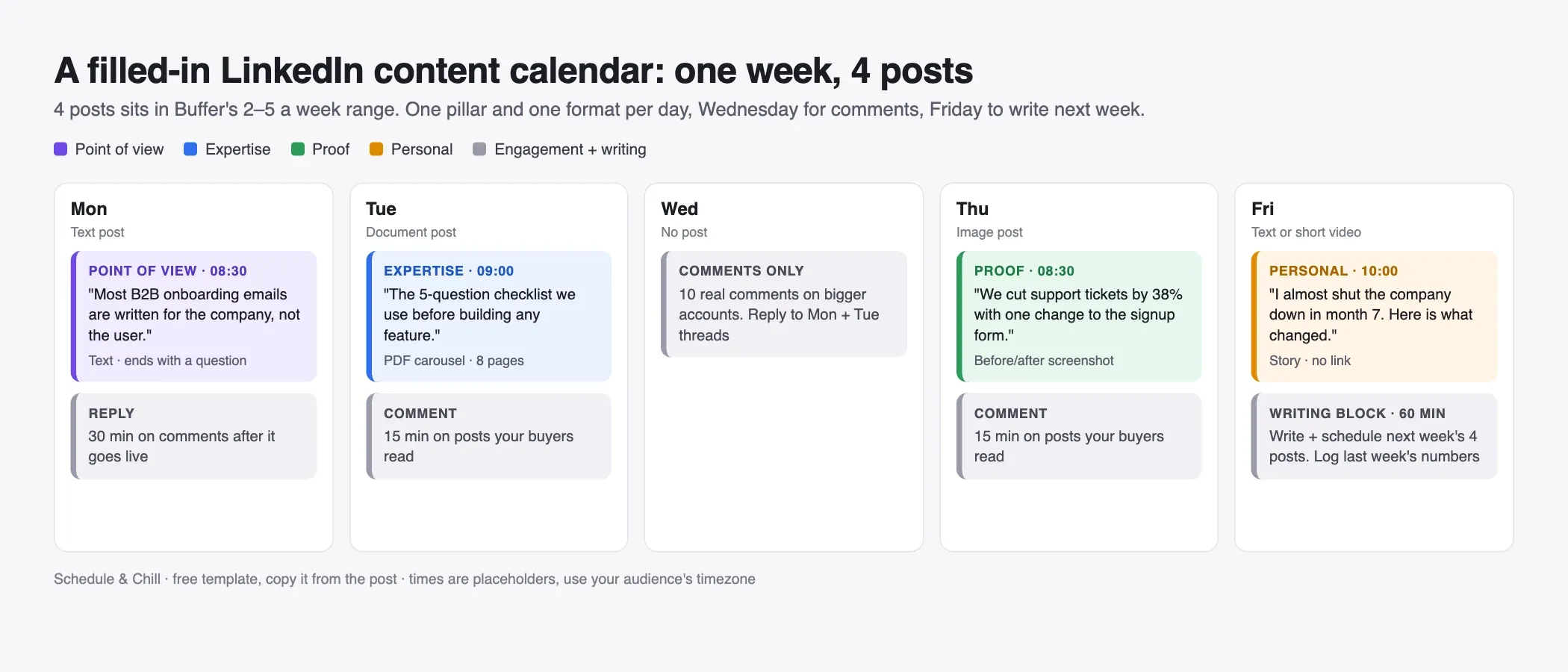
Four posts, Monday to Friday, with one day off from posting. Wednesday is for comments only. Each post has a different pillar and a different format.
| Day | Pillar | Format | Hook (first line) | Time |
|---|---|---|---|---|
| Mon | Point of view | Text | "Most B2B onboarding emails are written for the company, not the user." | 08:30 |
| Tue | Expertise | Document (PDF, 8 pages) | "The 5-question checklist we use before building any feature." | 09:00 |
| Wed | — | Comments only | 10 comments on posts your buyers read | — |
| Thu | Proof | Image (screenshot) | "We cut support tickets by 38% with one change to the signup form." | 08:30 |
| Fri | Personal | Text or short video | "I almost shut the company down in month 7. Here is what changed." | 10:00 |
| Fri pm | — | Writing block | Write and schedule next week's 4 posts | 60 min |
The times are placeholders. Your own post analytics will tell you more after a month than any study can.
Why Wednesday is off: a gap day gives Monday's and Tuesday's posts room to keep collecting comments. It also turns one day a week into pure engagement time, which most people skip otherwise.
If 4 posts is too many, drop Friday first, then Monday. Three posts a week, every week, is better than five posts for two weeks and then nothing.
#Monthly theme table
A theme gives each week one direction. Fill the themes at the start of the month and the actual posts one week at a time.
| Week | Theme | Point of view | Expertise | Proof | Personal |
|---|---|---|---|---|---|
| 1 | Getting started | A common mistake new buyers make | Setup checklist (PDF) | First customer story | Why I started this |
| 2 | Pricing and value | What your market gets wrong about price | How to compare options | Before/after numbers | A pricing decision we changed |
| 3 | Team and process | How you work differently | Your weekly process | A result from that process | A hire or a failure |
| 4 | Best of the month | Update a view you shared earlier | Remake the best post as a PDF | Monthly numbers | What I learned this month |
Week 4 is the cheap week. You rework what already worked, which takes less time and often performs better than new ideas.
#The quarterly view: launches, events and hiring
Some posts have a date you cannot move. Put those on the calendar first, then fill around them. Use one row per month:
| Month | Fixed dates | Posts they need | Lead time |
|---|---|---|---|
| October | Product launch (Oct 21) | Teaser, launch post, "what we learned" post | Start 2 weeks before |
| November | Industry conference (Nov 12–13) | "I'll be there" post, 1–2 takeaway posts after | Book the takeaway slots before you travel |
| December | Hiring a first salesperson | Role post, "why this role" post, team culture post | Write the role post when the job page is live |
Three rules for the quarterly view:
- Anchor posts first. A launch post is written before the weekly posts around it.
- Leave the week after an event light. You will be tired, and takeaway posts do better when they are written fresh.
- Hiring posts count as Personal or Proof. They are not a separate pillar. They still follow the rule of no pillar twice in a row.
#LinkedIn content calendar template CSV (for Google Sheets)
Copy this block. In Google Sheets, click cell A1, paste, then choose Data → Split text to columns. It also opens in Excel or Numbers if you save it as a .csv file.
 1date,day,time,pillar,format,hook,body_notes,cta,status,impressions_7d,comments_7d
 22026-10-05,Mon,08:30,point of view,text,Most B2B onboarding emails are written for the company not the user,3 examples; what to write instead; 1 rule,What is the worst onboarding email you got?,drafted,,
 32026-10-06,Tue,09:00,expertise,document,The 5-question checklist we use before building any feature,1 page per question; last page = summary,Save this for your next planning week,drafted,,
 42026-10-07,Wed,,engagement,comments,,10 comments on buyer-read posts,,todo,,
 52026-10-08,Thu,08:30,proof,image,We cut support tickets by 38% with one change to the signup form,screenshot before/after; the change; the number,,idea,,
 62026-10-09,Fri,10:00,personal,text,I almost shut the company down in month 7,what happened; the decision; the lesson,,idea,,
 72026-10-09,Fri,15:00,production,writing block,,write + schedule next week,,todo,,
Keep one spreadsheet tab per month and one "ideas" tab with no dates. When a comment or a customer call gives you an idea, it goes to the ideas tab, not to your memory.
#The weekly 60-minute batching routine
Batching is the reason a calendar survives week three. Writing one post a day from scratch means starting from zero five times.
Minutes 0–10: pick
- Open the month tab. Read the week's theme.
- Pull 4 ideas from the ideas tab, one per pillar.
- Write only the hook for each. If a hook is weak, swap the idea now.
Minutes 10–45: write
- Write all 4 posts in one sitting. Text posts first, because they are quickest.
- Keep each post to one idea. Use short lines. Check the length against the LinkedIn character limit.
- For the document post, write the page text now. Design can wait for a 20-minute slot later in the week.
Minutes 45–55: schedule
- Put each post into the scheduler at its time.
- Change the status to
scheduled.
Minutes 55–60: review
- Fill
impressions_7dandcomments_7dfor last week's posts. - Note one thing that worked. Keep it next week. Change only one thing at a time, so you know what caused the change.
If writing is the hard part, and not the planning, a LinkedIn ghostwriter can take over the writing block. The calendar is still yours.
#Where comments and engagement fit
A scheduled post goes out on its own. The comments under it do not answer themselves. So the calendar needs time for engagement, not only for posts.
- Right after each post goes live: stay for 20–30 minutes and reply to every comment. AuthoredUp's analysis says LinkedIn tests a post with a small audience in the first 1–2 hours and weighs comments about twice as much as likes (AuthoredUp). That is analysis from a tool maker, not a LinkedIn statement. It still matches what most creators see.
- Every weekday: 15 minutes of comments on other people's posts. Pick posts your buyers read.
- Wednesday: the no-post day, so it is the long comment day.
This is why a post time matters for you, not only for the feed. Schedule posts for times when you can be at your desk for the first half hour. A 08:30 post is useless if you are in meetings until 11:00.
#Repurpose one idea into text, carousel and video
One good idea can fill three slots across a month. Here is one idea worked through the formats:
| Week | Format | Example (idea: "5 questions before building a feature") |
|---|---|---|
| 1 | Text | Your strongest question, why it matters, a short story |
| 2 | Document (PDF carousel) | All 5 questions, one per page, with an example each |
| 3 | Video (60–90 s) | You explaining the question people argued about in the comments |
| 4 | Image | A screenshot of the checklist in your own tool, with the result |
Buffer's 2025 data found document (PDF) posts had the highest engagement of the formats it compared, and posts with links the lowest (Buffer). So a PDF version of your best text post is often worth the extra 20 minutes. For how to build one, see LinkedIn carousel posts. For video specs, see how to post a video on LinkedIn.
The same idea can go to other platforms with a different calendar. See the TikTok content calendar and the YouTube content calendar.
#Turn the calendar into scheduled posts
A calendar full of drafted rows publishes nothing. The step from plan to queue is where most calendars fail, which is why we wrote a separate post on the gap from calendar to publishing queue. You have two paths.
#Path 1: LinkedIn's native scheduler (free)
LinkedIn's help pages list the rules. We checked them on 24 September 2026:
| Rule | Personal profile (a1347212) | Company Page (a548192, a1419179) |
|---|---|---|
| How far ahead | 10 minutes to 3 months | 1 hour to 3 months |
| Time picker | 30-minute steps, or type an exact time | Same |
| Timezone | Your device's timezone (stored in UTC) | Not stated on the help page |
| Cannot be scheduled | Events, jobs, services | Events, multiple photos, reshares, polls, jobs, services |
| After scheduling | Edit, reschedule or delete | Post now, edit, reschedule or delete; other admins can manage it |
Where to find it: Start a post → write the post → click the clock icon → pick the date and time → Next → Schedule. The list of queued posts is behind the same clock icon, under View all scheduled posts. We cover that step by step in how to view and edit scheduled posts on LinkedIn.
The native scheduler is enough for one profile and a weekly plan. It is slow when you schedule four posts at once, because each one goes through the composer on its own. And it only knows about LinkedIn.
#Path 2: a third-party scheduler
A third-party scheduler posts through LinkedIn's official API. The useful extras for a calendar are a calendar view of everything queued, fixed weekly time slots, bulk import from a spreadsheet, and posting the same idea to other platforms. Check two things before you choose one: whether it supports personal profiles, company Pages or both, and whether it can do the post types your calendar uses (documents, video, multiple images).
#Where Schedule & Chill fits
Schedule & Chill is a free social media scheduler with a month calendar view and posting slots. You set your weekly times once, for example Mon, Tue, Thu and Fri at 08:30, and each new post can go into the next open slot. You can drag a post to another day on the calendar, and it keeps its time.
For LinkedIn it publishes to personal profiles: text, up to 9 images, one video, or one PDF document post of up to 300 pages, as public or connections-only. It does not post to company Pages yet, it cannot add mentions of people or companies (LinkedIn's API does not allow it), and automatic first comments are paused until LinkedIn approves the API access they need.
You can import text posts from a CSV. The file needs a content column. A scheduled_at column sets the time for each row. Include the timezone offset, for example 2026-10-05T08:30:00-04:00, because a time without one is read as UTC. You can also connect YouTube, Bluesky and Mastodon. The free plan covers 2 social accounts, 500 posts a month and 400 MB uploads. It also has an MCP server (posting to LinkedIn from Claude, step by step), so Claude or ChatGPT can turn the rows of your calendar into scheduled posts.
If you only post to one LinkedIn profile, LinkedIn's own scheduler is free and does the job.
#Keep reading
- Building a LinkedIn personal brand in 90 days — what this calendar is for, beyond filling slots.
- Rewrite your LinkedIn headline before a posting streak — new readers click your name first.
- LinkedIn posting for B2B founders — how the four pillars connect to sales.
- Scheduling the video version on YouTube — when the repurposed clip goes to YouTube too.
- Picking a TikTok video scheduler that really posts — for the TikTok cut of the same idea.
#Frequently Asked Questions
Does LinkedIn have a content calendar? Not a full one. LinkedIn has a native scheduler for personal profiles and Pages, and a list of your scheduled posts behind the clock icon in the post composer. It has no calendar view, no pillars and no planning columns. Most people plan in a spreadsheet or Notion and schedule in LinkedIn or a third-party tool.
Can you schedule content on LinkedIn? Yes. On a personal profile you can schedule a post from 10 minutes to 3 months ahead. On a company Page the range is 1 hour to 3 months. Events, jobs and service posts cannot be scheduled on either. Pages also cannot schedule polls, reshares or posts with multiple photos.
What is the 4-1-1 rule on LinkedIn? It is a content-marketing rule of thumb, not a LinkedIn rule: for every 6 posts, share 4 posts from other people, 1 original post and 1 promotional post. For a personal LinkedIn calendar, the useful part is the ratio. Keep direct selling to about one post in six, and fill the rest with posts that are useful to your reader.
What should a LinkedIn content calendar include? A date and time, a content pillar, a format, the hook (first line), short notes for the body, a call to action, a status, and two results columns: impressions and comments after 7 days. The results columns are what make each month's plan better than the last.
How many posts a week should a LinkedIn content calendar have? Start with 3 or 4. Buffer's 2025 study of 2 million+ posts found 2 to 5 posts a week is the sustainable sweet spot, and that posting more kept improving per-post results. The right number is the one you can keep for three months without skipping weeks.
How far ahead should I plan LinkedIn content? Plan themes a quarter ahead, topics a month ahead, and finished posts one week ahead. Fixed dates like launches, events and hiring go in first. Writing only a week ahead keeps posts current, and LinkedIn's 3-month scheduling limit is rarely the thing that stops you.