

75 LinkedIn Post Ideas by Goal and Format (2026)
The best LinkedIn post ideas come from your own work: a decision you made, a mistake you fixed, a question a client asked, a number that surprised you. Below are 75 LinkedIn post ideas grouped by goal, each with the format that suits it and a first line you can adapt.
After the list you get what most idea lists skip: format data from three 2025 studies, eight fill-in-the-blank templates, one idea turned into a full post, a way to find ideas in your own inbox, and a 4-week rotation. Every hook on this page was written for this guide. The LinkedIn facts were checked against LinkedIn's Help Center on 24 September 2026.
#Quick answer
- What should I post on LinkedIn? Things only you can say: lessons from your work, decisions and their reasons, results with numbers, and opinions your field argues about.
- Pick ideas by goal first. Authority, trust, engagement, leads, hiring, build in public or personal. Each goal has its own post types below.
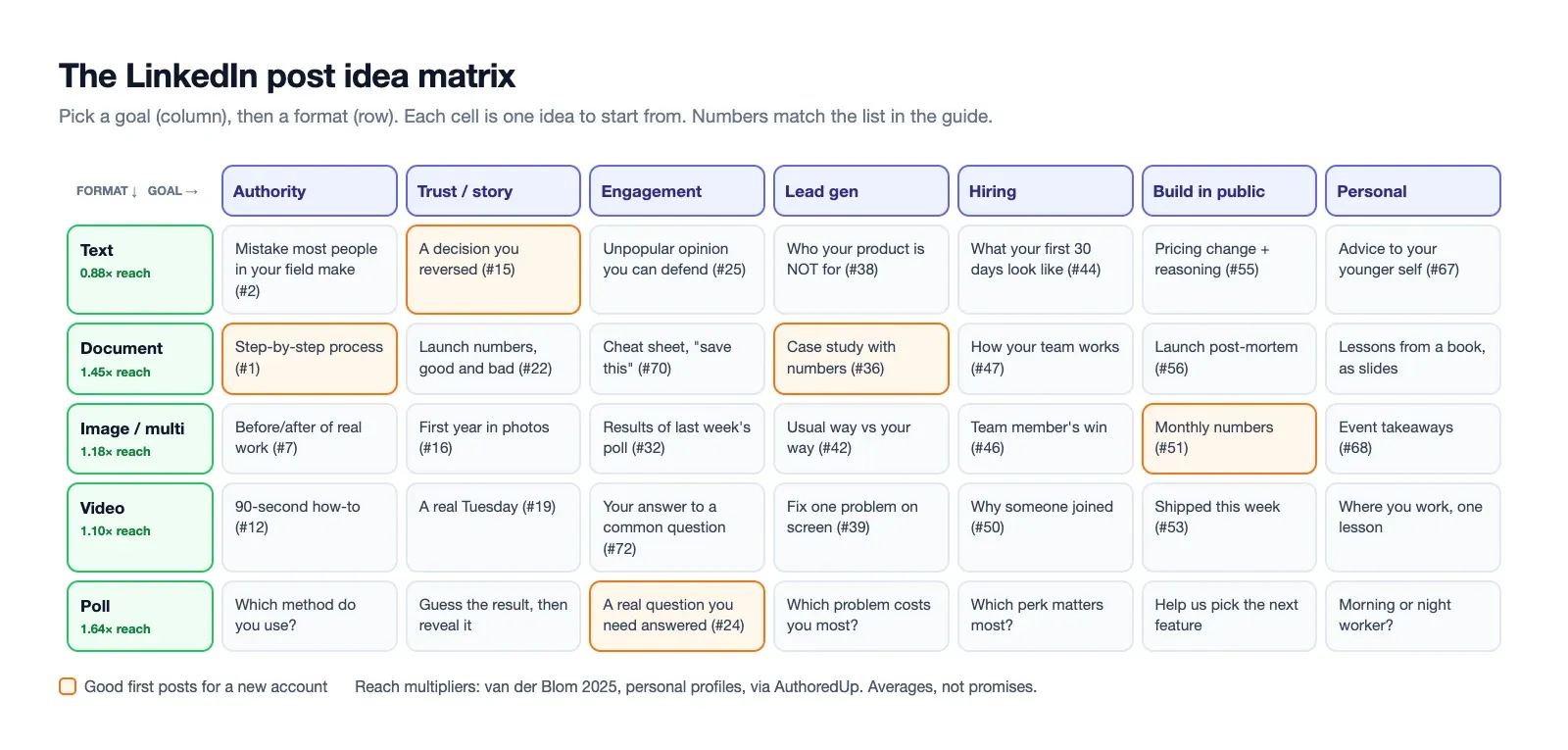
- Then pick the format. In Richard van der Blom's 2025 data, polls (1.64×) and documents (1.45×) got the most reach on personal profiles, and text-only posts got the least (0.88×) (AuthoredUp summary).
- The hook decides the post. Only about the first 140 to 250 characters show before "See more", depending on the screen. See our LinkedIn character limit guide.
- Never run out. Keep one ideas list. Add to it from comments, sales calls, support tickets and DMs every week.
- Rotate. A simple 4-week rotation (table below) mixes goals so you don't sell or preach every day.
#How to use this list
Don't post the ideas as written. Each one is a prompt. The hook is an example of the first line, so you can see the angle. Replace the details with your own facts. A post only works when it has a real story, a real number or a real opinion of yours in it.
Use it in three steps:
- Pick your goal for the week. Most weeks it's authority or trust. Lead gen should be about one post in six.
- Pick 2–3 ideas from that goal's table. Write down the real example from your work next to each one.
- Check the format column. Match the idea to the format that fits, not the one that's trending.
If you don't know your topics yet, start with the LinkedIn personal branding guide. It shows how to pick 3–4 content pillars. This list fills them. Before a post takes off, fix your headline too, because every reader who clicks your name sees it first. Our LinkedIn headline examples show how.
#LinkedIn post ideas for authority (teach what you know)
Authority posts show you know your field. They are the posts people save and send to colleagues. For most B2B accounts, they should be the biggest share of what you publish.
| # | Idea | Best format | Hook example |
|---|---|---|---|
| 1 | Your step-by-step process for one task | Document | "How we onboard a new client in 5 days, step by step." |
| 2 | A mistake most people in your field make | Text | "Most SaaS pricing pages hide the one thing buyers look for first." |
| 3 | A checklist you use yourself | Document | "The 12-point checklist I run before every product launch." |
| 4 | A framework with a name | Document | "I sort every feature request into 4 boxes. Here they are." |
| 5 | Myth vs fact in your industry | Text | "'Post every day or the algorithm forgets you.' Our data says no." |
| 6 | A tool stack and why each tool is there | Image | "Our whole stack costs $212 a month. Here's what each tool does." |
| 7 | A before/after of real work | Multi-image | "Same landing page. Two versions. One converted 3× better." |
| 8 | The 3 questions you ask before any decision | Text | "Before we build anything, we ask 3 questions." |
| 9 | A breakdown of a public example (a launch, an ad, a page) | Document | "I took apart the pricing page everyone copied this year." |
| 10 | Industry news plus what it means for your reader | Text | "LinkedIn changed X this week. Here's what it means for founders." |
| 11 | A glossary of terms beginners get wrong | Document | "10 words new PMs use wrong, and what they really mean." |
| 12 | A short screen-recorded how-to | Video | "Here's how I set this up in 90 seconds." |
#LinkedIn post ideas for trust (stories and proof)
Trust posts show you've done the work. Stories and numbers make people believe the authority posts.
| # | Idea | Best format | Hook example |
|---|---|---|---|
| 13 | A client result, with permission | Text | "A client's churn went from 8% to 3% in one quarter. It wasn't the product." |
| 14 | The biggest mistake of your career and what it cost | Text | "I lost our biggest client in 2021. It was my fault." |
| 15 | A decision you reversed | Text | "We removed the feature I fought hardest for." |
| 16 | What your first year really looked like | Multi-image | "Year one: 4 customers, 2 near-bankruptcies, 1 great decision." |
| 17 | A lesson from a failed project | Text | "We spent 4 months on something nobody used. Here's the warning sign I missed." |
| 18 | A customer quote and what you learned from it | Image | "A customer said one sentence on a call that changed our roadmap." |
| 19 | A behind-the-scenes look at how you work | Video | "This is what a Tuesday actually looks like." |
| 20 | Why you started, told as a specific moment | Text | "I started this company the day a client asked me for something I couldn't find." |
| 21 | A hard conversation you handled | Text | "I had to tell a client we'd missed the deadline. Here's how I did it." |
| 22 | Numbers behind a result, including the bad ones | Document | "Our launch got 4,000 visits. Here's why only 11 signed up." |
| 23 | A thank-you post that names what the person did | Text | "Two years ago a stranger reviewed my pitch deck for free. Here's what she said." |
#LinkedIn post ideas for engagement (start a conversation)
These posts invite replies. Use them to learn what your audience thinks, not just to farm comments. Comments count more than likes in LinkedIn's feed, so a real question can widen reach (AuthoredUp on van der Blom).
| # | Idea | Best format | Hook example |
|---|---|---|---|
| 24 | A real question you need answered | Poll | "Which do you trust more when buying software?" |
| 25 | An unpopular opinion you can defend | Text | "Unpopular opinion: most B2B demos are too long." |
| 26 | "This or that" choice in your field | Poll | "Annual plan discount: 15% or 2 months free?" |
| 27 | Ask for the reader's best tip | Text | "What's one tool you'd pay for even if your company didn't?" |
| 28 | A prediction for the next 12 months | Text | "Three things I think will change in B2B sales by next September." |
| 29 | Rate something (a trend, a practice) | Poll | "Is cold outreach dead, alive, or just badly done?" |
| 30 | Finish-the-sentence prompt | Text | "The best manager I ever had always..." |
| 31 | A debate between two common pieces of advice | Text | "'Niche down' vs 'go broad'. I've done both. Here's what happened." |
| 32 | Share a result of a past poll and what you learned | Image | "412 of you voted last week. The answer surprised me." |
| 33 | "What would you do?" with a real dilemma | Text | "Our best customer wants a feature nobody else needs. What would you do?" |
A note on polls: LinkedIn allows two to four options, and a poll runs for one week by default (LinkedIn Help: Create polls). A poll gets you votes quickly. It only starts a conversation if you add your own answer and reasoning in the text.
#LinkedIn post ideas for lead generation (soft selling)
These are the posts that bring in calls and sign-ups. Keep them to about one post in six. They work best when the other five posts have already earned trust.
| # | Idea | Best format | Hook example |
|---|---|---|---|
| 34 | A free resource people comment for or click | Document | "I made a free template for this. Here's page one." |
| 35 | A problem your product solves, told as a story | Text | "Our client was spending 6 hours a week on this. Now it's 20 minutes." |
| 36 | A case study with numbers | Document | "How one 5-person team booked 40 demos in 60 days." |
| 37 | An offer with a clear limit | Text | "I'm doing 5 free pricing-page reviews this month." |
| 38 | Who your product is NOT for | Text | "Please don't buy our product if you have a 20-person marketing team." |
| 39 | A product demo that solves one problem | Video | "Watch me fix this in under a minute." |
| 40 | A customer question answered in public | Text | "A prospect asked: 'Why is it cheaper than X?' Here's the honest answer." |
| 41 | A launch or new feature, told as the problem it fixes | Video | "You told us this was annoying. We fixed it." |
| 42 | A comparison of your approach vs the usual way | Image | "The usual way takes 5 steps. Ours takes 2. Here's the difference." |
| 43 | A webinar or event invite with one reason to come | Image | "One 30-minute session. One thing you'll leave knowing." |
#LinkedIn post ideas for hiring and team
Good candidates read the founder's and team's posts before they apply. These posts help recruiting as much as a job ad.
| # | Idea | Best format | Hook example |
|---|---|---|---|
| 44 | A job post that describes the real work | Text | "We're hiring. Here's what your first 30 days will look like." |
| 45 | What you look for in an interview | Text | "The one interview question that tells me the most." |
| 46 | A team member's win, with their OK | Image | "Priya shipped something this week that saved our support team 10 hours." |
| 47 | How your team works (meetings, tools, rules) | Document | "We have one meeting a week. Here's how it works." |
| 48 | A hiring mistake you made | Text | "I hired for skills and ignored one warning sign." |
| 49 | Your onboarding in pictures | Multi-image | "Day 1 at our company, in 6 photos." |
| 50 | Why someone joined, in their words | Video | "I asked our newest engineer why she said yes." |
#Founder build-in-public post ideas
Build-in-public posts share the company's progress in the open. They are strong proof posts for founders. Check what you share: customer names and private numbers need permission. For the full routine, see founder-led LinkedIn.
| # | Idea | Best format | Hook example |
|---|---|---|---|
| 51 | Monthly numbers update | Image | "Month 7: $4,200 MRR, 38 customers, 1 lesson." |
| 52 | A product decision and the trade-off | Text | "We said no to our biggest feature request. Here's why." |
| 53 | What you shipped this week | Video | "Shipped this week: 3 fixes, 1 feature, 0 meetings." |
| 54 | The metric you watch most and why | Text | "I don't look at revenue first. I look at this." |
| 55 | Pricing change and the reasoning | Text | "We raised prices 40%. Here's what happened to sign-ups." |
| 56 | A launch post-mortem | Document | "Our launch day, hour by hour, with the real numbers." |
| 57 | What you'd do differently starting again | Text | "If I started this company today, I'd skip these 3 things." |
| 58 | A channel that worked and one that didn't | Image | "Two channels, same budget, very different results." |
| 59 | A customer interview insight | Text | "I did 20 customer calls this month. 14 said the same thing." |
| 60 | Your roadmap, in public | Document | "What we're building next quarter, and what we're not." |
#Personal LinkedIn post ideas
Personal posts make people remember you. Keep them tied to work, and keep them to about one post in seven. For most B2B accounts, a feed of only personal posts is fun to read but gives no reason to hire you.
| # | Idea | Best format | Hook example |
|---|---|---|---|
| 61 | A book that changed how you work, with one idea from it | Text | "One chapter of this book changed how I run meetings." |
| 62 | A career turning point | Text | "In 2019 I almost quit tech. One conversation stopped me." |
| 63 | A habit that helps your work | Text | "I stopped checking email before 11am. Here's what changed." |
| 64 | Where you work from, with a lesson | Image | "My office for the next month. The Wi-Fi taught me something." |
| 65 | A work anniversary, told as lessons | Text | "5 years in. 5 things I believed on day one that were wrong." |
| 66 | A side project and what it taught you | Multi-image | "I built this on weekends. It made $0. It taught me a lot." |
| 67 | Advice to your younger self | Text | "What I'd tell myself at my first job." |
| 68 | An event you attended, with 3 takeaways | Multi-image | "3 things I heard at this conference that I'm still thinking about." |
#LinkedIn content ideas by format
Some ideas start from a format instead of a topic. Here are seven more, one per format idea, for weeks when you know how you want to post but not what.
| # | Format | Idea | Hook example |
|---|---|---|---|
| 69 | Document (PDF carousel) | Turn your best text post into 8 slides | "My most-saved post, now as a 1-minute read." |
| 70 | Document | A one-page cheat sheet | "Everything about X on one page. Save it." |
| 71 | Multi-image | A screenshot thread of a real workflow | "Our reporting setup in 5 screenshots." |
| 72 | Video | Answer one question to camera in under 60 seconds | "The question I get asked most, in 45 seconds." |
| 73 | Poll | Ask the question you'll write about next week | "I'm writing about this next week. Which side are you on?" |
| 74 | Image | A chart from your own data | "One chart that explains our year." |
| 75 | Text | A list post of short lessons | "7 lessons from 100 sales calls. Number 4 hurt." |
For how to build the first two, read how to make a LinkedIn carousel post. For video specs and upload steps, read how to post a video on LinkedIn. Video you already shot for TikTok or YouTube Shorts can often be reused here, trimmed and re-captioned.
#Which LinkedIn post formats perform best? (2025 data)
Three large studies looked at LinkedIn formats in 2025. They measure different things, on different accounts, so their numbers can't be compared directly. Where they agree, you can trust the pattern.
| Format | Van der Blom 2025: reach vs baseline (personal profiles) | Socialinsider 2026: engagement rate (company Pages) |
|---|---|---|
| Poll | 1.64× | 4.20% |
| Document (PDF) | 1.45× | 7.00% |
| Multi-image | Not reported separately | 6.45% |
| Image | 1.18× | 5.30% |
| Video | 1.10× | 6.00% |
| Text only | 0.88× | 4.50% |
| Link | Not reported | 3.25% |
Sources: van der Blom's Algorithm Insights 2025, as summarised by AuthoredUp, built on 1.8 million posts. Socialinsider LinkedIn benchmarks: 1.3 million posts from 16,645 business Pages, January 2024 to December 2025, engagement rate by impressions. Socialinsider says its "2026" figures are 2025 data.
A third study, Metricool's 2025 LinkedIn study of 577,180 posts from 47,735 profiles, found that polls got the highest reach, over 200% above average, and were also the least-used format. It found carousels had the highest engagement rate of all formats.
What the data says, in plain terms:
- Documents are the safest bet. They rank near the top in every study, for both reach and engagement.
- Polls get reach, not always depth. Top for reach in two studies, near the bottom for engagement rate on company Pages.
- Text-only posts start behind. They are still the easiest to write, and a strong text post beats a weak document. Just don't make every post text.
- Posts with one link do worst. Socialinsider's link posts had the lowest engagement rate. Van der Blom found single-link posts had the lowest reach.
- Averages are not promises. These are medians across millions of posts. Test on your own account.
Van der Blom's 2025 report also found organic reach fell by almost 50% year on year (van der Blom on LinkedIn). The format helps. The idea still matters more.
#8 fill-in-the-blank LinkedIn post templates
Copy these, fill the brackets with your facts, and cut anything that doesn't sound like you.
1. The lesson post
I [did something] for [time]. The biggest lesson wasn't [expected lesson]. It was [real lesson]. Here's what happened: [2–3 short lines of the story]. What I do now: [the change]. [Question for the reader]?
2. The mistake post
I made a [$ / time] mistake last [month/year]. [What you did.] [Why it seemed right.] [What went wrong, with a number.] If you're about to [do the same thing], check [one specific thing] first.
3. The how-to post
How to [get result] in [time/steps], without [common pain]:
- [Step]
- [Step]
- [Step] The step most people skip is [#]. [Why it matters.]
4. The contrarian post
Everyone says [common advice]. I did the opposite for [time]. [Result with a number.] It works when [condition]. It doesn't when [condition]. Where do you land?
5. The result post
[Client type / we] went from [before number] to [after number] in [time]. What changed: [1–3 things]. What didn't matter, even though we expected it to: [thing].
6. The list post
[Number] things I learned from [specific experience]:
- [Short lesson]
- [Short lesson] ... Number [#] is the one I wish I'd known first.
7. The decision post
We just decided to [decision]. Option A was [option]. Option B was [option]. We chose [one] because [reason]. The risk is [risk]. I'll share how it goes in [time].
8. The soft-sell post
[Problem your audience has, in their words.] Most people fix it by [usual way]. That costs [time/money]. We built [product/service] to [do it differently]. If that's you, [one clear next step]. If not, [a free tip they can use anyway].
#From idea to post: one worked example
Here is idea #15, "a decision you reversed", turned into a full post. The founder is invented for this example.
Step 1. The raw idea from the ideas list: "Killed the Slack integration. Took 3 months to build. 4% used it."
Step 2. Find the one point. The point is not "we killed a feature". It is "usage data beat my opinion, and I should have checked sooner."
Step 3. Write the hook. First try: "Some thoughts on product decisions." That's a warm-up, not a hook. Second try: "We deleted the feature I fought hardest for."
Step 4. The full post:
We deleted the feature I fought hardest for.
Last year I pushed the team to build a Slack integration. I was sure customers wanted it. Three of them had asked.
It took 3 months to build.
After 6 months, 4% of accounts had turned it on. Support tickets about it: 31. Bugs it caused in other parts of the app: 7.
Last week we removed it.
What I got wrong: I counted requests, not the size of the problem. Three loud customers are not a market.
What we do now: before we build anything, we ask 10 customers to describe the problem in their own words. If fewer than 5 bring it up without a prompt, it goes to the bottom of the list.
Have you ever built something because the loudest customer asked?
Why it works: the hook is a clear, slightly painful fact. The numbers make it believable. There is one lesson, and one rule the reader can steal. The question at the end is one people can answer from their own experience. It is about 900 characters, well under LinkedIn's 3,000-character post limit (character limit guide).
#How to find LinkedIn content ideas yourself
A list like this gets you started. Your best ideas will come from your own week. Keep one running list (a note on your phone is fine) and add to it from these five places.
| Source | What to look for | How it becomes a post |
|---|---|---|
| Comments on your posts | Questions, pushback, "what about X?" | Answer the best question in its own post |
| Comments you leave | Any comment longer than 3 sentences | It's already a post draft. Expand it. |
| Sales and discovery calls | Objections, repeated questions, words buyers use | "A prospect asked me X" posts; use their words in your hooks |
| Support tickets | Problems 3+ customers hit, confusing steps | How-to posts and checklists |
| DMs and emails | Advice you gave one person | Remove the private details, post the advice |
Two habits make this work:
- Write the idea down the moment you have it. You won't remember it on Tuesday.
- Write the example next to it. "Pricing mistake" is not an idea. "We priced per seat and lost every 2-person team" is.
A good test: if you've explained the same thing to three different people this month, it's a post. If someone else drafts your posts, hand them this list. Our guide to briefing a LinkedIn ghostwriter has a copy-paste brief.
#A 4-week LinkedIn post idea rotation
This rotation assumes three posts a week. It mixes goals so no week is all selling or all stories, and it uses the formats that the data favours without making every post a PDF. For how many posts to aim for, see how often to post on LinkedIn.
| Week | Post 1 (Mon/Tue) | Post 2 (Wed) | Post 3 (Thu/Fri) |
|---|---|---|---|
| 1 | Authority: how-to (#1), document | Trust: mistake story (#14), text | Engagement: real question (#24), poll |
| 2 | Authority: myth vs fact (#5), text | Build in public: monthly numbers (#51), image | Personal: book lesson (#61), text |
| 3 | Authority: checklist (#3), document | Trust: client result (#13), text | Lead gen: free resource (#34), document |
| 4 | Engagement: unpopular opinion (#25), text | Hiring or team win (#46), image | Trust: decision reversed (#15), text |
That's 12 posts: 4 authority, 3 trust, 2 engagement, 1 lead gen, 1 build in public and 1 personal or team. Swap in your own ideas from the same row. To turn this into a dated plan with time slots, use our LinkedIn posting calendar template. For timing, see the best time to post on LinkedIn. Running TikTok too? The weekly TikTok content calendar uses the same pillar idea.
#LinkedIn post ideas for common situations
Short answers for the most searched variants:
- For students and job seekers: posts #14, #17, #61, #62, #67 and #75 work without a big job title. Share what you're learning and what you built.
- For business Pages: #1, #3, #36, #41, #46 and #49. Company Pages reach fewer people organically, so staff sharing their own version helps.
- For software developers: #6, #12, #17, #52, #66 and #71. Show real code, real bugs and real trade-offs.
- For marketers: #7, #9, #22, #32, #58 and #74. Your own numbers are your best content.
- For recruiters and HR: #44, #45, #47, #48 and #50.
#Scheduling your LinkedIn posts with Schedule & Chill
Ideas are the hard part. Posting them on time, every week, is the part that usually breaks. Schedule & Chill lets you write a week's posts in one sitting and schedule them to your LinkedIn personal profile: text posts up to 3,000 characters, up to 9 images, one video, or one PDF document post of up to 300 pages. You can set each post to public or connections only, and you can schedule from an AI assistant like Claude through our MCP server for LinkedIn posting.
It is free right now: 2 social accounts, 500 posts a month and 400 MB uploads. Honest limits: it posts to personal profiles, not company Pages. It can't create polls, so post those in the LinkedIn app. It can't add mentions of people or companies, because LinkedIn's API doesn't give us that access. Automatic first comments are paused until LinkedIn approves the API access they need. Replying to comments stays your job, and it should.
#Keep reading
- LinkedIn personal branding, step by step — how to choose the pillars these ideas fill.
- LinkedIn headline examples for every role — fix the line readers see when they click your name.
- Founder build-in-public on LinkedIn — the weekly routine behind ideas #51–60.
- Making a PDF carousel on LinkedIn — the document format many of these ideas call for.
- Posting 2 to 4 times a week on LinkedIn — how many of these ideas to use each week.
#Frequently Asked Questions
What would be a good LinkedIn post? A good LinkedIn post makes one clear point, uses a real example or number from your work, and opens with a first line that makes the right reader stop. A lesson from a mistake, a result with the numbers behind it, or a step-by-step process usually works better than general advice. End with a question people can answer from their own experience.
What are the most popular types of LinkedIn posts? In Richard van der Blom's 2025 research, polls and document (PDF carousel) posts got the most reach on personal profiles, followed by images and video, with text-only posts last. In Socialinsider's benchmarks for company Pages, documents had the highest engagement rate at 7.00%, followed by multi-image posts and video. Stories, lessons and how-tos are the most common topics that do well.
What is the 3-2-1 rule on LinkedIn? It is a content-mix rule of thumb, not an official LinkedIn rule, and people use different versions. The most common one: in every six posts, share three about your industry or expertise, two with your personal view or lessons, and one personal story. It is a useful way to stop posting only about one thing.
What is the 5-5-5 rule for social media? It is an informal engagement habit with several versions. The most common: each day, like five posts, leave five thoughtful comments and reply to five messages or comments. On LinkedIn, the commenting part matters most, because useful comments on bigger accounts' posts put your name in front of their audience.
How do I come up with LinkedIn content ideas? Keep one running ideas list and add to it every week from five places: comments on your posts, long comments you leave on others' posts, questions from sales calls, repeated support tickets, and advice you gave in DMs. If you've explained something to three people this month, it is a post. Use the 75 ideas above when the list runs dry.
How many LinkedIn post ideas do I need? Aim to keep 15 to 20 ideas on your list at any time, enough for five or six weeks at three posts a week. Write the real example next to each one, so you can draft it quickly. For the whole system, including how often to post, read the LinkedIn personal branding guide.